Imagine sending SMS alerts from a microcontroller without interfacing with a GSM/GPRS module. It’s now possible, thanks to the Internet of things and IoT-capable microcontroller boards. IoT development boards can access the internet and send SMS to a registered number through web services. One such web service is Twilio.
Twilio is a communication API for SMS, voice calls, video messages, Whatsapp, email, and authentication. Owning this API will cost you, but there is a free trial.
For this project, we’ll program ESP32 — a popular IoT development board — to send SMS alerts via the Twilio app. A GSM or GPRS module or a SIM card is not required. However, it’s necessary to buy a Twilio phone number to send SMS alerts.
Now, let’s get started.
Components
- ESP32 DEVKIT V1 x1
- MicroUSB cable to upload the sketch to ESP32 x1
Software
- Arduino IDE
Circuit connections
No circuit connections are required for this project. Simply program ESP32 to access Twilio API to send SMS alerts to a registered number.
What is Twilio?
Twilio is a global, cloud-based web service that enables digital communication through several platforms, including SMS, voice calls, Whatsapp, email, and video.
Twilio offers an application programming interface (API) that easily integrates with any mobile app or software. Libraries and modules are available to integrate the API with microcontrollers and embedded platforms. This is particularly useful for IoT development boards as they can access the service to send SMS or Whatsapp message alerts without interfacing with a GSM/GPRS module or additional hardware.
Creating a trial account on Twilio
Although Twilio is not free, a trial version is available to test its functionalities. Create a trial account on Twilio here.
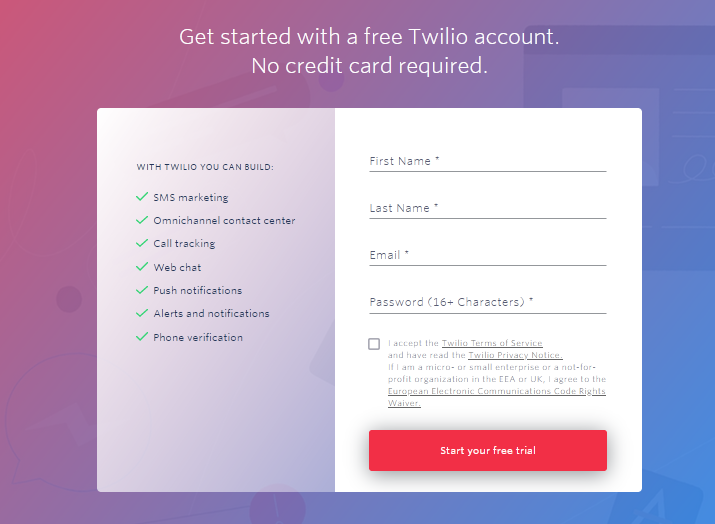
You’ll need to enter your name and email, and create a password. Then, accept the Terms of Service and click the submit button to start your free trial.
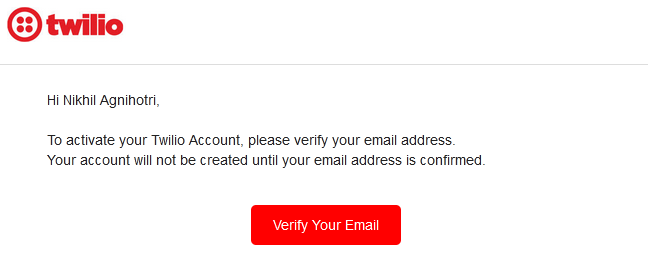
You’ll be asked to verify your email before using Twilio.
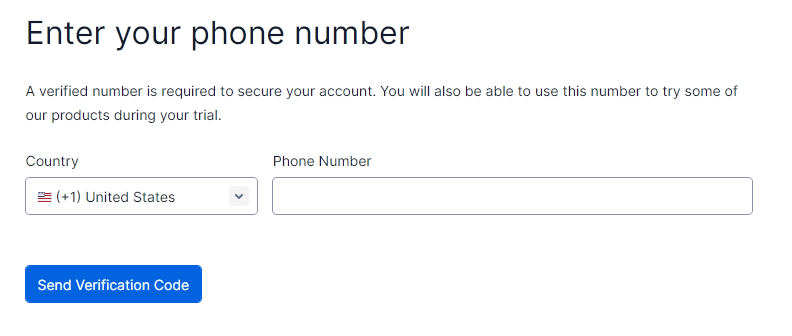
Afterwards, you will be prompted to enter a phone number for double verification. Enter a valid phone number and click the ‘Send Verification Code’ button.
Twilio will then ask you to complete a short survey to personalize your settings and will open the Twilio console.

Adding caller IDs
Once you’ve set-up a Twilio account, it’s possible to view and add verified caller IDs.
In the Twilio console, navigate to: Phone Numbers-> Manage -> Verified Caller IDs. You’ll see that the phone number you provided to create the trial account is already listed.
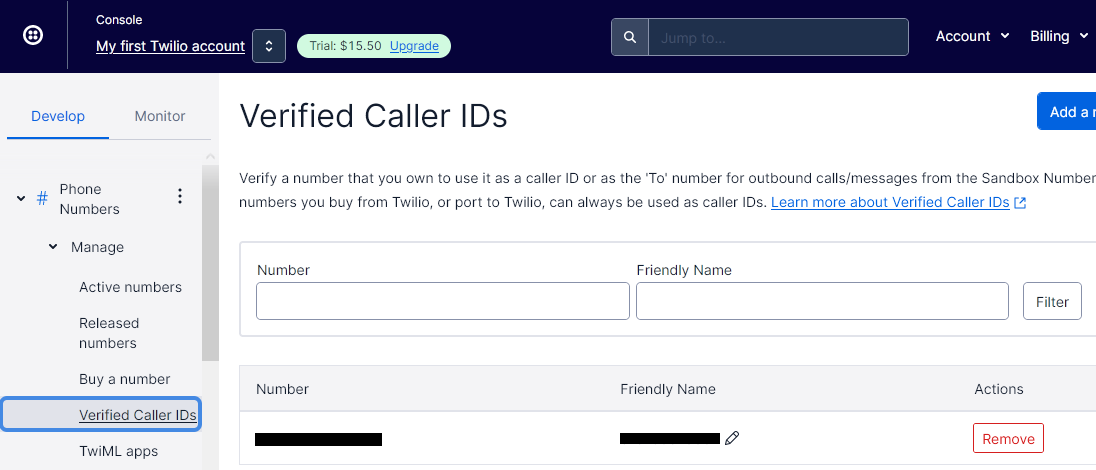
You can edit the ‘Friendly Name” to replace the phone number with a readable name.
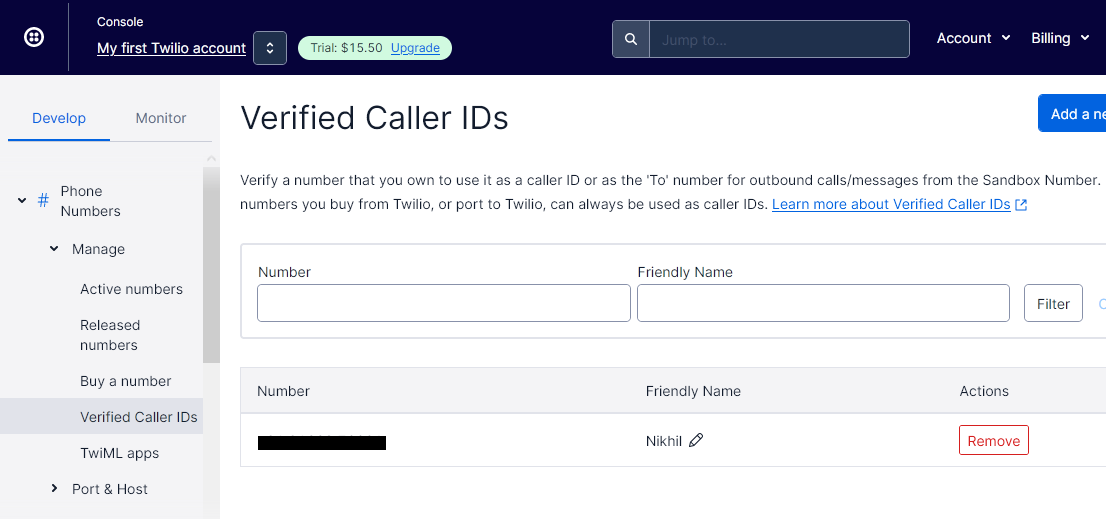
Click the ‘Add a new caller ID’ button to add more phone numbers. Like before, it’s necessary to confirm the numbers via a verification code received via SMS or voice.
Only verified caller IDs can be sent an SMS alert. The SMS will be sent via a Twilio phone number that must be purchased.
Sending SMS
To send SMS alerts, you must first buy a Twilio phone number.
To get started with messaging, navigate to Messaging -> Try it out -> Get Set Up.

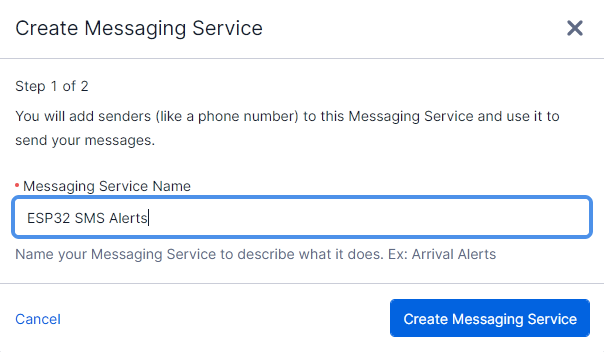
Click on the ‘Start setup’ button and then enter a name for the messaging service. We’re naming it ‘ESP32 SMS Alerts.’ After entering the messaging service name, click the ‘Create Messaging Service’ button.
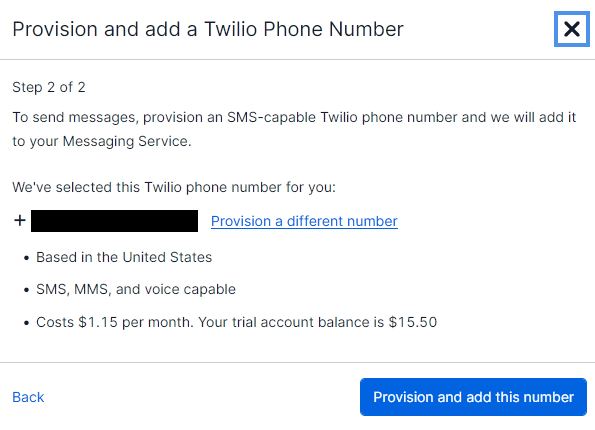
Twilio will automatically provide a phone number, deducting U.S. $1.15 from the $15.50 trial balance. You’ll have the option to pick a different phone number. Once the phone number is confirmed, click the ‘Provision and this number’ button.
After successfully setting up the messaging service, you’ll be redirected to a page showcasing your message service SID, account SID, and authentication token. These are required when programming the ESP32 to access Twilio API.
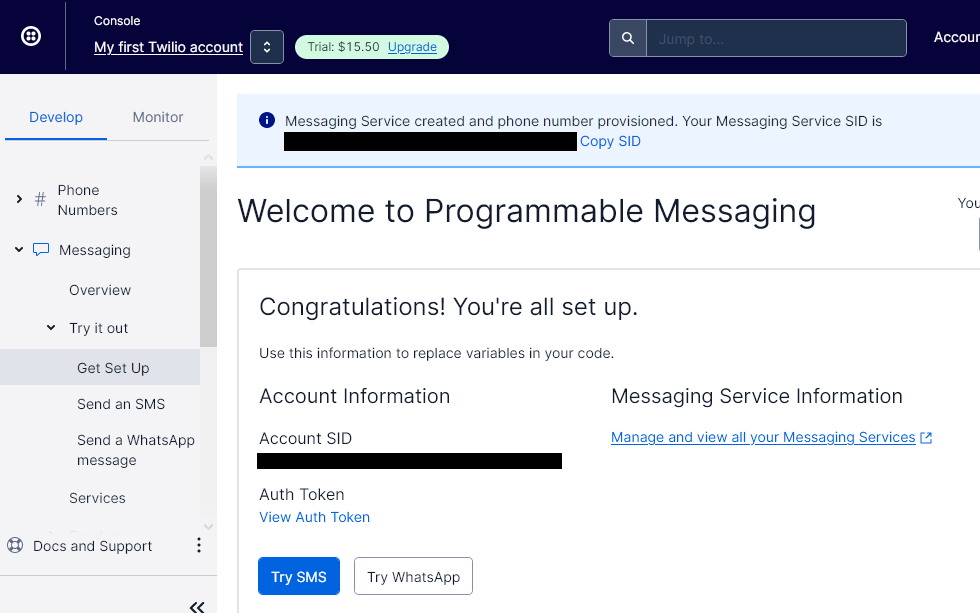
To try the SMS messaging service, click the ‘Try SMS’ button.
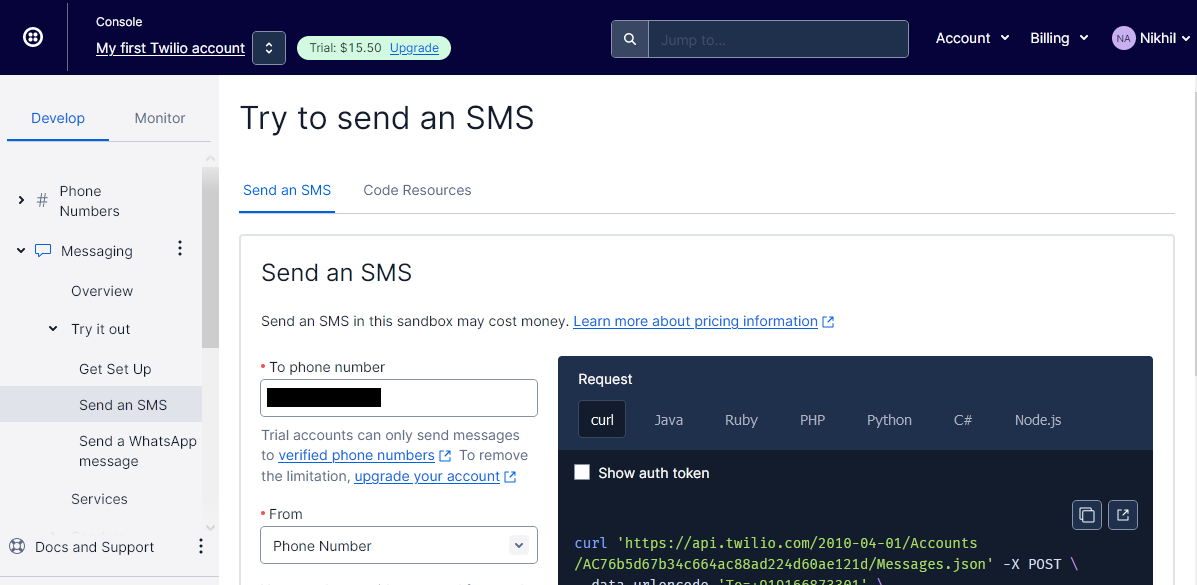
Next, you’ll be prompted to enter the phone number you want to SMS. This can be any verified caller ID already added to your account. Select the sender’s number from the provisioned Twilio options, and create an SMS message. Once complete, click the ‘Send test SMS’ button.
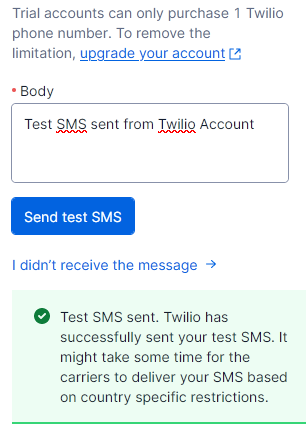
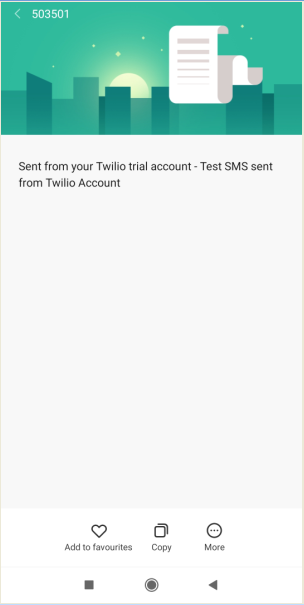
If everything is entered properly, the SMS is delivered to the selected caller ID.
 SMS alerts to a registered number from ESP32
An Arduino-compatible microcontroller or microcomputer can access the Twilio API if running JavaScript or Python codes. Since ESP32 has WiFi capabilities and can connect to any available network, it can easily access the Twilio web service.
There’s an ESP32 client library for Twilio API that simplifies this task.
Arduino library
First, install the ESP32 add-on to Arduino IDE (learn more here).
To access Twilio API from ESP32, you’ll need to add the ESP32 Twilio Client to Arduino IDE. This is another Arduino library that lets ESP32 access the Twilio web service.
Navigate to Tools -> Manage Libraries and search for ‘Twilio ESP32 Client.’
Then, scroll to ‘Twilio-ESP32-Client’ library written by Adam Demuri and click the ‘Install’ button to install the library.

Arduino sketch
After Installing the library, upload the following sketch to ESP32. Remember to enter the SSID and network key of your WiFi network, account SID, authentication token, sender Twilio phone number, and receiver phone number from your trial account.
#include “twilio.hpp”
static const char *ssid = “”;
static const char *password = “”;
static const char *account_sid = “”;
static const char *auth_token = “”;
static const char *from_number = “”;
static const char *to_number = “”;
static const char *message = “SMS Sent from ESP32 via Twilio”;
Twilio *twilio;
void setup() {
Serial.begin(115200);
Serial.print(“Connecting to WiFi network ;”);
Serial.print(ssid);
Serial.println(“‘…”);
WiFi.begin(ssid, password);
while (WiFi.status() != WL_CONNECTED) {
Serial.println(“Connecting…”);
delay(500);
}
Serial.println(“Connected!”);
twilio = new Twilio(account_sid, auth_token);
delay(1000);
String response;
bool success = twilio->send_message(to_number, from_number, message, response);
if (success) {
Serial.println(“Sent message successfully!”);
} else {
Serial.println(response);
}
}
void loop() {
}
The code
The sketch begins by importing the ‘twilio.hpp’ library. The library provides access to the functions required to send SMS messages vai HTTP requests.
The variables are defined to store the SSID and network key of the WiFi connection, account SID, authentication token, sender number (with country code), and receiver number (with a country code). The variable ‘message’ stores the text content of the SMS message. A Twilio pointer variable is then instantiated.
In the setup() function, the baud rate for serial communication is set to 115200 bps. The connection with the WiFi network is initialized by calling the WiFi.begin() method. The status of the WiFi connectivity is monitored until ESP32 connects to the network using the given SSID and network key.
An object of the Twilio class is instantiated. A variable of the string type is defined to capture the HTTP response. The SMS message is sent by calling the send_message() method of the Twilio class. The method returns the status of the message delivery, which is stored in a boolean ‘status.’ If the status is true, a message indicating successful delivery of SMS message is printed to the console.
The loop() function is empty. All the code is in the setup() function because the SMS must only be sent once.
How it works
ESP32 connects with the WiFi network using the WiFi library. It uses the Twilio ESP32 client library to access the Twilio web service to send the SMS. The SMS is sent to a verified caller ID via the HTTP request.
Results
After uploading the sketch to ESP32, click microboard’s ‘Enable’ button and open Arduino’s serial monitor — with the baud rate set to 115200 bps.
The code in the setup() function will be executed and a relevant response will be printed to the serial monitor.
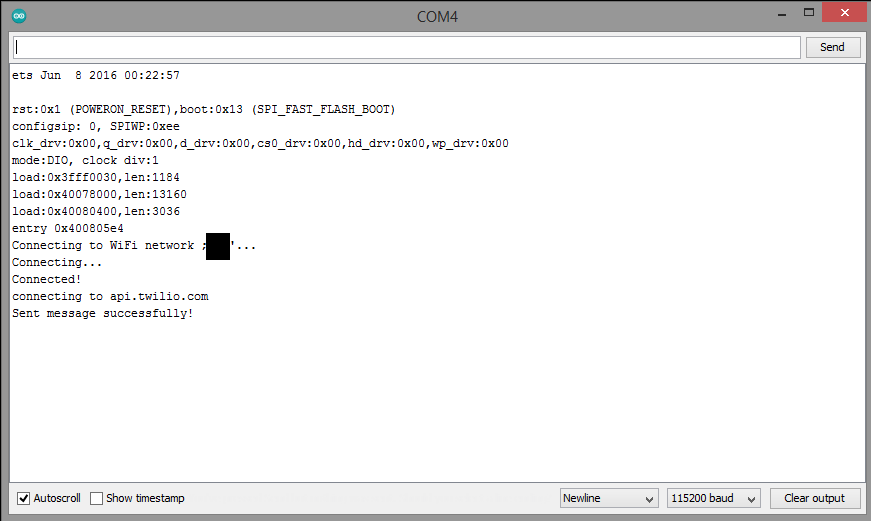
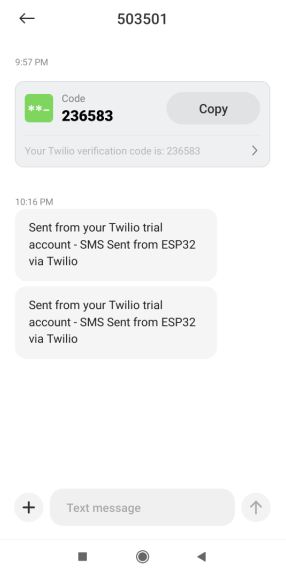
The SMS message will be delivered to the selected receiver number.
You may also like:


Filed Under: IoT applications, Tutorials
Questions related to this article?
👉Ask and discuss on EDAboard.com and Electro-Tech-Online.com forums.
Tell Us What You Think!!
You must be logged in to post a comment.