Engineers Garage

  • Electronic Projects & Tutorials
    • Electronic Projects
      • Arduino Projects
      • AVR
      • Raspberry pi
      • ESP8266
      • BeagleBone
      • 8051 Microcontroller
      • ARM
      • PIC Microcontroller
      • STM32
    • Tutorials
      • Audio Electronics
      • Battery Management
      • Brainwave
      • Electric Vehicles
      • EMI/EMC/RFI
      • Hardware Filters
      • IoT tutorials
      • Power Tutorials
      • Python
      • Sensors
      • USB
      • VHDL
    • Circuit Design
    • Project Videos
    • Components
  • Articles
    • Tech Articles
    • Insight
    • Invention Stories
    • How to
    • What Is
  • News
    • Electronic Product News
    • Business News
    • Company/Start-up News
    • DIY Reviews
    • Guest Post
  • Forums
    • EDABoard.com
    • Electro-Tech-Online
    • EG Forum Archive
  • DigiKey Store
    • Cables, Wires
    • Connectors, Interconnect
    • Discrete
    • Electromechanical
    • Embedded Computers
    • Enclosures, Hardware, Office
    • Integrated Circuits (ICs)
    • Isolators
    • LED/Optoelectronics
    • Passive
    • Power, Circuit Protection
    • Programmers
    • RF, Wireless
    • Semiconductors
    • Sensors, Transducers
    • Test Products
    • Tools
  • Learn
    • eBooks/Tech Tips
    • Design Guides
    • Learning Center
    • Tech Toolboxes
    • Webinars & Digital Events
  • Resources
    • Digital Issues
    • EE Training Days
    • LEAP Awards
    • Podcasts
    • Webinars / Digital Events
    • White Papers
    • Engineering Diversity & Inclusion
    • DesignFast
  • Guest Post Guidelines
  • Advertise
  • Subscribe

How to use a LiDAR sensor with Arduino

By Usman ali Butt March 26, 2021

LiDAR, or “light detection and ranging,” is a remote-sensing method that uses light in laser form to measure distances or ranges. LiDAR has been used for decades although there are more recent advancements in the technology.

These include laser scanning and processing speeds that make 3D mapping possible and accessible. This technique uses light (precise laser pulses) to map an underlying object or the terrain (the earth’s surface). The laser is pointed on an object’s surface or the terrain and, after hitting the surface, reflects back.

Mapping and 3D drawings of an object’s surface or terrain is quite simple. Every reflection of light is composed of thousands of individual beams. These beams, or patterns, vary in distance — each one is nearly 10 cm apart. A scanner picks these up.

The time and distance it takes for these beams to occur are recorded by the scanner. Additionally, the distance between the object and the light source is calculated by using the recorded time and speed of light.

If we place dots representing each beam at its distance and then view these dots from the opposite axis, it’s possible to see a 3D image of the ground. Let’s check out this phenomenon in an image.
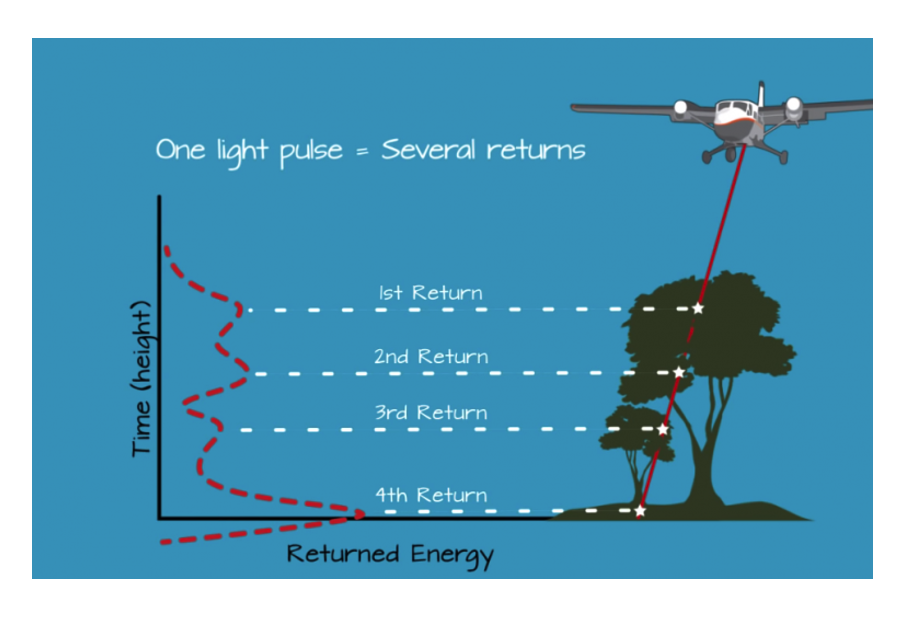
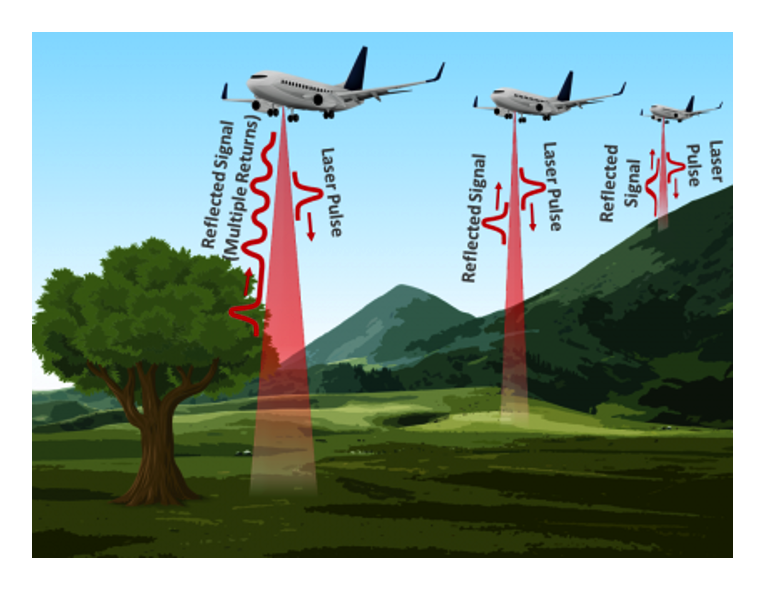
Each reflected beam depicts a dot in 3D space. For each object, the beams will be different. For example, in the image below, you’ll note the differences between the ground, a hill, and a tree.
For this project, we’re going to use a LiDAR sensor offered by SparkFun Electronics. SparkFun provides a pre-defined Arduino library for the sensor, which is ideal. The company offers two variants of LiDAR (that are distinguished based on updated speed bases).
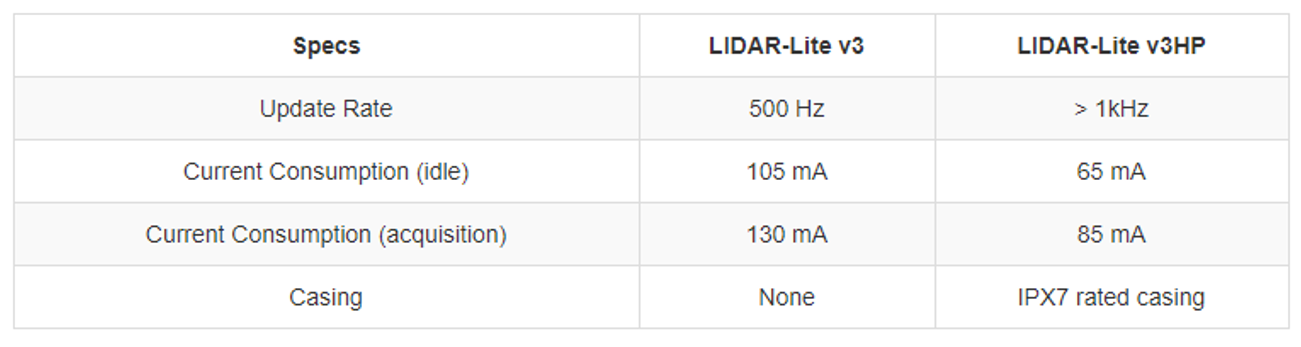
The LIDAR-Lite v3HP a compact, high-performance optical distance measurement sensor from Garmin. The v3HP is similar in function to that of the v3 but can sample faster at rates (almost double!). Another improvement is that this v3HP model is more efficient in terms of its its current consumption rates.
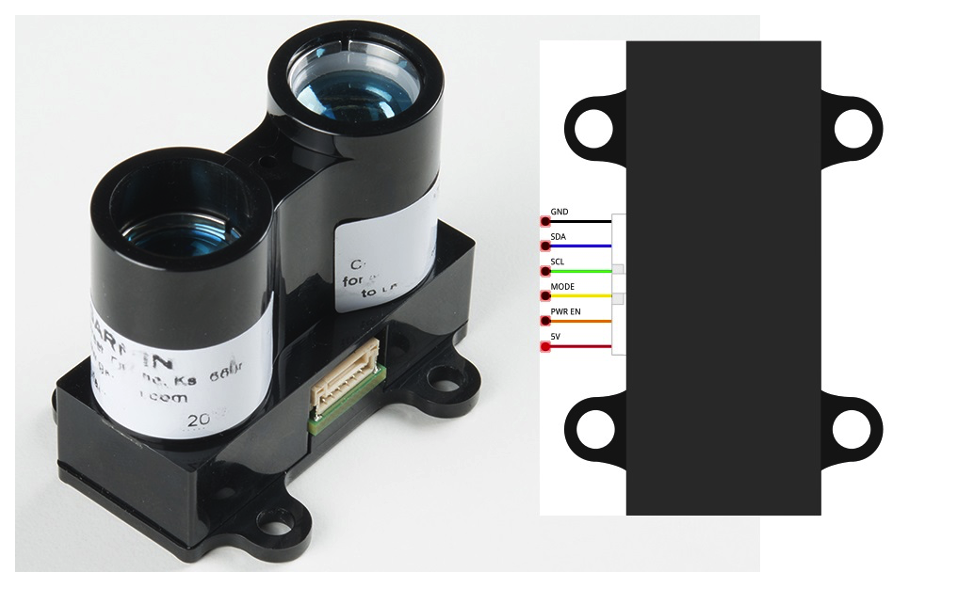
The LIDAR-Lite v3HP has six pins. Communication with an external controller is possible via the I2C protocol with a pulse-width modulation (PWM) output. For the I2C, the SDA (data) and SCL (clock) pins are used. For the PWM, the “Mode” pin is inserted, which places the sensor in analog output mode.

Now, each distance corresponds to an analog output value that must be sampled by the analog-to-digital converter (ADC) at the host side. We’ll grab the data using the I2C protocol.

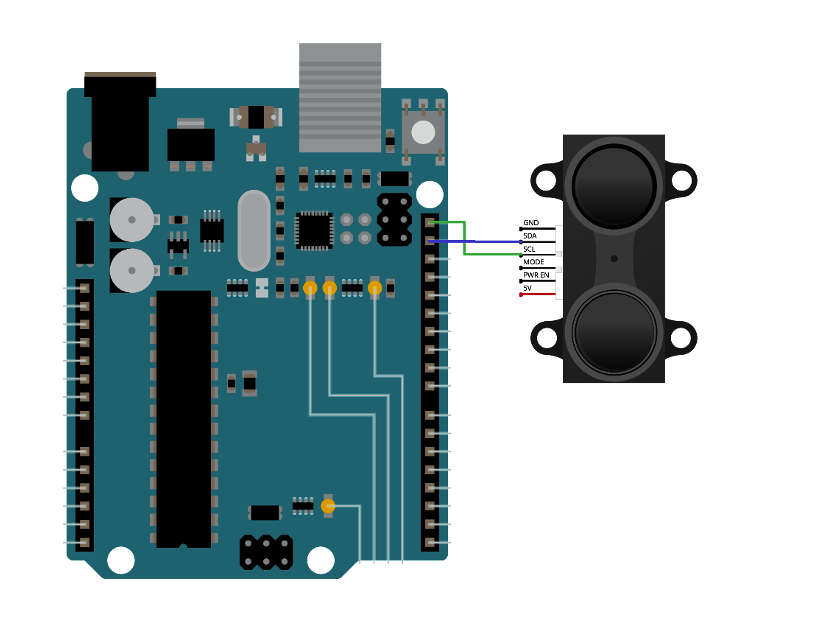
The circuit diagram for this project is simple. Simply connect the sensor’s I2C wires with Arduino’s I2C pins, which are located at A4 and A5. They’re are also present at the top of the header on the right side.

Circuit diagram
The code
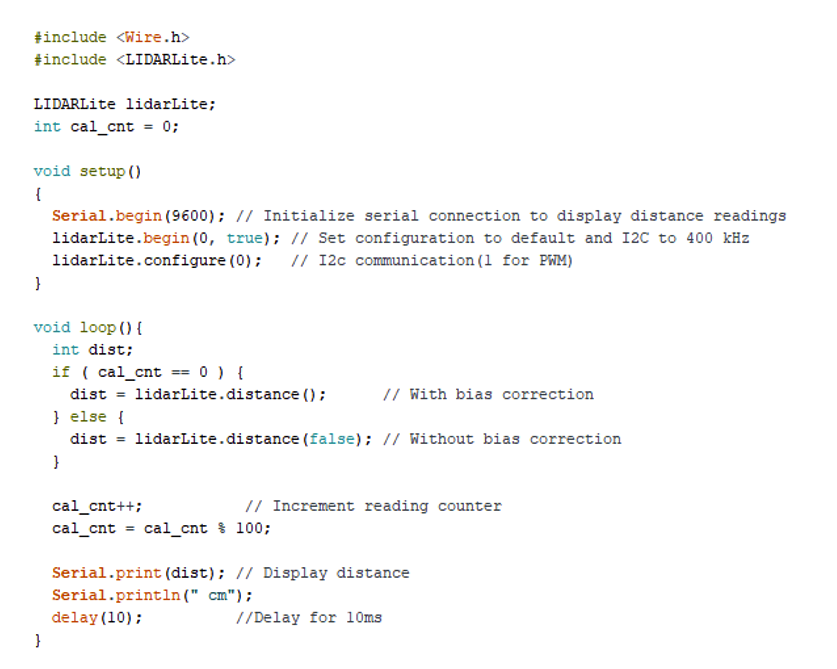
To begin, we included the I2C general library (wire.h) in Arduino sketch, followed by the LiDARLite library from SparkFun. So, an instance of the LiDARLite library is created.

In the setup function, we then initialized the serial monitor and started it at 9600 bits per second, and defined the I2C as a communication protocol.

The loop function is where we measure the distance. Two different functions are executed on the basis of the condition: one function calculates distance without bias and the other uses bias. The sensor’s calibration is done in the function without bias.

The calculated distance is displayed on Arduino’s serial monitor. A 10ms delay is used after every scan to prevent any crossover or collisions.
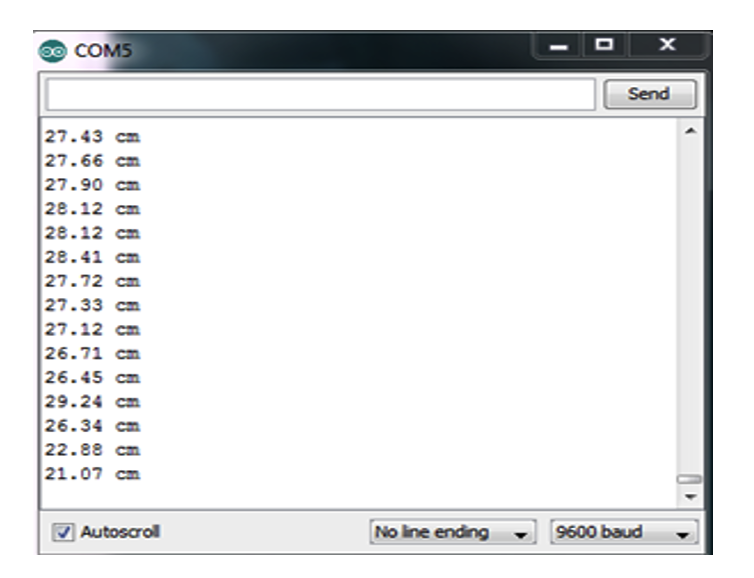
The data is displayed on the LCD’s serial monitor. If we point this data on a 2D platform, we’ll get something like this…
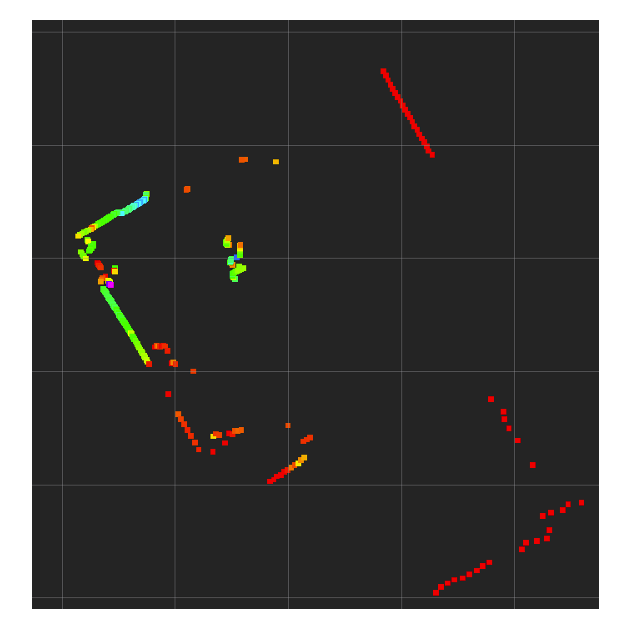
A 360-degree view of a 2D space, depicting obstacles and the distance from the sensor.

We can classify objects with the help of dots. To do so, however, a LiDAR that can scan an entire area from a center point is required. With the SparkFun LiDAR used here, it’s only possible to calculate distances.

Higher-resolution LiDARS can also calculate the angle of light from a reference point — the angles and distances based on the terrain are then 3D representations. For example, look at the below images of trees in front of a LiDAR sensor.

From a set reference point, the distance and angle of the light are grouped together. If only the distance is known, then the dots are a horizontal straight line.
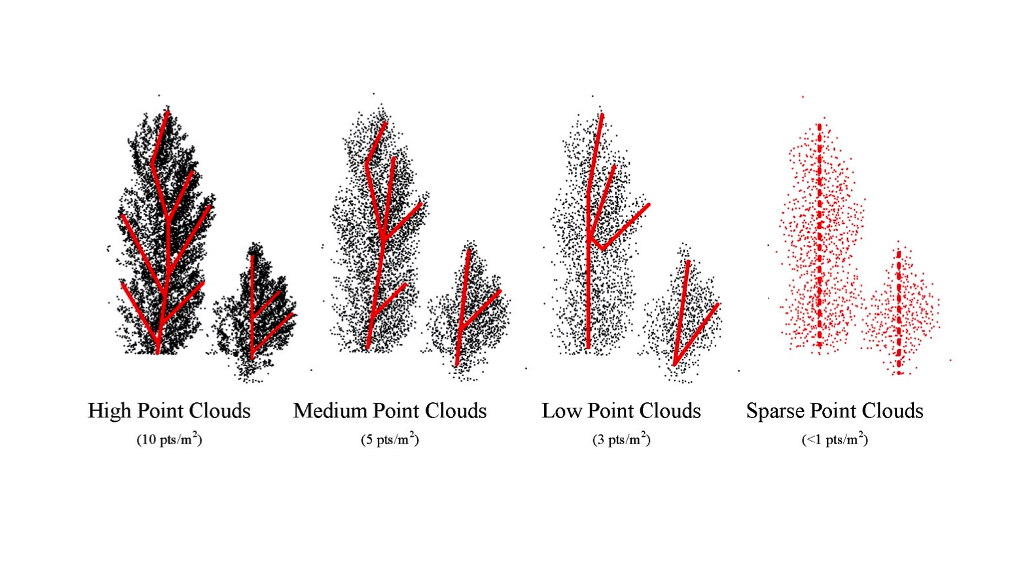
Unfortunately, small-scale, do-it-yourself LiDARs simply aren’t powerful enough to support angle calculation.

Where to purchase the parts?

  • Arduino: Mouser
  • Lidar: Mouser

Image sources:

  • LiDAR News
  • MDPI
  • The Greenest Workforce


You may also like:


  • Intel LiDAR camera to use world’s smallest ST micro-mirror scanning…

  • High-resolution LiDAR depth camera

  • What is LIDAR?

  • Sensors: Different Types of Sensors

Filed Under: Microcontroller Projects
Tagged With: Arduino
 

Next Article

← Previous Article
Next Article →

Questions related to this article?
👉Ask and discuss on Electro-Tech-Online.com and EDAboard.com forums.


Tell Us What You Think!! Cancel reply

You must be logged in to post a comment.

EE TECH TOOLBOX

“ee
Tech Toolbox: Internet of Things
Explore practical strategies for minimizing attack surfaces, managing memory efficiently, and securing firmware. Download now to ensure your IoT implementations remain secure, efficient, and future-ready.

EE Learning Center

EE Learning Center
“engineers
EXPAND YOUR KNOWLEDGE AND STAY CONNECTED
Get the latest info on technologies, tools and strategies for EE professionals.

HAVE A QUESTION?

Have a technical question about an article or other engineering questions? Check out our engineering forums EDABoard.com and Electro-Tech-Online.com where you can get those questions asked and answered by your peers!


RSS EDABOARD.com Discussions

  • Voltage mode pushpull is a nonsense SMPS?
  • Input impedance matching network
  • High Side current sensing
  • The comparison of different Tcl script checkers
  • Reducing "shoot-through" in offline Full Bridge SMPS?

RSS Electro-Tech-Online.com Discussions

  • Back to the old BASIC days
  • Parts required for a personal project
  • PIC KIT 3 not able to program dsPIC
  • Failure of polypropylene motor-run capacitors
  • Siemens large industrial PLC parts

Featured – RPi Python Programming (27 Part)

  • RPi Python Programming 21: The SIM900A AT commands
  • RPi Python Programming 22: Calls & SMS using a SIM900A GSM-GPRS modem
  • RPi Python Programming 23: Interfacing a NEO-6MV2 GPS module with Raspberry Pi
  • RPi Python Programming 24: I2C explained
  • RPi Python Programming 25 – Synchronous serial communication in Raspberry Pi using I2C protocol
  • RPi Python Programming 26 – Interfacing ADXL345 accelerometer sensor with Raspberry Pi

Recent Articles

  • What is AWS IoT Core and when should you use it?
  • AC-DC power supply extends voltage range to 800 V DC
  • Infineon’s inductive sensor integrates coil system driver, signal conditioning circuits and DSP
  • Arm Cortex-M23 MCU delivers 87.5 µA/MHz active mode
  • STMicroelectronics releases automotive amplifiers with in-play open-load detection

EE ENGINEERING TRAINING DAYS

engineering

Submit a Guest Post

submit a guest post
Engineers Garage
  • Analog IC TIps
  • Connector Tips
  • Battery Power Tips
  • DesignFast
  • EDABoard Forums
  • EE World Online
  • Electro-Tech-Online Forums
  • EV Engineering
  • Microcontroller Tips
  • Power Electronic Tips
  • Sensor Tips
  • Test and Measurement Tips
  • 5G Technology World
  • Subscribe to our newsletter
  • About Us
  • Contact Us
  • Advertise

Copyright © 2025 WTWH Media LLC. All Rights Reserved. The material on this site may not be reproduced, distributed, transmitted, cached or otherwise used, except with the prior written permission of WTWH Media
Privacy Policy

Search Engineers Garage

  • Electronic Projects & Tutorials
    • Electronic Projects
      • Arduino Projects
      • AVR
      • Raspberry pi
      • ESP8266
      • BeagleBone
      • 8051 Microcontroller
      • ARM
      • PIC Microcontroller
      • STM32
    • Tutorials
      • Audio Electronics
      • Battery Management
      • Brainwave
      • Electric Vehicles
      • EMI/EMC/RFI
      • Hardware Filters
      • IoT tutorials
      • Power Tutorials
      • Python
      • Sensors
      • USB
      • VHDL
    • Circuit Design
    • Project Videos
    • Components
  • Articles
    • Tech Articles
    • Insight
    • Invention Stories
    • How to
    • What Is
  • News
    • Electronic Product News
    • Business News
    • Company/Start-up News
    • DIY Reviews
    • Guest Post
  • Forums
    • EDABoard.com
    • Electro-Tech-Online
    • EG Forum Archive
  • DigiKey Store
    • Cables, Wires
    • Connectors, Interconnect
    • Discrete
    • Electromechanical
    • Embedded Computers
    • Enclosures, Hardware, Office
    • Integrated Circuits (ICs)
    • Isolators
    • LED/Optoelectronics
    • Passive
    • Power, Circuit Protection
    • Programmers
    • RF, Wireless
    • Semiconductors
    • Sensors, Transducers
    • Test Products
    • Tools
  • Learn
    • eBooks/Tech Tips
    • Design Guides
    • Learning Center
    • Tech Toolboxes
    • Webinars & Digital Events
  • Resources
    • Digital Issues
    • EE Training Days
    • LEAP Awards
    • Podcasts
    • Webinars / Digital Events
    • White Papers
    • Engineering Diversity & Inclusion
    • DesignFast
  • Guest Post Guidelines
  • Advertise
  • Subscribe