Engineers Garage

  • Electronic Projects & Tutorials
    • Electronic Projects
      • Arduino Projects
      • AVR
      • Raspberry pi
      • ESP8266
      • BeagleBone
      • 8051 Microcontroller
      • ARM
      • PIC Microcontroller
      • STM32
    • Tutorials
      • Audio Electronics
      • Battery Management
      • Brainwave
      • Electric Vehicles
      • EMI/EMC/RFI
      • Hardware Filters
      • IoT tutorials
      • Power Tutorials
      • Python
      • Sensors
      • USB
      • VHDL
    • Circuit Design
    • Project Videos
    • Components
  • Articles
    • Tech Articles
    • Insight
    • Invention Stories
    • How to
    • What Is
  • News
    • Electronic Product News
    • Business News
    • Company/Start-up News
    • DIY Reviews
    • Guest Post
  • Forums
    • EDABoard.com
    • Electro-Tech-Online
    • EG Forum Archive
  • DigiKey Store
    • Cables, Wires
    • Connectors, Interconnect
    • Discrete
    • Electromechanical
    • Embedded Computers
    • Enclosures, Hardware, Office
    • Integrated Circuits (ICs)
    • Isolators
    • LED/Optoelectronics
    • Passive
    • Power, Circuit Protection
    • Programmers
    • RF, Wireless
    • Semiconductors
    • Sensors, Transducers
    • Test Products
    • Tools
  • Learn
    • eBooks/Tech Tips
    • Design Guides
    • Learning Center
    • Tech Toolboxes
    • Webinars & Digital Events
  • Resources
    • Digital Issues
    • EE Training Days
    • LEAP Awards
    • Podcasts
    • Webinars / Digital Events
    • White Papers
    • Engineering Diversity & Inclusion
    • DesignFast
  • Guest Post Guidelines
  • Advertise
  • Subscribe

Biometric sensor with Arduino

By Usman ali Butt February 24, 2021

This tutorial is about using a biometric sensor with Arduino for security purposes. The biometric domain includes all the human attributes which could distinguish each individual from the other, such as fingerprint mapping, eye retina scan, and facial recognition.

Fingerprint sensors are a common and cheap solution to add a biometric authentication layer to any security application. The fingerprint sensor uses optical and imaging technology to grasp the finger linings. Capacitive fingerprint sensors also exist; their use is only confined to mobile phones. Capacitive sensors’ pattern recognition resolution is lower than optical. You can increase their resolution at an additional cost.

Capacitive sensors can’t be tricked like optical which take image and image can be replicated. Capacitive sensors have an array of capacitors. Upon finger touching with its surface, the capacitance of capacitors increases/decreases. Capacitors states are then stored in flash as a finger lining pattern of a single finger which could later be used for matching purposes.

Project circuit

I am using a fingerprint sensor and Arduino dual relay board. With relays, I will drive an alarm and an electric door lock. The system will be installed on the main door of a house. Alarm and electric door locks require more power than Arduino. That’s the reason behind the actuator’s isolation and relay usage. Arduino digital pins directly control the relay board.
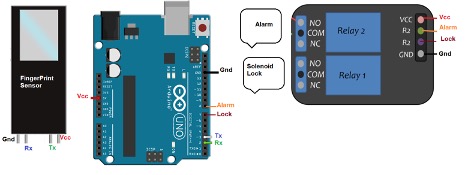
The fingerprint sensor communicates with an external controller on UART protocol. UART pins of the sensor are attached with serial-1 pins (2 & 3) of Arduino Uno. Two digital pins, 7 & 8, are used to activate/deactivate relays when required. Alarm and electronic locks normally require 12 volts for operation. I isolated them from Arduino and placed a relay in between so that their power doesn’t affect Arduino.
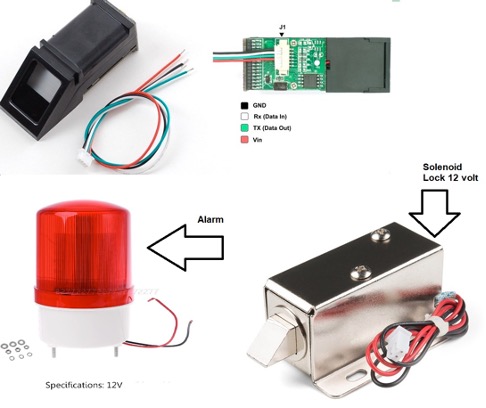
Alarm and electronic locks are simple devices. They have two power lines to energize. You need to cut one wire and control it with a relay. I suppose you know how to wire them with the relay. The fingerprint sensor from Adafruit is shown in the above picture. Almost all the fingerprint sensors have the same pinout as Adafruit.

Project code

Arduino predefined libraries are a great resource to get started with. For fingerprint sensors, Adafruit libraries provide a nice and clean library with plenty of getting started examples. Download the Adafruit fingerprint sensor library from their website or directly install it using the “Library Manager” feature from Arduino IDE.

Once you have downloaded the libraries, now it’s time to enroll the fingerprints in the sensor. Fingerprints of those whom we want to give permission to access a particular house must first be uploaded and stored in the sensor. Later for entering the house, those fingerprints will be matched when a person approaches the house and requests entrance.
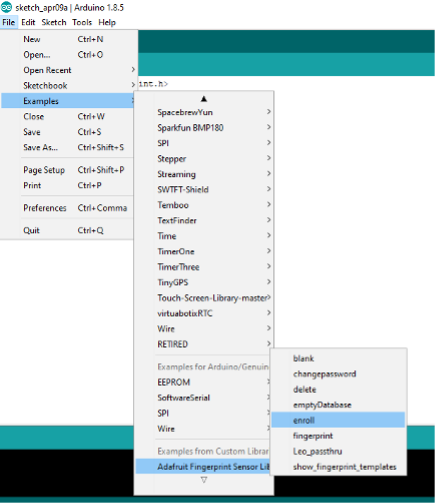
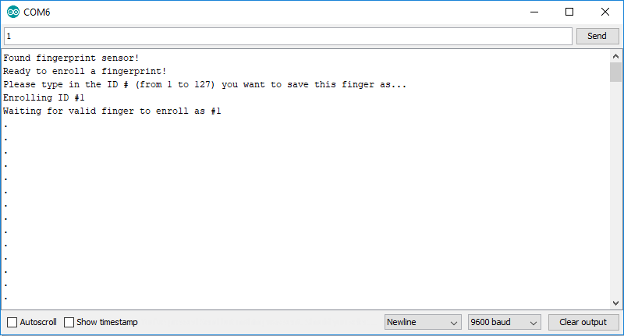
Open Arduino ide go to File>Examples>Adafruit Fingerprint Sensor Libraries> enroll. Upload the sketch in Arduino. Now open the Arduino serial monitor at 9600 bps. You will see Arduino popping up a message to enroll a fingerprint with ID. Manually enter the ID. ID must be between 1 to 127. The fingerprint sensor can only store 127 fingerprints.

After ID entrance, place your finger on the sensor, and it will start grabbing the fingerprint. After successful input, it may or may not ask you to place the same finger on the sensor for verification. Repeat the same step for all the fingers and persons.
Once all the fingerprints are uploaded, it is time to place the sensor at the door and start its operation. Again, go to File>Example’s> Adafruit Fingerprint Sensor Libraries> Fingerprint. This example matches the fingerprints with the one which is already uploaded to the sensor.
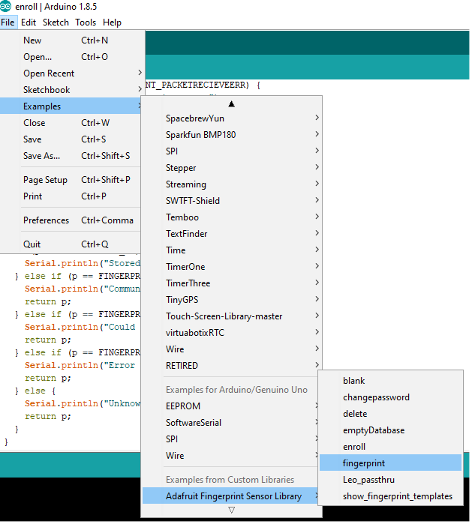
We need to modify the example for alarm and lock control. First, define the pins. The setup function declares their output and defines their initial state, alarm switched off, and lock closed.

The following code in the example matches the fingerprint with the ones stored in it. If a match is found, it displays “Found a print match!” on the serial monitor. At the same instance, I added the door open statement. If no match, let the door remain closed and buzz the alarm. I decided to buzz the alarm for 2 seconds; you can change it.
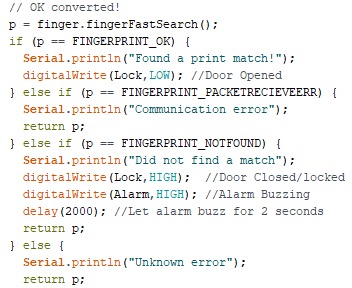
The code is quite lengthy, but it’s easy to understand. Predefined examples are a great resource to start developing our code. It saves time, and you don’t need to go through lengthy datasheets and configuration, etc.

Let’s DIY the project: Where to buy parts?
Mouser: Fingerprint sensor
Mouser: Alarm Siren
Mouser: Arduino Uno
Mouser: Dual relay module
Mouser: Electronic Lock

You may also like:


  • Facial recognition tech shows up to 96% accuracy, according to…
  • face recognition
    Pluses and perils of face recognition

  • IRIS Recognition : Encoding the IRIS

Filed Under: Arduino Projects, Microcontroller Projects


Next Article

← Previous Article
Next Article →

Questions related to this article?
👉Ask and discuss on Electro-Tech-Online.com and EDAboard.com forums.


Tell Us What You Think!! Cancel reply

You must be logged in to post a comment.

EE TECH TOOLBOX

“ee
Tech Toolbox: Internet of Things
Explore practical strategies for minimizing attack surfaces, managing memory efficiently, and securing firmware. Download now to ensure your IoT implementations remain secure, efficient, and future-ready.

EE Learning Center

EE Learning Center
“engineers
EXPAND YOUR KNOWLEDGE AND STAY CONNECTED
Get the latest info on technologies, tools and strategies for EE professionals.

HAVE A QUESTION?

Have a technical question about an article or other engineering questions? Check out our engineering forums EDABoard.com and Electro-Tech-Online.com where you can get those questions asked and answered by your peers!


RSS EDABOARD.com Discussions

  • Voltage mode pushpull is a nonsense SMPS?
  • Input impedance matching network
  • High Side current sensing
  • The comparison of different Tcl script checkers
  • Reducing "shoot-through" in offline Full Bridge SMPS?

RSS Electro-Tech-Online.com Discussions

  • Back to the old BASIC days
  • Parts required for a personal project
  • PIC KIT 3 not able to program dsPIC
  • Failure of polypropylene motor-run capacitors
  • Siemens large industrial PLC parts

Featured – RPi Python Programming (27 Part)

  • RPi Python Programming 21: The SIM900A AT commands
  • RPi Python Programming 22: Calls & SMS using a SIM900A GSM-GPRS modem
  • RPi Python Programming 23: Interfacing a NEO-6MV2 GPS module with Raspberry Pi
  • RPi Python Programming 24: I2C explained
  • RPi Python Programming 25 – Synchronous serial communication in Raspberry Pi using I2C protocol
  • RPi Python Programming 26 – Interfacing ADXL345 accelerometer sensor with Raspberry Pi

Recent Articles

  • What is AWS IoT Core and when should you use it?
  • AC-DC power supply extends voltage range to 800 V DC
  • Infineon’s inductive sensor integrates coil system driver, signal conditioning circuits and DSP
  • Arm Cortex-M23 MCU delivers 87.5 µA/MHz active mode
  • STMicroelectronics releases automotive amplifiers with in-play open-load detection

EE ENGINEERING TRAINING DAYS

engineering

Submit a Guest Post

submit a guest post
Engineers Garage
  • Analog IC TIps
  • Connector Tips
  • Battery Power Tips
  • DesignFast
  • EDABoard Forums
  • EE World Online
  • Electro-Tech-Online Forums
  • EV Engineering
  • Microcontroller Tips
  • Power Electronic Tips
  • Sensor Tips
  • Test and Measurement Tips
  • 5G Technology World
  • Subscribe to our newsletter
  • About Us
  • Contact Us
  • Advertise

Copyright © 2025 WTWH Media LLC. All Rights Reserved. The material on this site may not be reproduced, distributed, transmitted, cached or otherwise used, except with the prior written permission of WTWH Media
Privacy Policy

Search Engineers Garage

  • Electronic Projects & Tutorials
    • Electronic Projects
      • Arduino Projects
      • AVR
      • Raspberry pi
      • ESP8266
      • BeagleBone
      • 8051 Microcontroller
      • ARM
      • PIC Microcontroller
      • STM32
    • Tutorials
      • Audio Electronics
      • Battery Management
      • Brainwave
      • Electric Vehicles
      • EMI/EMC/RFI
      • Hardware Filters
      • IoT tutorials
      • Power Tutorials
      • Python
      • Sensors
      • USB
      • VHDL
    • Circuit Design
    • Project Videos
    • Components
  • Articles
    • Tech Articles
    • Insight
    • Invention Stories
    • How to
    • What Is
  • News
    • Electronic Product News
    • Business News
    • Company/Start-up News
    • DIY Reviews
    • Guest Post
  • Forums
    • EDABoard.com
    • Electro-Tech-Online
    • EG Forum Archive
  • DigiKey Store
    • Cables, Wires
    • Connectors, Interconnect
    • Discrete
    • Electromechanical
    • Embedded Computers
    • Enclosures, Hardware, Office
    • Integrated Circuits (ICs)
    • Isolators
    • LED/Optoelectronics
    • Passive
    • Power, Circuit Protection
    • Programmers
    • RF, Wireless
    • Semiconductors
    • Sensors, Transducers
    • Test Products
    • Tools
  • Learn
    • eBooks/Tech Tips
    • Design Guides
    • Learning Center
    • Tech Toolboxes
    • Webinars & Digital Events
  • Resources
    • Digital Issues
    • EE Training Days
    • LEAP Awards
    • Podcasts
    • Webinars / Digital Events
    • White Papers
    • Engineering Diversity & Inclusion
    • DesignFast
  • Guest Post Guidelines
  • Advertise
  • Subscribe