When it comes to general-purpose microcontrollers, nobody expects them to perform heavy-duty software operations. Microcontrollers are simple devices that control binary devices and talk over serial interfaces. Building audio/video or multimedia applications on microcontrollers is never attempted. It is challenging and infeasible in most situations to handle any kind of multimedia through microcontrollers. Microcontrollers are not just designed for that.
Despite incompetency for applications like audio and/or video, it is worth trying and experimenting with audio and graphic projects with microcontrollers. We have already seen how Arduino can generate digital audio in the form of musical notes and melody tunes. Can Arduino also play music for us? Well, Arduino is incapable of playing the audio files on its own. Playing MP3 and WAVE format audio files by Arduino only using external breakout circuits is possible.
Arduino interfaces with any speaker quite well, either directly or through an amplifier circuit. It can very well drive any speaker to play tunes on its own. Then, how complex tunes can we play on Arduino. We cannot load audio files to Arduino. Its memory and filesystem do not support that. We can not use binary code audio to Arduino firmware as the flash memory is limited.
Then, there is only one way to play complex musical tunes on Arduino: by streaming. In this project, we will play some complex tunes and one involving multiple tracks on Arduino by streaming the audio file’s content to the board. We will stream musical tunes for multi-track songs using a Python script on a PC/Mac and let Arduino play them on a speaker.
The project
In this project, we will build a Python application to stream the contents of an audio file from a computer to an Arduino. The Arduino board is programmed to receive the audio stream serially and play it on the speaker in real time. This way, we will play tunes for theme songs of popular movies like Mission Impossible, Pirates of the Caribbean, and Titanic on Arduino. Following this project, tunes for any song or music can be streamed to Arduino.
Note that the maximum baud rate for serial communication in Arduino is 115200. Most audio files have a higher bit rate, like 192K. That is why the music streamed on Arduino may not feel the same as experienced on computers, phones, and other multimedia gadgets.
There are two versions of this application. In this project, we will build a version suitable for playing single-track audio files.
Components required
- Arduino UNO/Mega x1
- Speaker x1
- Connecting wires/Jumper wires
- A computer
MIDO Python library
We are using Python’s MIDO library for extracting content from audio files. The library will extract notes and note durations from MIDI audio file format and stream the values to Arduino. The Arduino will then fetch pairs of values representing notes and note durations through a continuous serial stream of data and play the respective tune in real time over a speaker.
Installing MIDO library
To install the MIDO library on your PC or Mac, run Terminal on Mac or Command Prompt in Windows and execute the following command.
py -m pip install mido
The command will install the mido library. It will also install numpy as a dependency if not already installed on the system.
Inspecting the audio file by Python scripting
Let us start with writing the desktop application first. The application is written in Python and uses the MIDO and PySerial libraries. The MIDO library decodes audio files, and the PySerial library streams data from audio files to Arduino through serial communication. You will require a mid file of the music or song you want to play. You can download a mid file for your favorite song, theme, or tune online or convert your favorite song/tune from MP3 format to MID format using an online tool. Before writing the main application, we need to inspect the audio file through Python scripting.
We will play the “He’s Pirate” theme song on Arduino in this project. The MP3 file for this theme song is attached below.
The MID file for the theme song downloaded from https://freemidi.org/ is attached below.
[Link to poctheme.mid]

Place both files in a project folder and create a file with the name “mido-single-track-inspection.py” in the same folder. We will write a Python script to inspect the audio file in this file. Accordingly, the main application will be programmed.
Add the following code to the file “mido-single-track-inspection.py.”
import mido
mid = mido.MidiFile(‘poctheme.mid’, clip=True)
mid.tracks
print(len(mid.tracks))
Save and run the script. It will return the number of tracks in the audio file ‘poctheme.mid’. There are three tracks in our audio file. If you are working with a different audio file, replace the filename in the above code.
Let us now inspect the size of the content in each track. Run the following code in Python script to get the size of the content of all three tracks.
import mido
mid = mido.MidiFile(‘poctheme.mid’, clip=True)
mid.tracks
print(len(mid.tracks[0]))
print(len(mid.tracks[1]))
print(len(mid.tracks[2]))

We can see nine lines in track 0, 1285 lines in track 1, and 1557 lines in track 2. Let us inspect the content of each track. Run the following code in the Python script to view the content of track 0.
msg = []
for m in mid.tracks[0]:
msg.append(str(m))
for m in msg:
print(m)
 As we can see in the above screen dump, track 0 only has the metadata related to the audio file.
Run the following code in Python script to inspect the content of track1.
msg = []
for m in mid.tracks[1]:
msg.append(str(m))
for m in msg:
print(m)
 As you can see from the above screen dump, track 1 contains the audio data. After the 10th line in the track, the audio data is present as note status, channel, note, velocity, and note duration.
Run the following code in Python script to inspect the content of track2.
msg = []
for m in mid.tracks[2]:
msg.append(str(m))
for m in msg:
print(m)
 As you can see from the screen dump, track 2 also contains audio data but for a different channel. There are two channels, as this is a stereo audio. The audio data for both channels is stored in the audio file in different tracks. We need to extract the audio data from these tracks for streaming to Arduino.
Note that an audio file can have multiple tracks, each with audio data for multiple channels. Tracks or channels could correspond to each instrument played in the music.
Let us work on track 1 of the audio file. We need to extract the audio data for streaming. So, first, let us eliminate the meta information stored in the first ten lines of track 1. Note that we have already dumped each message of track 1 in a Python list ‘msg’. Add the following code to get rid of meta information from the track.
for m in range(10):
del msg[0]
Now, we need to dump each individual element of the message/line of the track in an array. Add the following code to dump each attribute of messages of the track into an array.
notesmatrix = []
for m in msg:
row = m.split(” “)
notesmatrix.append(row)
With each attribute of track 1 messages dumped in a 2-dimensional array, now we can extract all notes of the audio track in another array using the following code.
notes = []
for row in notesmatrix:
notes.append(row[2].split(“=”)[1])
print(notes)
The note durations for all notes of the track can be dumped into another array using the following code.
notedurations = []
for row in notesmatrix:
notedurations.append(row[4].split(“=”)[1])
print(notedurations)
We need to extract notes and note durations from the audio track to play a tune for the audio file on Arduino. As the audio data will be serially streamed and played in real-time, each note must be followed by note duration in the serial data. So we will extract pairs of notes and respective note durations in a different array, so Arduino immediately plays each note upon receiving note & note duration value pairs in real-time. The following code stores each note followed by respective note duration in an array.
musicnotes = []
for row in notesmatrix:
musicnotes.append(row[2].split(“=”)[1])
musicnotes.append(row[4].split(“=”)[1])
print(musicnotes)
Finally, we have audio data for track 1 dumped into an array. We only need to stream the array content serially to Arduino to play a tune.
The Python script “audio-single-track-inspection.py” for inspecting the audio file “poctheme.mid” finally has the following code.
The desktop application
After inspecting the audio file, we can now write the main application code that extracts audio data from track 1 of the file and stream it serially to Arduino. Before that, connect Arduino to your computer and check the port number it connects to. In our case, Arduino connects to COM6. Create a new Python script file and name it ‘python-audio-streaming.py’. Add the following code to the script file.
The above script is our main desktop application for streaming audio tracks to Arduino. It uses the MIDO library to extract audio data from a track of the audio file and the PySerial library to stream the data serially to the Arduino. If you do not have the Pyserial library installed, install the library by running the following command in the Terminal/Command Prompt.
py -m pip install pyserial
Circuit connections
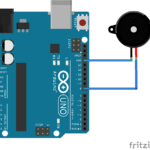
We need to prepare our Arduino to receive the audio stream and play it over a speaker. Connect the Arduino to the computer and interface a speaker to Arduino directly. The speaker used in this project is 4ohm 50Watt 3-inch speaker that does not require any amplifier circuit to generate audible sound. The speaker has two terminals. Connect one terminal to Arduino’s Ground pin and the other terminal to any GPIO. Here, the other terminal is connected to pin D8 of Arduino UNO.

Arduino sketch
After making circuit connections, upload the following sketch to Arduino.
The sketch reads a pair of bytes from the serial data as a note and note duration and generates the note on the speaker immediately. This way, while it receives audio streams, the stream is played on a speaker by Arduino in real-time.
How it works
The Python script ‘python-audio-streaming’ on the desktop takes in an audio file and extracts the audio data from one of its tracks. The audio data is transmitted over serial communication to Arduino as note & note duration pair values. The Arduino receives information about notes and note durations through a serial data stream from the computer. It uses stream data to play musical notes on a speaker in real-time.
How to test the project
After writing the desktop application – ‘python-audio-streaming’, making circuit connections for Arduino, and uploading a sketch to the Arduino board, you have Arduino connected to the computer. On your computer, run the Python script ‘python-audio-streaming’, and immediately the Arduino will start playing the tune for the song/music on the speaker. The transmitted audio data can be viewed from the Python console.
Results
Conclusion
We can play tunes for any song or music on Arduino by streaming the audio data to it. Uploading an audio file to Arduino’s file system is impossible. It is also impossible to write audio data to its firmware due to limited memory on the microcontroller. In such cases, complex and long musical tunes can be played on Arduino by streaming the audio data to it. The audio stream is then played in real-time by Arduino. The played tune will have a lower bit rate than the original audio file as the maximum baud rate for UNO is limited to 115200 bps. In this project, we build a Python script to decipher audio files and stream the audio content of one of its tracks to Arduino. The Arduino can play only one tone at a time. Therefore the tune played by the Arduino may not feel exactly the same as experienced on playing the original audio file. Still, if the audio file has a single track or one prominent track, the tune played by Arduino will closely match the original MP3 audio.
You may also like:


Filed Under: Arduino Projects, Electronic Projects, Video
Questions related to this article?
👉Ask and discuss on Electro-Tech-Online.com and EDAboard.com forums.
Tell Us What You Think!!
You must be logged in to post a comment.