Engineers Garage

  • Electronic Projects & Tutorials
    • Electronic Projects
      • Arduino Projects
      • AVR
      • Raspberry pi
      • ESP8266
      • BeagleBone
      • 8051 Microcontroller
      • ARM
      • PIC Microcontroller
      • STM32
    • Tutorials
      • Audio Electronics
      • Battery Management
      • Brainwave
      • Electric Vehicles
      • EMI/EMC/RFI
      • Hardware Filters
      • IoT tutorials
      • Power Tutorials
      • Python
      • Sensors
      • USB
      • VHDL
    • Circuit Design
    • Project Videos
    • Components
  • Articles
    • Tech Articles
    • Insight
    • Invention Stories
    • How to
    • What Is
  • News
    • Electronic Product News
    • Business News
    • Company/Start-up News
    • DIY Reviews
    • Guest Post
  • Forums
    • EDABoard.com
    • Electro-Tech-Online
    • EG Forum Archive
  • DigiKey Store
    • Cables, Wires
    • Connectors, Interconnect
    • Discrete
    • Electromechanical
    • Embedded Computers
    • Enclosures, Hardware, Office
    • Integrated Circuits (ICs)
    • Isolators
    • LED/Optoelectronics
    • Passive
    • Power, Circuit Protection
    • Programmers
    • RF, Wireless
    • Semiconductors
    • Sensors, Transducers
    • Test Products
    • Tools
  • Learn
    • eBooks/Tech Tips
    • Design Guides
    • Learning Center
    • Tech Toolboxes
    • Webinars & Digital Events
  • Resources
    • Digital Issues
    • EE Training Days
    • LEAP Awards
    • Podcasts
    • Webinars / Digital Events
    • White Papers
    • Engineering Diversity & Inclusion
    • DesignFast
  • Guest Post Guidelines
  • Advertise
  • Subscribe

AVR ATmega16/32 Fuse Bits

By Akshay Daga March 28, 2011

Summary

Updating with the era of technology, the new microcontrollers are coming with lots of inbuilt peripherals and features. These inbuilt peripherals and features not only reduce the cost of additional circuits to be used with the controller but also provide an ease to interface additional devices (such as Modems etc) directly with the microcontroller.

The new generations of microcontrollers are capable of working on internal as well as on external clock option. But then the question comes as to how do we make them work on a desired clock option? How to disable/enable a particular peripheral? As a beginner when you get a new chip (ATmega16/32) you may complain that ‘PORTC of the chip is not working!’ or ‘when the reset pin and 6th pin of PORTC (in ATmega8) are common how shall I select them/distinguish between them?’. These questions may taste bitter when you try to skip them and go ahead, but all these issues can be solved by properly setting the FUSE BITS of your device.

 
There are few parameters in the chip which are used to configure it before it can be used for external environment. These parameters are set with the use of Fuse Bits. In other words, the fuse bit determines the behavior of the chip, whether it has a boot loader, what is the speed and voltage it runs at, the Watchdog Timer conditions, etc. The main advantage of fuse bits is that the microcontroller can be configured as per the requirement.
 
Once the fuse bits are set for a particular configuration, the controller can be used again and again (program can be burned again and again). You don’t have to set the fuse bits every time you are using the controller till the time you want to use it under the same configuration. Fuse bits need to be changed only in case you want to change the initial configuration of the controller.  The fuse bits are very confusing for the beginners. This tutorial will explore the fuse bits and also give a clear understanding of what fuses you need to set for your device.
 

Description

Description
Before configuring the fuse bits for your device, one must have thorough knowledge of fuse bits, when exactly and how would you configure them and what all are the factors which may affect the working of the device. It is important to note that the fuse bit settings are not affected by the chip erase operation. They are configured separately by using external programmer.
 
Another very important aspect to note is that the desired fuse bits must be programmed before setting the lock bits of the device. You must be very careful while writing the fuse bits of the device. Suppose if you using an SPI programmer/burner to program your controller and by chance you disabled (unprogrammed) the SPIEN bit, then the chip cannot be further programmed. The SPIEN bit can again be enabled (programmed) by using a parallel burner. If the bit reads as logic 0, it means the bit is programmed or else it is called as unprogrammed bit.
 
The AVR microcontroller (ATmega16) consists of sixteen fuse bits which are classified as low fuse and high fuse. These Fuse bits can be configured to select the microcontroller clock options or to control some in-built peripherals like JTAG, SPI etc.
A new or virgin microcontroller has a default value of fuse bytes which is equal to 0x99E1 in hexadecimal. To understand the meaning of this default value, each fuse bit must be understood.
High Fuse bits:
 
Fuse Bit
OCDEN
JTAGEN
SPIEN
CKOPT
EESAVE
BOOTSZ1
BOOTSZ0
BOOTRST
Bit No.
Bit 7
Bit 6
Bit 5
Bit 4
Bit 3
Bit 2
Bit 1
Bit 0
Default
values
1
0
0
1
1
0
0
1
 
Low Fuse bits:
 
Fuse Bit
BODLEVEL
BODEN
SUT1
SUT0
CKSEL3
CKSEL2
CKSEL1
CKSEL0
Bit No.
Bit 7
Bit 6
Bit 5
Bit 4
Bit 3
Bit 2
Bit 1
Bit 0
Default values
1
1
1
0
0
0
0
1

The individual fuse bit is explained in next section.

Fuse Bits

CKSEL [3:0] (Clock Select)
These fuse bits are used to select different clock source option for microcontroller. The table below shows the different device clock sources and their corresponding fuse bits.
Device Clocking Option
CKSEL[3:0]
External Crystal/Ceramic Resonator
1111 – 1010
External Low-frequency Crystal
1001
External RC Oscillator
1000 – 0101
Calibrated Internal RC Oscillator
0100 – 0001
External Clock
0000

The default clock setting for new controller is CKSEL = 0001 (internal RC oscillator 1MHz). Generally, external crystal is used as a clock option (so fuse bit is set between the range 1111-1010).

 
CKOPT (Clock Option)
There are two oscillation modes in ATmega16 microcontroller; the CKOPT bit selects one of these modes. If CKOPT bit is programmed (0), the oscillator generates full rail-to-rail output swing. This mode has wide frequency range. If CKOPT is unprogrammed (1), the oscillation has smaller output swing (this mode has limited frequency).
 
Atmega16 can be operated on a maximum clock frequency of 16 MHz (16PU or 16PI), thus the CKOPT is programmed. The CKOPT bit is combined with CKSEL [3:1] bits to select operating frequency and its mode. Table2 shows the CKSEL[3:1] and CKOPT bit combination used to select frequency of crystal for ATmega16. The table below also recommends the capacitors’ ranges which are connected across the crystal.
CKOP
CKSEL[3:1]
Frequency Range (MHz
Recommended Range for Capacitors (pF)
1
101*
0.4 – 0.9
–
1
110
0.9 – 3.0
12 – 22
1
111
3.0 – 8.0
12 – 22
0
101, 110, 111
1.0 -16.0
12 – 22
* This mode is only used for ceramic resonator.
 
For CKOPT=0, the CKSEL [3:1] bits are selected as follows:
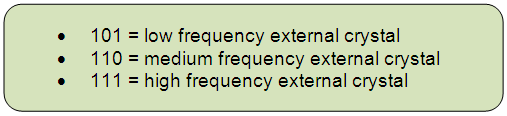
 Image showing selected Fuse Bits
Fig. 1: Image showing selected Fuse Bits
For 12 MHz frequency of external crystal, CKSEL [3:1] is set to 111.
 

Fuse Bits Continued

SUT [1:0] (Start Up Time)
This bit is used to set start up time of ATmega16. The combination of SUT [1:0] and CKSEL0 bits are used to select the start-up time of controller. The table below shows the bit combinations to select the start-up time.
CKSEL0
SUT[1:0]
No. of Start-up clocks
Additional Delay from Reset
Recommended Usage
0
00
258 CK
4.1 ms
 
Ceramic resonator, fast rising power
0
01
258 CK
65 ms
 
Ceramic resonator, slowly rising power
0
10
1K CK
–
 
Ceramic resonator, BOD enabled
0
11
1K CK
4.1 ms
Ceramic resonator, fast rising power
1
00
1K CK
65 ms
Ceramic resonator, slowly rising power
1
01
16K CK
–
Crystal Oscillator, BOD enabled
1
10
16K CK
4.1 ms
Crystal Oscillator, fast
rising power
1
11
16K CK
65 ms
Crystal Oscillator, slowly rising power


BODEN (Brown-Out Detection Enable)

ATmega16 has a brown-out detection unit which   continuously monitors Vcc level with fixed trigger level. This fuse bit is used to enable/disable the brown-out detection unit. To enable the BOD unit, BODEN bit is programmed (0).


BODLEVEL (Brown-Out Detection Level)
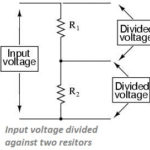
This fuse bit is used to set trigger level for BOD unit. The trigger voltage is set as 2.7 volts, if the BODLEVEL bit is unprogrammed (1). If this fuse bit is programmed (0), the trigger level is set to 4.0 volts.
 
BOOTRST [BootLoader Reset]
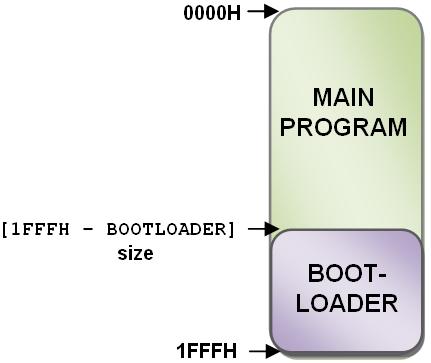
BootLoader is a small program which is written on a specific area of the flash memory. This program executes at the boot time of the controller. If BOOTRST bit is programmed (0), the device will jump on first address bootloader block.
 
BOOTSZ [1:0]
This fuse bit is used to set the bootloader size. The default value of these bits is ‘00’ which sets the boot size to 1024 words. This size is allocated from flash memory. Bootloader always resides at the bottom of flash.
 
Image showing placement of Bootloader with Main Program

Fig. 2: Image showing placement of Bootloader with Main Program

 
EESAVE (EEPROM Save)
This bit is used to preserve the EEPROM content during chip erase. If the fuse is programmed (0), the EEPROM preserves its content else it is not preserved duringchip erase.
 
SPIEN (SPI Serial Programming Enable)
If this bit is programmed (0), the SPI serial programming of the controller is enabled. To disable the serial programming, this bit is left unprogrammed (1).
 
JTAGEN (JTAG Enable)
There is an in-built JTAG unit in ATmega16, which is pre-activated in virgin microcontroller. To disable the JTAG, JTAGEN bit should be unprogrammed (1). (Refer How to disable JTAG)
 
OCDEN (On-Chip Debugging Enable)
The on-chip debugging is used to run the program step-by-step on hardware to study the internal signal which provides the information about state of the processor. This bit is used to enable/disable the on-chip debugging. If this bit is programmed (0), then the on-chip debugging is enabled.
 
There are few more bits which are not present in ATmega16 but they are important while using other ICs of AVR series like ATmega8. The RSTDISBL bit is very important (specially in the case of ATmega8). By programming this bit, the reset bit is converted into general I/O pin. It must be noted that while using SPI programmer, one should never program this bit. Programming this bit would disable the SPI programming since all the SPI programmers use RESET pin to program the microcontroller (AVR).
 

Configuring a New Microcontroller

Configuring a new microcontroller
A virgin microcontroller controller is configured at 1MHz internal RC oscillator with longest start-up and the JTAG pre-enabled. So the fuse bytes are as follows:  Image showing status of Fuse Bits for virgin microcontroller
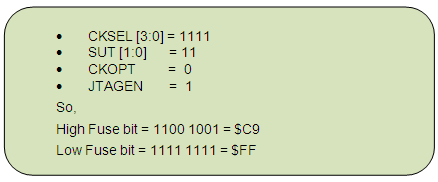
Fig. 3: Image showing status of Fuse Bits for virgin microcontroller

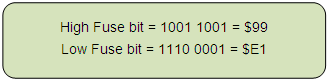
To set the microcontroller for high external frequency with longest start-up and JTAG disabled, the fuse settings are changed as following.
Image showing status of Fuse Bits for high external frequency with longest start-up and JTAG disabled 

Fig. 4: Image showing status of Fuse Bits for high external frequency with longest start-up and JTAG disabled

Refer to JTAG disabling in AVR to learn the read/write operation of fuse bytes using AVRDUDE.

You may also like:

  • PS2 Keyboard To Store Text In SD Card Using Arduino Circuit Setup On Breadboard
    How To Use PS2 Keyboard To Store Text In SD…

  • What is the 1-Wire protocol?
  • ATtiny85
    ATtiny85 microcontroller tutorials, Part 1: Introduction

  • ATtiny85 microcontroller tutorials, Part 2: Working with ATtiny85

  • How to measure voltage of multiple batteries connected in string/array…

Filed Under: Tutorials
Tagged With: atmega16, atmega32, avr, fuse
 

Next Article

← Previous Article
Next Article →

Questions related to this article?
👉Ask and discuss on EDAboard.com and Electro-Tech-Online.com forums.


Tell Us What You Think!! Cancel reply

You must be logged in to post a comment.

EE TECH TOOLBOX

“ee
Tech Toolbox: Internet of Things
Explore practical strategies for minimizing attack surfaces, managing memory efficiently, and securing firmware. Download now to ensure your IoT implementations remain secure, efficient, and future-ready.

EE Learning Center

EE Learning Center
“engineers
EXPAND YOUR KNOWLEDGE AND STAY CONNECTED
Get the latest info on technologies, tools and strategies for EE professionals.

HAVE A QUESTION?

Have a technical question about an article or other engineering questions? Check out our engineering forums EDABoard.com and Electro-Tech-Online.com where you can get those questions asked and answered by your peers!


RSS EDABOARD.com Discussions

  • Voltage mode pushpull is a nonsense SMPS?
  • Input impedance matching network
  • High Side current sensing
  • The comparison of different Tcl script checkers
  • Reducing "shoot-through" in offline Full Bridge SMPS?

RSS Electro-Tech-Online.com Discussions

  • Is AI making embedded software developers more productive?
  • Back to the old BASIC days
  • Parts required for a personal project
  • PIC KIT 3 not able to program dsPIC
  • Failure of polypropylene motor-run capacitors

Featured – RPi Python Programming (27 Part)

  • RPi Python Programming 21: The SIM900A AT commands
  • RPi Python Programming 22: Calls & SMS using a SIM900A GSM-GPRS modem
  • RPi Python Programming 23: Interfacing a NEO-6MV2 GPS module with Raspberry Pi
  • RPi Python Programming 24: I2C explained
  • RPi Python Programming 25 – Synchronous serial communication in Raspberry Pi using I2C protocol
  • RPi Python Programming 26 – Interfacing ADXL345 accelerometer sensor with Raspberry Pi

Recent Articles

  • What is AWS IoT Core and when should you use it?
  • AC-DC power supply extends voltage range to 800 V DC
  • Infineon’s inductive sensor integrates coil system driver, signal conditioning circuits and DSP
  • Arm Cortex-M23 MCU delivers 87.5 µA/MHz active mode
  • STMicroelectronics releases automotive amplifiers with in-play open-load detection

EE ENGINEERING TRAINING DAYS

engineering

Submit a Guest Post

submit a guest post
Engineers Garage
  • Analog IC TIps
  • Connector Tips
  • Battery Power Tips
  • DesignFast
  • EDABoard Forums
  • EE World Online
  • Electro-Tech-Online Forums
  • EV Engineering
  • Microcontroller Tips
  • Power Electronic Tips
  • Sensor Tips
  • Test and Measurement Tips
  • 5G Technology World
  • Subscribe to our newsletter
  • About Us
  • Contact Us
  • Advertise

Copyright © 2025 WTWH Media LLC. All Rights Reserved. The material on this site may not be reproduced, distributed, transmitted, cached or otherwise used, except with the prior written permission of WTWH Media
Privacy Policy

Search Engineers Garage

  • Electronic Projects & Tutorials
    • Electronic Projects
      • Arduino Projects
      • AVR
      • Raspberry pi
      • ESP8266
      • BeagleBone
      • 8051 Microcontroller
      • ARM
      • PIC Microcontroller
      • STM32
    • Tutorials
      • Audio Electronics
      • Battery Management
      • Brainwave
      • Electric Vehicles
      • EMI/EMC/RFI
      • Hardware Filters
      • IoT tutorials
      • Power Tutorials
      • Python
      • Sensors
      • USB
      • VHDL
    • Circuit Design
    • Project Videos
    • Components
  • Articles
    • Tech Articles
    • Insight
    • Invention Stories
    • How to
    • What Is
  • News
    • Electronic Product News
    • Business News
    • Company/Start-up News
    • DIY Reviews
    • Guest Post
  • Forums
    • EDABoard.com
    • Electro-Tech-Online
    • EG Forum Archive
  • DigiKey Store
    • Cables, Wires
    • Connectors, Interconnect
    • Discrete
    • Electromechanical
    • Embedded Computers
    • Enclosures, Hardware, Office
    • Integrated Circuits (ICs)
    • Isolators
    • LED/Optoelectronics
    • Passive
    • Power, Circuit Protection
    • Programmers
    • RF, Wireless
    • Semiconductors
    • Sensors, Transducers
    • Test Products
    • Tools
  • Learn
    • eBooks/Tech Tips
    • Design Guides
    • Learning Center
    • Tech Toolboxes
    • Webinars & Digital Events
  • Resources
    • Digital Issues
    • EE Training Days
    • LEAP Awards
    • Podcasts
    • Webinars / Digital Events
    • White Papers
    • Engineering Diversity & Inclusion
    • DesignFast
  • Guest Post Guidelines
  • Advertise
  • Subscribe