Engineers Garage

  • Electronic Projects & Tutorials
    • Electronic Projects
      • Arduino Projects
      • AVR
      • Raspberry pi
      • ESP8266
      • BeagleBone
      • 8051 Microcontroller
      • ARM
      • PIC Microcontroller
      • STM32
    • Tutorials
      • Audio Electronics
      • Battery Management
      • Brainwave
      • Electric Vehicles
      • EMI/EMC/RFI
      • Hardware Filters
      • IoT tutorials
      • Power Tutorials
      • Python
      • Sensors
      • USB
      • VHDL
    • Circuit Design
    • Project Videos
    • Components
  • Articles
    • Tech Articles
    • Insight
    • Invention Stories
    • How to
    • What Is
  • News
    • Electronic Product News
    • Business News
    • Company/Start-up News
    • DIY Reviews
    • Guest Post
  • Forums
    • EDABoard.com
    • Electro-Tech-Online
    • EG Forum Archive
  • DigiKey Store
    • Cables, Wires
    • Connectors, Interconnect
    • Discrete
    • Electromechanical
    • Embedded Computers
    • Enclosures, Hardware, Office
    • Integrated Circuits (ICs)
    • Isolators
    • LED/Optoelectronics
    • Passive
    • Power, Circuit Protection
    • Programmers
    • RF, Wireless
    • Semiconductors
    • Sensors, Transducers
    • Test Products
    • Tools
  • Learn
    • eBooks/Tech Tips
    • Design Guides
    • Learning Center
    • Tech Toolboxes
    • Webinars & Digital Events
  • Resources
    • Digital Issues
    • EE Training Days
    • LEAP Awards
    • Podcasts
    • Webinars / Digital Events
    • White Papers
    • Engineering Diversity & Inclusion
    • DesignFast
  • Guest Post Guidelines
  • Advertise
  • Subscribe

The pros and cons of the Raspberry Pi 400

By Nikhil Agnihotri February 18, 2021

In many ways, Raspberry Pi falls short as a full-fledged personal computer. The Raspberry Pi Foundation has tried to change this with its latest addition, the Raspberry Pi 400.

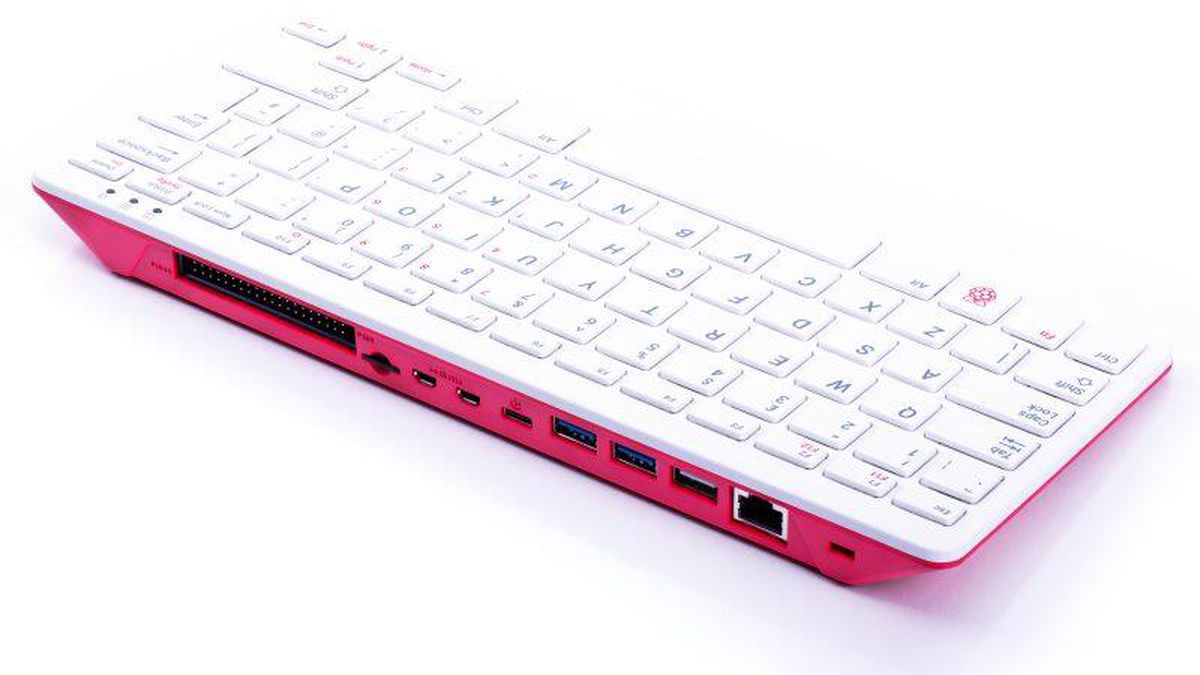
Launched in November of 2020, the Raspberry Pi 400 is a single-board computer in the form of a keyboard, retailing at $70 per unit or $100 as a kit. The kit includes a mouse, microSD card, power supply, connecting cables, and a beginner’s guide.
The pros
Since its inception, Raspberry Pi has been always known as a credit-card-sized computer without the feel of a desktop computer. 

RPi has, undoubtedly, become one of the most popular microcomputers, earning high accolades as an affordable computing platform in electronics and computer engineering communities. 

However, the Raspberry Pi 400 offers a completely new form-factor that’s closer to a portable desktop computer. It’s similar to the Raspberry Pi 4 4GB model but with a slightly higher clock frequency and thermal tolerance. Beneath the new form factor is simply an upgraded version of the Raspberry Pi 4. 

The heart of Raspberry Pi 400 is comprised of a Broadcom BCM2711 quad-core Cortex-A72 64-bit SoC that clocks at 1.8 GHz — that’s 300 MHz higher than Raspberry Pi 4. It has the same 4GB LPDDR4-3200 RAM as the RPi 4. Similarly, it also has two micro-HDMI ports that support a resolution of up to 4K and OpenGL ES 3.0 Graphics. 

The RPi 400 can also connect with two displays at the same time by using HDMI cables. On the rear side of the keyboard, users will find the available ports, including:  

  • Two USB 3.0 ports
  • One USB 2.0 port
  • A gigabit Ethernet
  • A MicroSD card slot 
  • A horizontal 40-pin GPIO header

For wireless connectivity, RPi 400 offers an onboard, dual-band IEEE 802.11b/g/n/ac Wireless LAN, Bluetooth 5.0, and BLE. 

Additionally, the RPi 400 houses a large heat sink between the mainboard and keyboard, which acts as a shield. As a result, this model can tolerate much higher temperatures and works comparatively well with over-clocking. 

The cons
Raspberry Pi 400 is designed to be used as a portable microcomputer so it offers zero CSI or DSI connectors. This means it’s not possible to connect the official RPi camera and touchscreen with this new model. This is a significant loss for those interested in creating several types of projects.

Granted, the lack of a touchscreen can be overcome with a display. But the lack of a CSI port means it’s only possible to use USB webcams. The RPi 400’s horizontal GPIO header can be accessed using jumper wires, but a breakout board is required to connect a HAT or pHAT.

It’s worth repeating: RPi 400 is simply a portable computer in a keyboard. It’s not intended for use as a testbed for embedded computing.

Unfortunately, the Raspberry Pi 400 hasn’t quite overcome the drawbacks of the platform as a desktop computer. For example, despite a superior thermal performance, this model suffers at times from overheating issues compared to typical desktop computers.

The board still relies on a MicroSD card for secondary memory and lacks a GPU. So, the Raspberry Pi 400 is more of a cosmetic upgrade rather than a complete replacement for a typical desktop computer.

The verdict
The Raspberry Pi 400 offers a new keyboard form-factor that’s unique and convenient to use. Simply connect it to any display with an HDMI port and a USB mouse, and you’ve got a desktop computer.

However, the new design lacks certain capabilities as an embedded systems platform, including the CSI and DSI ports. It also requires breakout boards for connecting HAT and pHAT. 

Raspberry Pi 400 is designed to be an affordable, portable microcomputer. Just don’t expect a full-fledge desktop in terms of memory and performance. But, given the cost, the RPi 400 still makes an ideal choice for those new to computing and who want enhance their education at a small price tag. 

You may also like:
  • Raspberry Pi 4
    RPi Python Programming 01: Introduction to Raspberry Pi 4

  • How to build a Raspberry Pi VPN server

  • Raspberry Pi camera QR-code scanning

  • Raspberry Pi 2 & 3 Vs Beaglebone Black

  • Getting started with Raspberry Pi

Filed Under: Embedded, Products, Raspberry pi, Tech Articles
Tagged With: raspberrypi
 

Next Article

← Previous Article
Next Article →

Questions related to this article?
👉Ask and discuss on EDAboard.com and Electro-Tech-Online.com forums.


Tell Us What You Think!! Cancel reply

You must be logged in to post a comment.

EE TECH TOOLBOX

“ee
Tech Toolbox: Internet of Things
Explore practical strategies for minimizing attack surfaces, managing memory efficiently, and securing firmware. Download now to ensure your IoT implementations remain secure, efficient, and future-ready.

EE Learning Center

EE Learning Center
“engineers
EXPAND YOUR KNOWLEDGE AND STAY CONNECTED
Get the latest info on technologies, tools and strategies for EE professionals.

HAVE A QUESTION?

Have a technical question about an article or other engineering questions? Check out our engineering forums EDABoard.com and Electro-Tech-Online.com where you can get those questions asked and answered by your peers!


RSS EDABOARD.com Discussions

  • Voltage mode pushpull is a nonsense SMPS?
  • Input impedance matching network
  • High Side current sensing
  • The comparison of different Tcl script checkers
  • Reducing "shoot-through" in offline Full Bridge SMPS?

RSS Electro-Tech-Online.com Discussions

  • Is AI making embedded software developers more productive?
  • Back to the old BASIC days
  • Parts required for a personal project
  • PIC KIT 3 not able to program dsPIC
  • Failure of polypropylene motor-run capacitors

Featured – RPi Python Programming (27 Part)

  • RPi Python Programming 21: The SIM900A AT commands
  • RPi Python Programming 22: Calls & SMS using a SIM900A GSM-GPRS modem
  • RPi Python Programming 23: Interfacing a NEO-6MV2 GPS module with Raspberry Pi
  • RPi Python Programming 24: I2C explained
  • RPi Python Programming 25 – Synchronous serial communication in Raspberry Pi using I2C protocol
  • RPi Python Programming 26 – Interfacing ADXL345 accelerometer sensor with Raspberry Pi

Recent Articles

  • What is AWS IoT Core and when should you use it?
  • AC-DC power supply extends voltage range to 800 V DC
  • Infineon’s inductive sensor integrates coil system driver, signal conditioning circuits and DSP
  • Arm Cortex-M23 MCU delivers 87.5 µA/MHz active mode
  • STMicroelectronics releases automotive amplifiers with in-play open-load detection

EE ENGINEERING TRAINING DAYS

engineering

Submit a Guest Post

submit a guest post
Engineers Garage
  • Analog IC TIps
  • Connector Tips
  • Battery Power Tips
  • DesignFast
  • EDABoard Forums
  • EE World Online
  • Electro-Tech-Online Forums
  • EV Engineering
  • Microcontroller Tips
  • Power Electronic Tips
  • Sensor Tips
  • Test and Measurement Tips
  • 5G Technology World
  • Subscribe to our newsletter
  • About Us
  • Contact Us
  • Advertise

Copyright © 2025 WTWH Media LLC. All Rights Reserved. The material on this site may not be reproduced, distributed, transmitted, cached or otherwise used, except with the prior written permission of WTWH Media
Privacy Policy

Search Engineers Garage

  • Electronic Projects & Tutorials
    • Electronic Projects
      • Arduino Projects
      • AVR
      • Raspberry pi
      • ESP8266
      • BeagleBone
      • 8051 Microcontroller
      • ARM
      • PIC Microcontroller
      • STM32
    • Tutorials
      • Audio Electronics
      • Battery Management
      • Brainwave
      • Electric Vehicles
      • EMI/EMC/RFI
      • Hardware Filters
      • IoT tutorials
      • Power Tutorials
      • Python
      • Sensors
      • USB
      • VHDL
    • Circuit Design
    • Project Videos
    • Components
  • Articles
    • Tech Articles
    • Insight
    • Invention Stories
    • How to
    • What Is
  • News
    • Electronic Product News
    • Business News
    • Company/Start-up News
    • DIY Reviews
    • Guest Post
  • Forums
    • EDABoard.com
    • Electro-Tech-Online
    • EG Forum Archive
  • DigiKey Store
    • Cables, Wires
    • Connectors, Interconnect
    • Discrete
    • Electromechanical
    • Embedded Computers
    • Enclosures, Hardware, Office
    • Integrated Circuits (ICs)
    • Isolators
    • LED/Optoelectronics
    • Passive
    • Power, Circuit Protection
    • Programmers
    • RF, Wireless
    • Semiconductors
    • Sensors, Transducers
    • Test Products
    • Tools
  • Learn
    • eBooks/Tech Tips
    • Design Guides
    • Learning Center
    • Tech Toolboxes
    • Webinars & Digital Events
  • Resources
    • Digital Issues
    • EE Training Days
    • LEAP Awards
    • Podcasts
    • Webinars / Digital Events
    • White Papers
    • Engineering Diversity & Inclusion
    • DesignFast
  • Guest Post Guidelines
  • Advertise
  • Subscribe