The Raspberry pi is a mini computer which is designed in a single board with all the essential components required for running an operating system. The Raspberry pi board runs on ARM11 processor but is available at extremely cheap price. The board is provided with a RCA connector which can be used to connect it directly to a TV screen which is based on PAL and NTSC standard. The board also has a HDMI connector output which can be used to connect the board to a HD TV. There is an Ethernet port which can be used to connect the board to a computer network.
The operating systems like Archlinux ARM, OpenELEC, Pidora, Raspbmc, RISC OS and the Raspbian and also Ubuntu versions are available for the Raspberrypi board. Linux operating systems especially Ubuntu is preferred for all kind of programming and development. The immediate advantage of having an Operating System like Ubuntu running on an embedded system device is multitasking. The Raspberrypi is a board actually designed for helping computer education for remote schools but it is a nice platform for programmers especially beginners to explore various coding techniques.
In a multi-tasking system several processes will be running at a time. The Operating System can control a process by sending signals to it. A user can sometimes initiate a signal sending and the processes can also send signals to each other. This project demonstrates how a process can receive the signal called SIGALRM from the OS and use it.
A signal is a software interrupt that can be sent to a process which is currently executing in the Operating System. Most of the time the Operating system send signals to the processes automatically and sometimes the user can initiate a signal sending. A process can also send signals to each other by calling some specific functions. A signal is sent for the purpose of notifying the process about something that required immediate attention. Different signals are used to notify different events and the signals are differentiated by their signal numbers. The list of all the available signals in the OS and their signal numbers can be obtained using the following command;
kill -l
The following table gives a list of the most common signals that a process might encounter in an Operating System;
|
NAME |
NUMBER |
DESCRIPTION |
|
SIGHUP |
1 |
Linux sends a process this signal when it becomes disconnected from a terminal. |
|
SIGINT |
2 |
Linux sends a process this signal when the user tries to end it by pressing CTRL+C. |
|
SIGILL |
4 |
Linux sends a process this signal when it attempts to execute an illegal instruction. |
|
SIGABRT |
6 |
Linux sends a process this signal to the process when the process calls the ‘abort ()’ function |
|
SIGFPE |
8 |
Linux sends a process this signal when it has executed an invalid floating-point math instruction |
|
SIGKILL |
9 |
Linux sends a process this signal to end it immediately |
|
SIGUSR1 |
10 |
User programs can send this signal to other process |
|
SIGUSR2 |
12 |
User programs can send this signal to other process |
|
SIGSEGV |
11 |
Linux sends a process this signal when the program has attempted an invalid memory access |
|
SIGPIPE |
13 |
Linux sends a process this signal when the program has attempted to access a broken data stream, such as a socket connection that has been already closed |
|
SIGALRM |
14 |
A process can receive this signal from the Linux using the function alarm (), after a time period mentioned in its argument. |
|
SIGTERM |
15 |
Linux sends a process this signal requesting it to terminate |
|
SIGCHLD |
17 |
Linux sends a process this signal when a child process exits |
|
SIGXCPU |
24 |
Linux sends a process this signal when it exceeds the limit of CPU time that it can consume. |
|
SIGVTALRM |
26 |
A process can receive this signal from the Linux using the function setitimer (), after a time period mentioned in its argument. |
Fig. 2: List of common signals for Alarm Signal process in Operating System
The steps that the process do corresponding to a received signal is called ‘Signal Handling’. It is very much similar to the ‘Interrupt Servicing’ and just like the ‘Interrupt Service Routine’, there should be a function called ‘Signal Handler’ which can perform the necessary things in response to a signal received. A function can be made the Signal Handler for a particular signal using the function called ‘signal ()’. This particular project is based on receiving and handling the signal number 14, the SIGALRM.
In this project the Raspberrypi board is loaded with Ubuntu and is remotely accessed using VNC. The Raspberrypi board is also connected to the internet. There are 26 connectors which can be taken out from the connector port of the Raspberrypi board. All the connector pins are taken out using 13*2 pin female connectors and at the other end of their wire 26 pin Burg stick male connectors are attached. The Burg stick male connectors allow each pin out from the Raspberrypi board to be plugged into the holes of a breadboard. To access the pins that coming out of the Broadcom controller of the Raspberrypi board using C language, a C library is available called “bcm2835” which has been downloaded and installed.
A process can receive the SIGALRM signal from the OS by calling a function named ‘alarm ()’. The OS will send the SIGALRM to the process after a time period mentioned in the parameter passed to the function during the function call.
alarm ()
The call made to the function alarm () will make the OS to send a SIGALRM to the process after a time period mentioned in the parameters passed to the function. The prototype of the function is defined in the header file <signal.h> as given below;
unsigned int alarm ( unsigned int seconds );
The only argument is the number of seconds that should be elapsed before receiving the SIGALRM after a call has been made to this function. If the process wants to cancel any existing alarm, it can be done by calling alarm with a seconds argument of zero.The return value indicates how many seconds remain before the previous alarm would have been sent. If there is no previous alarm, alarm returns zero.
A single call to the alarm () will receive a single SIGALRM signal only. To receive a SIGALRM after 2 seconds the following statement can be used;
alarm ( 2 );
Assume a function; say ‘sig_handler’ is declared as follows;
void sig_handler ( int signo );
To make a function ‘sig_handler’ as a Signal Handler for the SIGALRM, use the ‘signal ()’ function as given below;
int main()
{
signal ( SIGALRM, sig_handler );
alarm ( 2 );
while ( 1 );
}
The code will wait till the signal number 14, SIGALRM is received and as soon as the signal is received the signal number and the code flow is transferred to the function ‘sig_handler()’ and also the statements written inside the function ‘sig_handler()’ will get executed.
The code written for this project simply toggles the LEDs one-by-one using the alarm () function and the Signal Handler for the SIGALRM signal.
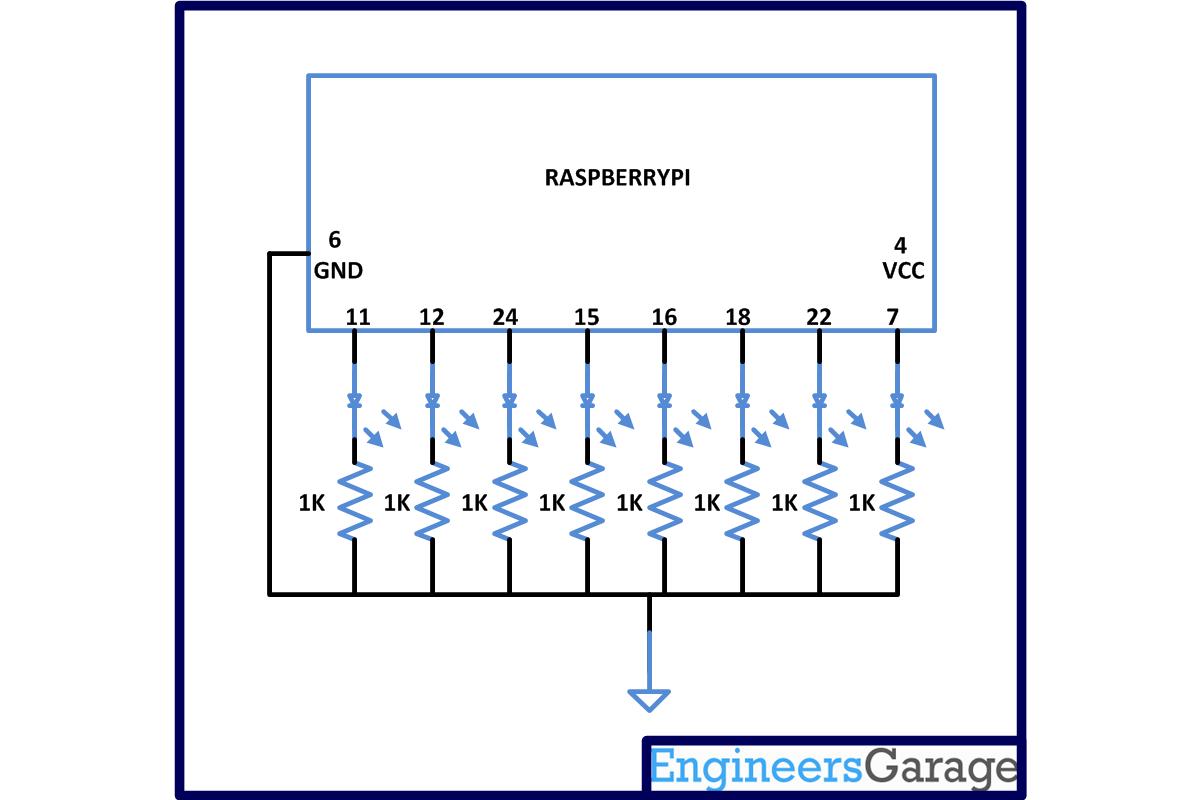
***Note that in this project the latest version of library “bcm2835” is used with an old version of Raspberrypi board. It is not possible to access the pin number 13 of the old board with the latest library version and hence the pin number 24 is used to blink the 3rd LED. The circuit diagram is also drawn accordingly. Those who have the latest version of the board can use the pin 13 without any trouble.
To find the ‘Revision’ and other important details about the Raspberrypi board, use the following command;
cat /proc/cpuinfo
Project Source Code
###
#include#include#include#include#define PIN1 RPI_GPIO_P1_11#define PIN2 RPI_GPIO_P1_12#define PIN3 RPI_GPIO_P1_24#define PIN4 RPI_GPIO_P1_15#define PIN5 RPI_GPIO_P1_16#define PIN6 RPI_GPIO_P1_18#define PIN7 RPI_GPIO_P1_22#define PIN8 RPI_GPIO_P1_07void sig_handler ( int signo );void set_pins_output ( void );void set_all_pin_low ( void );int main(){if (!bcm2835_init())return 1;set_pins_output ();set_all_pin_low ();signal ( SIGALRM, sig_handler );alarm ( 2 );while ( 1 );bcm2835_close();return 0;}void set_all_pin_low ( void ){bcm2835_gpio_write(PIN1, LOW);bcm2835_gpio_write(PIN2, LOW);bcm2835_gpio_write(PIN3, LOW);bcm2835_gpio_write(PIN4, LOW);bcm2835_gpio_write(PIN5, LOW);bcm2835_gpio_write(PIN6, LOW);bcm2835_gpio_write(PIN7, LOW);bcm2835_gpio_write(PIN8, LOW);}void set_pins_output ( void ){bcm2835_gpio_fsel(PIN1, BCM2835_GPIO_FSEL_OUTP);bcm2835_gpio_fsel(PIN2, BCM2835_GPIO_FSEL_OUTP);bcm2835_gpio_fsel(PIN3, BCM2835_GPIO_FSEL_OUTP);bcm2835_gpio_fsel(PIN4, BCM2835_GPIO_FSEL_OUTP);bcm2835_gpio_fsel(PIN5, BCM2835_GPIO_FSEL_OUTP);bcm2835_gpio_fsel(PIN6, BCM2835_GPIO_FSEL_OUTP);bcm2835_gpio_fsel(PIN7, BCM2835_GPIO_FSEL_OUTP);bcm2835_gpio_fsel(PIN8, BCM2835_GPIO_FSEL_OUTP);}void sig_handler ( int signo ){static int i = 0;set_all_pin_low ();bcm2835_delay( 50 );i ++;switch ( i ){case 1:bcm2835_gpio_write(PIN1, HIGH);break;case 2:bcm2835_gpio_write(PIN2, HIGH);break;case 3:bcm2835_gpio_write(PIN3, HIGH);break;case 4:bcm2835_gpio_write(PIN4, HIGH);break;case 5:bcm2835_gpio_write(PIN5, HIGH);break;case 6:bcm2835_gpio_write(PIN6, HIGH);break;case 7:bcm2835_gpio_write(PIN7, HIGH);break;case 8:bcm2835_gpio_write(PIN8, HIGH);i = 0;break;};alarm ( 2 );}###
Circuit Diagrams
Project Components
Project Video
Filed Under: Raspberry pi
Filed Under: Raspberry pi
Questions related to this article?
👉Ask and discuss on Electro-Tech-Online.com and EDAboard.com forums.
Tell Us What You Think!!
You must be logged in to post a comment.