Raspberry Pi is an amazing credit card-sized development board that can serve varied purposes for hackers, hobbyists, artists, as well as students. One of the most versatile application boards, it is believed that it can only be used for some common programming purposes especially the ones related to IoT or AI. In this blog, we will be breaking that myth and show you the versatility of this system and how it can make a difference to our lives in a long run. Let’s get on with it then.
As Your Desktop: It is one of the simplest applications that makes great sense. Also, it is one project where you will have all the required equipment right by your side.
Requirements:
- Raspberry Pi
- MicroSD Card
- Power Supply
- A Suitable Display Screen
- A HDMI Cable
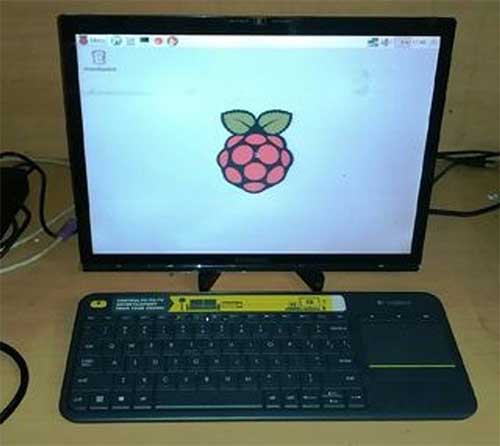
Fig. 1: Raspberry Pi As Desktop
1. Procedure: The Raspberry Pi 3 comes with an in-built Bluetooth and Wi-Fi, however if you plan to work with some other versions you will need USB dongles that are compatible with this board. Those using Ethernet will find it easy because the system already comes equipped with an Ethernet port. Once you are done setting up everything, all you will have to do is install the operating system you prefer. Rest will be taken care by the board itself.
2. Home Automation System: The Raspberry Pi system can easily host some of the most power packed home automation applications. It can be used to attach sensors, relays, cameras, and lights with computer or phone. You can easily control your home remotely. If you want to extend its functionalities, just add Arduino or some equally potent board and bingo!! There you go. You can collect more details about it at https://www.instructables.com/id/Uber-Home-Automation-w-Arduino-Pi/
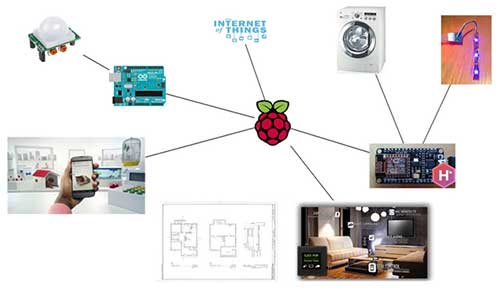
Fig. 2: Home Automation System Based On Raspberry Pi
3. Miniature Camcorder: The most suitable version for this purpose is the Raspberry Pi Zero.
Requirement:
- LiPo Battery Pack
- Zero LiPo
- Pi Zero Camera Module
- Pimoroni HyperPixel Screen
- Soldering Machine
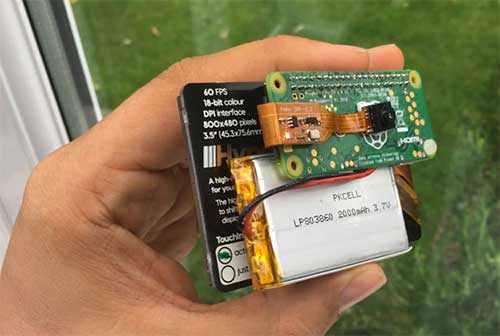
Fig. 3: Raspberry Pi Based Camcorder
Procedure:
A soldering machine would be where you want to start. You may solder all the parts together and prepare the setup as shown in image. Once done, all you need to do is install HyperPixel driver on Pi and it is all set to record. The good thing about HyperPixel is that it comes with a touchscreen, therefore, a GUI (Graphical User Interface) can easily be add-on if you want. More step by step details can be collected at https://www.hackster.io/TheBubbleworks/picorder-0eb94d.
4. Zero-Powered Smartphone: That can really be done with original Raspberry Pi. You can easily create a homebrew smartphone with not only the original version but successive versions of this development board. The final product will have following features:
- A fully-functional reliable phone.
- A cheap phone that is completely open-source.
- A handset that can be repaired as well as assembled independently.
- A phone whose parts can be purchased easily from your close vicinity.
- Allows writing your own app ideas in Python.
- Has no apps that have privacy concerns.
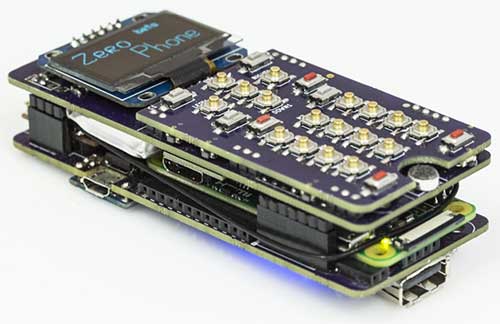
Fig. 4: The ZeroPhone – Raspberry Pi Based Smartphone
The parts for this one can be collected from eBay and it can easily be assembled with a soldering iron. The user interface for the same will be written in Python. More details about it can be collected from https://hackaday.io/project/19035-zerophone-a-raspberry-pi-smartphone.
5. XBox Zero: Do you know the size of Raspberry Pi Zero is so small that it can fit inside anything even a XBox game console. You just need to make a few tweaks and it can be placed inside XBox controller. Next, you will need RetroPie Emulation Software that will stay completed inside the controller. You will see that controller loops back inside the Pi. You can play any of your favourite games in a HDMI display screen.
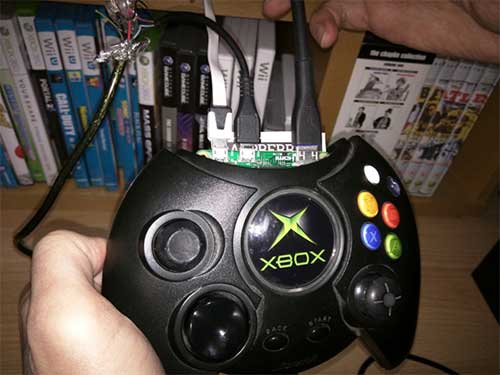
Fig. 5: XBox Zero – Raspberry Pi Based XBox Controller
Requirement:
- Micro SD Card
- Raspberry Pi Zero
- Original large-size Xbox Controller
- 2A USB Power Supply
- Mini HDMI cable and adapter
- USB OTG Cable
- Regular steel nerves, wire-strippers, knives, and screwdrivers
Step by step procedure can be noted at https://shkspr.mobi/blog/2015/11/raspberry-pi-zero-hidden-in-an-xbox-controller/.
6. AI Assistant: ‘Magpi’, the official Raspberry Pi magazine, recently partnered with Google to release a hardware kit that allows users to integrate natural language voice commands through Google’s CLoud Speech API as well as Google Assistant SDK. The kit includes many things includes cardboard case, button, microphone, and speaker. The cardboard case can house your person lo-fi Google Home version.

Fig. 6: Raspberry Pi Based Google AI Assistant
The kit can be purchased here https://aiyprojects.withgoogle.com/voice#project-overview.
7. Home Arcade Box: It is true that Raspberry Pi doesn’t have the potential to run several modern games, there are some tech geeks who predict that Pi is perfect for playing emulators. For those who do not know, emulators are programs that let the users play titles from outdated, older consoles like the original PlayStation, the Sega Genesis, or the SNES. Most of these programs are freely able to use ROMs.
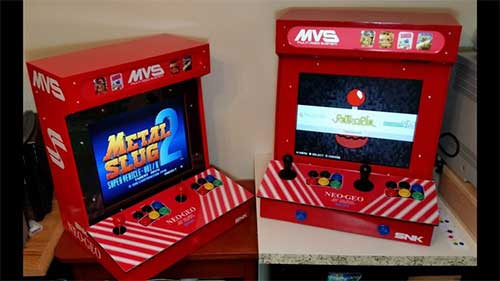
Fig. 7: Raspberry Pi Based Home Arcade System
Most emulators can run from the ideal Raspbian OS. Guys from RetroPie worked hard for a long time to create a customized disk image that would do every possible task for you. It will allow the user to select as well as start the emulator of their choice with a single USB gamepad. There is just one small catch, you will need physical copy of games or the pirated version.
8. Wireless Print Server: The worst thing about technology is that it becomes obsolete in no time and gets replaced by new ones. Remember, how we all were in love with Windows 7, some of us are even very much loyal to it even after Windows 10 is in the game. What wouldn’t you give to keep some of your favorite techs alive, isn’t it? Raspberry can take care of some of such issues. If you have any old printer that you loved but it is non-functional now due to lack of wireless connectivity feature, Raspberry Pi can take care of that flaw now. You just need Raspberry Pi connected with your home network along with a few print server software.
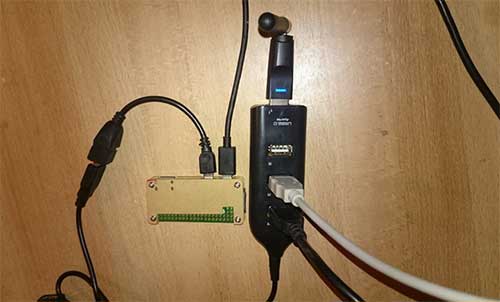
Fig. 8: Raspberry Pi Zero As Wireless Print Server
The task can be accomplished through installation of Samba file sharing software closely followed by CUPS (Common Unix Printing System). CUPS provides drivers for printers along with an administration console.
Once the setup is complete, you may want to configure Pi to ensure that any of your OS whether MacOS or Windows that connects to your home can access the printer. Also, if your printer doesn’t have a USB, you can always avail adapters from market. But remember it has its limitations, very old printers may still not be compatible with it. A rational solution is to get something cheaper and run it with your latest system.
9. Minecraft Game Server: The application of Raspberry Pi isn’t limited to old and outdated systems. Very few people know that the default OS of Raspberry Pi comes with a special pre-installed version of Minecraft. Also, there are very few who know that Pi can be used as a game server as well.
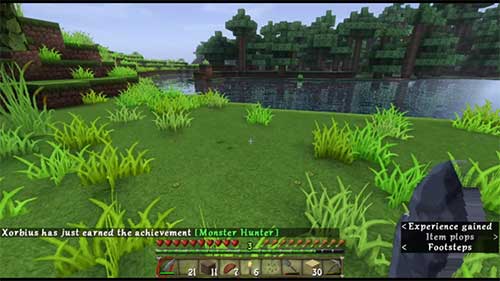
Fig. 9: Representational Image Showing Raspberry Pi As MInecraft Game Server
Pi can host Minecraft in the most effortless fashion. You can now keep your gaming world safe inside it and play from any part of your home network. In case, you own more than one or two Raspberry Pis, you can always turn one of those into a dedicated gaming server for an upgraded gaming experience. Apart from Minecraft, it can act as a dedicated server for several other online multiplayer games like Open TTD, Civilization, Doom, Quake, and others.
10. Motion Capture Security Camera: If you have a generic USB webcam, you just need a Raspberry Pi Camera Module to build a motion capture security system. Just make sure you have a good stock of USB storage devices and high capacity microSD cards to store footage from device.
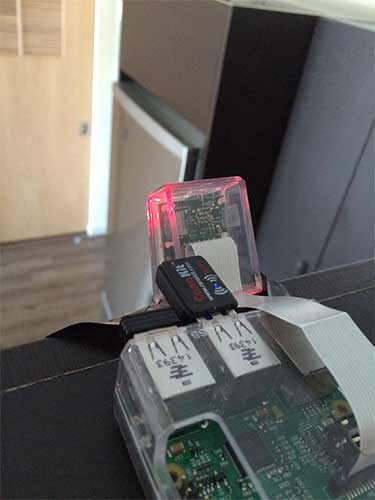
Fig. 10: Motion Capture Camera Based On Raspberry Pi
Uvccapture is a tool that is used for capturing webcam footage. It is a motion software that works in sync with Raspberry Pi. The fffmpeg software is also used for managing time lapse and bitrate. Once you are able to get it up and running, you will see that the system has started recording as soon as some movement is detected in its coverage area. If you have more vulnerable risks, it is better to configure email alerts with it.
11. Night Sky Photography: We are capping this list with one of the most intriguing and larger than life applications of Rpi – Night Sky Photography. For this, you will need a Raspberry Pi-No-IR camera module and a good quality camera. As the IR filter will be out of the picture, the camera would give much better night–time results allowing you to take a look at what’s happening in sky while you rest below.

Fig. 11: Jupiter Image Captured With Raspberry Pi Based Camera
Whether you are looking for close snapshots of planets, moon, meteors, or stars, you can have it all without hacking into any of NASA’s cameras. You can also use the time-lapse camera we discussed in last few paragraphs here to track stars, moon or planets trajectory. Whatever you plan, this small wonder will make it possible for you without hurting your pocket.
Final Word
What we have discussed here is just tip of the iceberg. There is much more that has been done and will be done while toying with this system. Arduino and RPi have proved to be biggest helping hands for innovators and tech geeks all over the world. They have simplified programming and the scope of infusing technology into daily lives without taxing money, time, and energy. This is all for now, but as the time progresses ahead we will keep bringing you better and bigger stories related to these systems.
You may also like:


Filed Under: Raspberry pi, Tech Articles
Questions related to this article?
👉Ask and discuss on Electro-Tech-Online.com and EDAboard.com forums.
Tell Us What You Think!!
You must be logged in to post a comment.