AT commands are used to control MODEMs. AT is the abbreviation for Attention. These commands come from Hayes commands that were used by the Hayes smart modems. The Hayes commands started with AT to indicate the attention from the MODEM. The dial up and wireless MODEMs (devices that involve machine to machine communication) need AT commands to interact with a computer. These include the Hayes command set as a subset, along with other extended AT commands.
AT commands with a GSM/GPRS MODEM or mobile phone can be used to access following information and services:
1. Information and configuration pertaining to mobile device or MODEM and SIM card.
2. SMS services.
3. MMS services.
4. Fax services.
5. Data and Voice link over mobile network.
The Hayes subset commands are called the basic commands and the commands specific to a GSM network are called extended AT commands.
Types of AT Commands:
There are four types of AT commands:
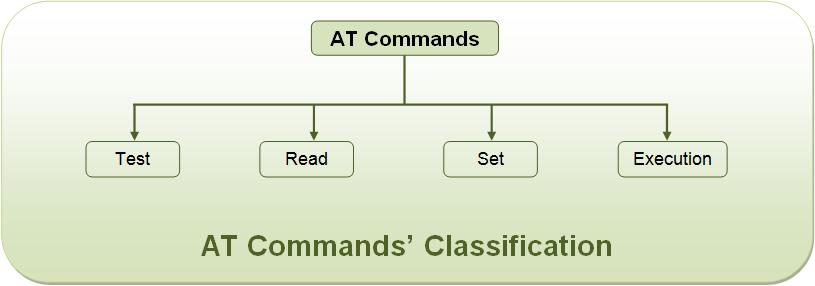
Fig. 1: Image Showing Classification of AT Commands
1) Test commands – used to check whether a command is supported or not by the MODEM.
SYNTAX: AT<command name>=?
For example: ATD=?
2) Read command – used to get mobile phone or MODEM settings for an operation.
SYNTAX: AT<command name>?
For example: AT+CBC?
3) Set commands – used to modify mobile phone or MODEM settings for an operation.
SYNTAX: AT<command name>=value1, value2, …, valueN
Some values in set commands can be optional.
For example: AT+CSCA=”+9876543210”, 120
4) Execution commands – used to carry out an operation.
SYNTAX: AT<command name>=parameter1, parameter2, …, parameterN
The read commands are not available to get value of last parameter assigned in execution commands because parameters of execution commands are not stored.
For example: AT+CMSS=1,”+ 9876543210”, 120
Explanation of commonly used AT commands:
1) AT – This command is used to check communication between the module and the computer.
For example,
AT
OK
The command returns a result code OK if the computer (serial port) and module are connected properly. If any of module or SIM is not working, it would return a result code ERROR.
2) +CMGF – This command is used to set the SMS mode. Either text or PDU mode can be selected by assigning 1 or 0 in the command.
SYNTAX: AT+CMGF=<mode>
0: for PDU mode
1: for text mode
The text mode of SMS is easier to operate but it allows limited features of SMS. The PDU (protocol data unit) allows more access to SMS services but the operator requires bit level knowledge of TPDUs. The headers and body of SMS are accessed in hex format in PDU mode so it allows availing more features.
For example,
AT+CMGF=1
OK
3) +CMGW – This command is used to store message in the SIM.
SYNTAX: AT+CMGW=” Phone number”> Message to be stored Ctrl+z
As one types AT+CMGW and phone number, ‘>’ sign appears on next line where one can type the message. Multiple line messages can be typed in this case. This is why the message is terminated by providing a ‘Ctrl+z’ combination. As Ctrl+z is pressed, the following information response is displayed on the screen.
+CMGW: Number on which message has been stored
4) +CMGS – This command is used to send a SMS message to a phone number.
SYNTAX: AT+CMGS= serial number of message to be send.
As the command AT+CMGS and serial number of message are entered, SMS is sent to the particular SIM.
For example,
AT+CMGS=1
OK
5) ATD – This command is used to dial or call a number.
SYNTAX: ATD<Phone number>;(Enter)
For example,
ATD123456789;
6) ATA – This command is used to answer a call. An incoming call is indicated by a message ‘RING’ which is repeated for every ring of the call. When the call ends ‘NO CARRIER’ is displayed on the screen.
SYNTAX: ATA(Enter)
As ATA followed by enter key is pressed, incoming call is answered.
For example,
RING
RING
ATA
7) ATH – This command is used to disconnect remote user link with the GSM module.
SYNTAX: ATH (Enter)
List of AT commands:
The AT commands for both, GSM module and the mobile phone, are listed below. Some of these commands may not be supported by all the GSM modules available. Also there might be some commands which won’t be supported by some mobile handsets.
Testing :
|
Command
|
Description
|
|
AT
|
Checking communication between the module and computer.
|
Call control :
|
Command
|
Description
|
|
ATA
|
Answer command
|
|
ATD
|
Dial command
|
|
ATH
|
Hang up call
|
|
ATL
|
Monitor speaker loudness
|
|
ATM
|
Monitor speaker mode
|
|
ATO
|
Go on-line
|
|
ATP
|
Set pulse dial as default
|
|
ATT
|
Set tone dial as default
|
|
AT+CSTA
|
Select type of address
|
|
AT+CRC
|
Cellular result codes
|
Data card Control :
|
Command
|
Description
|
|
ATI
|
Identification
|
|
ATS
|
Select an S-register
|
|
ATZ
|
Recall stored profile
|
|
AT&F
|
Restore factory settings
|
|
AT&V
|
View active configuration
|
|
AT&W
|
Store parameters in given profile
|
|
AT&Y
|
Select Set as power up option
|
|
AT+CLCK
|
Facility lock command
|
|
AT+COLP
|
Connected line identification presentation
|
|
AT+GCAP
|
Request complete capabilities list
|
|
AT+GMI
|
Request manufacturer identification
|
|
AT+GMM
|
Request model identification
|
|
AT+GMR
|
Request revision identification
|
|
AT+GSN
|
Request product serial number identification (IMEI)
|
Phone control :
|
Command
|
Description
|
|
AT+CBC
|
Battery charge
|
|
AT+CGMI
|
Request manufacturer identification
|
|
AT+CGMM
|
Request model identification
|
|
AT+CGMR
|
Request revision identification
|
|
AT+CGSN
|
Request product serial number identification
|
|
AT+CMEE
|
Report mobile equipment error
|
|
AT+CPAS
|
Phone activity status
|
|
AT+CPBF
|
Find phone book entries
|
|
AT+CPBR
|
Read phone book entry
|
|
AT+CPBS
|
Select phone book memory storage
|
|
AT+CPBW
|
Write phone book entry
|
|
AT+CSCS
|
Select TE character set
|
|
AT+CSQ
|
Signal quality
|
Computer data interface :
|
Command
|
Description
|
|
ATE
|
Command Echo
|
|
ATQ
|
Result code suppression
|
|
ATV
|
Define response format
|
|
ATX
|
Response range selection
|
|
AT&C
|
Define DCD usage
|
|
AT&D
|
Define DTR usage
|
|
AT&K
|
Select flow control
|
|
AT&Q
|
Define communications mode option
|
|
AT&S
|
Define DSR option
|
|
AT+ICF
|
DTE-DCE character framing
|
|
AT+IFC
|
DTE-DCE Local flow control
|
|
AT+IPR
|
Fixed DTE rate
|
Service :
|
Command
|
Description
|
|
AT+CLIP
|
Calling line identification presentation
|
|
AT+CR
|
Service reporting control
|
|
AT+DR
|
Data compression reporting
|
|
AT+ILRR
|
DTE-DCE local rate reporting
|
Network Communication parameter :
|
Command
|
Description
|
|
ATB
|
Communications standard option
|
|
AT+CBST
|
Select bearer service type
|
|
AT+CEER
|
Extended error report
|
|
AT+CRLP
|
Radio link protocol
|
|
AT+DS
|
Data compression
|
Miscellaneous :
|
Command
|
Description
|
|
A/
|
Re-execute command line
|
|
AT?
|
Command help
|
|
AT*C
|
Start SMS interpreter
|
|
AT*T
|
Enter SMS block mode protocol
|
|
AT*V
|
Activate V.25bis mode
|
|
AT*NOKIATEST
|
Test command
|
|
AT+CESP
|
Enter SMS block mode protocol
|
SMS Text mode :
|
Command
|
Description
|
|
AT+CSMS
|
Select message service
|
|
AT+CPMS
|
Preferred message storage
|
|
AT+CMGF
|
Message format
|
|
AT+CSCA
|
Service centre address
|
|
AT+CSMP
|
Set text mode parameters
|
|
AT+CSDH
|
Show text mode parameters
|
|
AT+CSCB
|
Select cell broadcast message types
|
|
AT+CSAS
|
Save settings
|
|
AT+CRES
|
Restore settings
|
|
AT+CNMI
|
New message indications to TE
|
|
AT+CMGL
|
List messages
|
|
AT+CMGR
|
Read message
|
|
AT+CMGS
|
Send message
|
|
AT+CMSS
|
Send message from storage
|
|
AT+CMGW
|
Write message to memory
|
|
AT+CMGD
|
Delete message
|
SMS PDU mode :
|
Command
|
Description
|
|
AT+CMGL
|
List Messages
|
|
AT+CMGR
|
Read message
|
|
AT+CMGS
|
Send message
|
|
AT+CMGW
|
Write message to memory
|
Filed Under: PIC Microcontroller
Questions related to this article?
👉Ask and discuss on Electro-Tech-Online.com and EDAboard.com forums.
Tell Us What You Think!!
You must be logged in to post a comment.