Measuring the voltage of your solar panel, UPS, and other daily-use batteries takes a lot of time. Grabbing a multimeter, opening the battery boxes, and touching both the multimeter leads to the battery terminals takes some effort. How about developing an efficient IoT system through which you can see the status of your battery on your desktop and mobile web browsers?
Let’s start with this DIY project. We will develop an IoT system that monitors battery status and updates us on our browser. We will need some circuit/device/controller that can effectively measure voltage.
A WiFi device that can connect to our local home WiFi takes voltage readings from the controller and updates the end user about the current battery level. For this purpose, I decided to use the NodeMCU WiFi module in the project. It can not only work as a controller, but also it can connect itself to a WiFi network like a server or client. The battery monitoring circuit is a traditional voltage divider circuit. I am going to measure 12-volt batteries. The circuit can be modified to measure 24-volt batteries and even more 48-volt parallel battery clusters.
Voltage divider working and calculations
NodeMCU is a tiny device that works on 3.3 volts. A voltage greater than 5 volts may blow the pin or fry the NodeMCU. In our case, we want to measure a 12-volt battery, and the NodeMCU ADC (analog to digital converter) can only accept 3.3 volts. We need to play smartly here. We will divide the voltage between two resistors and measure the only voltage across one resistor, and the remaining resistor voltage will be calculated mathematically. A typical voltage divider circuit and formula are given below.
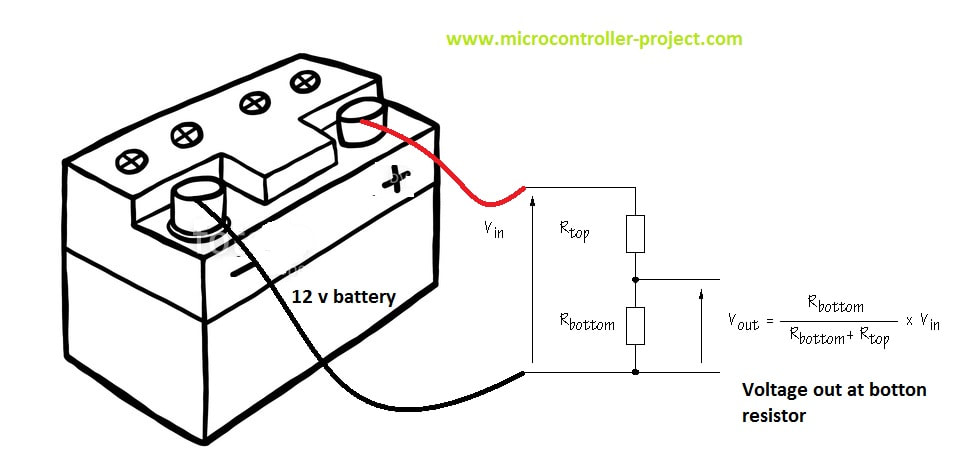
Voltage divider with battery circuit
Now, let’s calculate the values for Rtop and Rbottom. Here, we need some simple federations to be taken seriously. Resistors can sink much current, and wires can be heated instantly. Consequently, wires can meltdown in seconds. So always use a sufficient amount of resistors for bigger ampere-hour batteries. I selected one resistor, Rbottom, to be 10k ohm.
- During charging, the battery voltage can increase to 18 volts. For example, 150 watts of a solar panel output 17 volts at 6 amperes during full sun. The output voltage can even reach above 18 volts. The solar charge controller also outputs approximately 15 volts to charge the batteries.
Formula Calculations
I will measure the voltage across Rbottom and randomly decide its value to be 10k ohm. We know Vout can be up to a maximum of 3.3 volts since NodeMCU works and accepts a maximum of 3.3 volts at its I/O pins. Vin is 18 volts when the battery is charging. Now we can find Rtop.
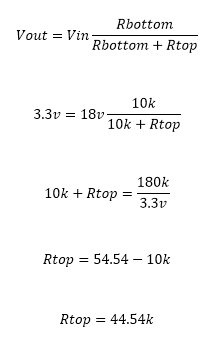
Voltage divider resistance value calculation
If 18 volts are at the battery side, it will be divided across resistors, with 3.3 volts dropping at 10k resistor and the remaining 14.7 volts dropping at 44.54 k resistor. 44.54 k ohm resistor is not available in the market I am going to use the one above this rating and easily can be found from any electronics shop 47 k ohm resistor. If the battery is not charging and supplying 12 volts, what will the voltage drop across resistors be? Let’s calculate it
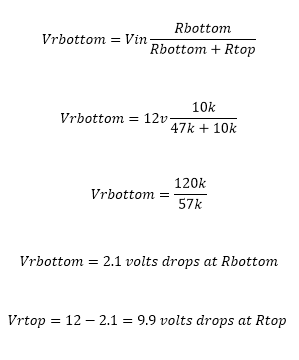
The voltage drop across the resistance of the voltage divider circuit
It’s evident from the above discussion that the voltage across Rbottom will not exceed 3.3 volts now. I hope the calculations make sense to readers. The question now is how the 3.33 volts is converted to 12 volts by NodeMCU or how, from 3.33 volts, we can predict that at the battery side, the voltage is 12 volts. Well, a little more mathematics is involved here. Since the resistor values are fixed, we can calculate the voltage ratio across the resistors concerning the source and use it in code for actual voltage at the source. How the ratio is calculated is below.

Voltage divider ratio calculation
Two cases are given above when the source is at 18 volts and when the source is at 12 volts. The ratio is multiplied by the voltage at Rbottom for the actual voltage value.
The project circuit diagram is given below. I am using the ADC0 channel of NodeMCU to measure the battery voltage. The battery and NodeMCU power must be grounded to complete the circuit. Its most common mistake is measuring the voltage in which neither ground is grounded. If the NodeMCU ground is not taped with the battery ground, the adc0 pin will become a floating pin and start reading floating values.
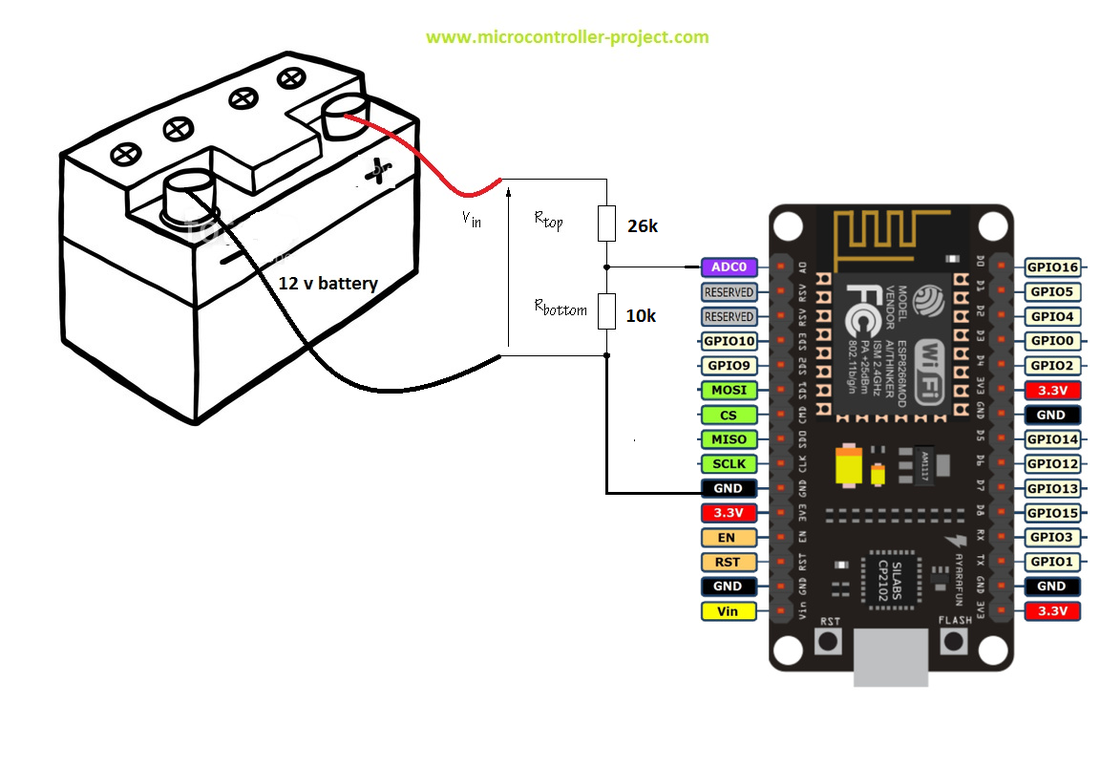
Battery voltage monitoring with NodeMCU
After you complete the circuit, it’s time to move on to code. The code is written in Arduino IDE. I used the ESP8266WiFi.h library in the code, so first, please make sure you installed this library in your Arduino library folder. If it’s not present, download it from GitHub and install it first. Then, enter the SSID and password of the WiFi network to which you want your NodeMCU to be connected. Most probably, it will be your home WiFi. So, enter the SSID and password. Now, upload the code in NodeMCU. Before uploading, make sure you selected the right board from Arduino boards. If NodeMCU does not appear in your board’s drop-down menu, import its link from its manager and install the necessary files. You can find many online tutorials about installing NodeMCU support for Arduino IDE.
|
After uploading the code, you have to do a bit one-time complex work. Open Arduino serial monitor. When you open it, you will see the NodeMCU server starting and your WiFi assigning an IP to your NodeMCU. This IP is essential. To see the battery status, you must enter this IP in your mobile or desktop browser. Suppose you do not see any message on the serial monitor. Check for serial monitor communication speed. It must be 9600 bps. Could you change it to 9600? If you still do not see anything, the code might not be uploaded correctly, or the board is disconnected. Check for possible errors. Once your router allows the IP to the NodeMCU, it will always remain the same. I hope so 😀
|
|

|
When you hit the assigned IP in your browser, you will see the battery status page and a button. Press this button to get the updated temperature whenever you want.
Note: The Nodemcu and your client’s mobile or desktop on which you want to view the voltage must be connected to the same WiFi. If your server-nodemcu and, server nodemcu and client mobile are connected to different networks, you can not view anything after hitting the IP. |
battery voltage monitor over WiFi
|
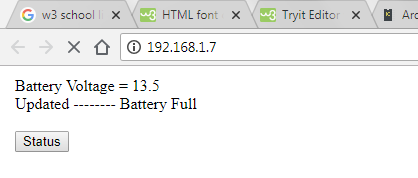
This is a base project. Furthermore, the project can be developed, and data can be sent to the remote website to be displayed in real-time on web pages. An alert can be generated when the voltage is low. LEDs or LCDs can be connected to NodeMCU for an on-spot status view.
To learn about other ways to measure battery voltage, take the below tutor, take the tutorial below to measure batteries when they are connected in series and parallel combinations.
Download the project code. The folder contains the project .ino file. Please provide us with your feedback on the project. If you have any queries or questions, write them below in the comments section.
You may also like:



Filed Under: Electronic Projects, ESP8266
Your article, “Battery voltage monitor with NodeMCU Esp8266-12E WiFi module” gives a very good explanation and exactly what I was looking for.
I’m running my ESP8266 in deepsleep mode for 30 minutes at a time, from a 9Volt battery and monitoring the battery voltage decay over time to see how long it will last.
Rbot is 1M ohm Rtop is 2M ohm.
Can you explain what the parameter “Rvalue=(float)(Vvalue/1024.0)*5; //Convert Voltage in 5v factor” is, how did you arrive at the “*5” 5v factor?
Since I’m running from a 9volt battery, for my application, I changed it to, “*10” 10v factor.
My highrange is 9 volts, midrange is 7 volts, low range is 5 volts.
Thank you for your reply.
Hi, Thanks for reading article on engineersgarage.com. If you have any technical questions or need more information please visit our forums https://www.edaboard.com/ or https://www.electro-tech-online.com/. You can read more articles on http://www.engineersgarage.com
Have a great day