Engineers Garage

  • Electronic Projects & Tutorials
    • Electronic Projects
      • Arduino Projects
      • AVR
      • Raspberry pi
      • ESP8266
      • BeagleBone
      • 8051 Microcontroller
      • ARM
      • PIC Microcontroller
      • STM32
    • Tutorials
      • Audio Electronics
      • Battery Management
      • Brainwave
      • Electric Vehicles
      • EMI/EMC/RFI
      • Hardware Filters
      • IoT tutorials
      • Power Tutorials
      • Python
      • Sensors
      • USB
      • VHDL
    • Circuit Design
    • Project Videos
    • Components
  • Articles
    • Tech Articles
    • Insight
    • Invention Stories
    • How to
    • What Is
  • News
    • Electronic Product News
    • Business News
    • Company/Start-up News
    • DIY Reviews
    • Guest Post
  • Forums
    • EDABoard.com
    • Electro-Tech-Online
    • EG Forum Archive
  • DigiKey Store
    • Cables, Wires
    • Connectors, Interconnect
    • Discrete
    • Electromechanical
    • Embedded Computers
    • Enclosures, Hardware, Office
    • Integrated Circuits (ICs)
    • Isolators
    • LED/Optoelectronics
    • Passive
    • Power, Circuit Protection
    • Programmers
    • RF, Wireless
    • Semiconductors
    • Sensors, Transducers
    • Test Products
    • Tools
  • Learn
    • eBooks/Tech Tips
    • Design Guides
    • Learning Center
    • Tech Toolboxes
    • Webinars & Digital Events
  • Resources
    • Digital Issues
    • EE Training Days
    • LEAP Awards
    • Podcasts
    • Webinars / Digital Events
    • White Papers
    • Engineering Diversity & Inclusion
    • DesignFast
  • Guest Post Guidelines
  • Advertise
  • Subscribe

Displaying name on 16×2 Character lcd using 8051(89c51,89c52) microcontroller

By EG Projects August 5, 2019

This is a simple project on how to display/print your name on 16×2 lcd using 8051(89c51) microcontroller. Character lcd’s comes in many packages 16×2 , 8×1 ,16×1 ,8×2. All the lcd’s performs actually the same function, display data that we send to them. Displaying data on 16×2 lcd is not an easy task, its also not that much hard. You should first be familiarize with the 16×2 lcd pin out and working, its internal structure, registers and lcd controller.
​

I recommend you to take this tutorial. It contains all the information about 16×2 lcd. Its pin out and the functions that are associated with each pin. Lcd’s most important pins rs(register select) rw(read write) and en(enable) are also discussed. Commands used to initialized the lcd and many other’s are given in it. Generation of character on a 5×8 matrix is also highlighted.

  • 16×2 lcd pinout and working.

Display your name on lcd – Project circuit diagram

  • Connect port 2 of 8051 microcontroller with 8 data pins of 16×2 lcd. Connect DB0 pin of 16×2 lcd to pin-0 of port 2 then DB1 to pin-1 and so on.
  • Connect rs(register select) pin of 16×2 lcd to port 3 pin 5.
  • Connect rw(read write) pin of 16×2 lcd with port 3 pin 6.
  • Connect en(enable) pin of lcd to pin 7 of port 3.
  • Apply 5 volts to pin 40(vcc) and 31(EA) of 8051(89c51) microcontroller.  
  • Use pin 9 of microcontroller as reset pin. Attach button to it when ever you want to reset your program press the button.
  • Ground pin 20.
  • Use crystal of 11.0592 MHz with two 33 pF capacitors in parallel to pins 18 and 19 of 8051 microcontroller.


​Circuit diagram of the project is given below.
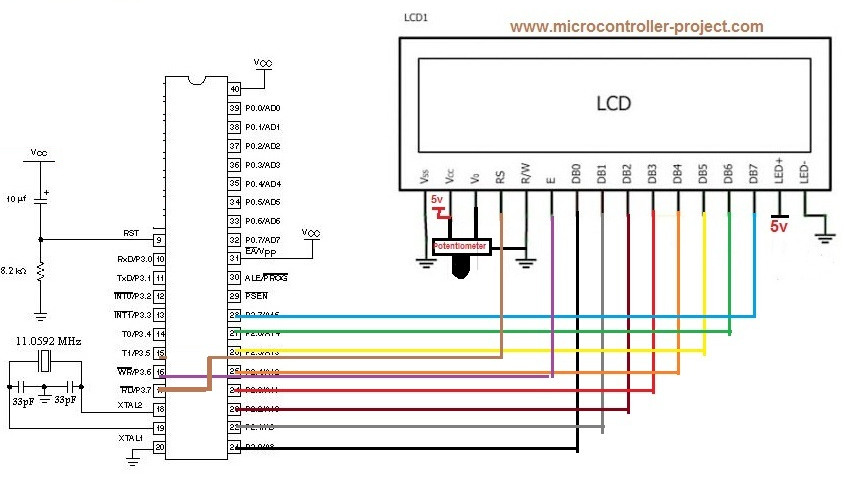
16x2 lcd with 8051 microcontroller - Displaying name on lcd

16×2 lcd with 8051 microcontroller – Displaying name on lcd

Displaying name on lcd – Project code

The code of the project is very easy to understand. I am using keil uvision 4 ide for writing and compiling code and generating hex file for 8051 microcontroller. First i included the header file reg51.h in code. This header file is necessary, if you are using keil software for your 8051 microcontroller code and generation of hex file. The header file contains necessary configurations of 8051 microcontroller. Then three individual bits of port 3 are declared. These bits are declared to be used with 16×2 lcd to toggle its rs, rw and en pins when needed. Then a simple delay loop is created for giving necessary delays where needed in our program code. Then a command function is created, it is performing the function of selecting command register of 16×2 lcd and carry out the task associated with each command. Then lcddata() function is selecting data register of 16×2 lcd and prints data on lcd that we input to it. lcd() function in main is initialing lcd in 16×2 mode with cursor blinking and display on. Rest of all the things in main function are characters that we want to print on our lcd. 

Displaying name on lcd – Project Output

The output on the 16×2 lcd is “!!!WE LOVE!!!” on first line of lcd and “PAKISTAN” on second line of lcd. You can also change the code according to your need. If you want to print your name just place your name in lcddata() function instead of “!!!WE LOVE !!! PAKISTAN“.

​Related Projects

  • Dis playing moving text on 16×2 lcd with 8051 microcontroller
  • Generating custom characters on 16×2 lcd with 89c51 microcontroller
Download the project code written in keil u visison 4 ide and please give us your feed back on the project.
Download Code/Files


Filed Under: 8051 Microcontroller, Electronic Projects, Microcontroller Projects


Next Article

← Previous Article
Next Article →

Questions related to this article?
👉Ask and discuss on Electro-Tech-Online.com and EDAboard.com forums.


Tell Us What You Think!! Cancel reply

You must be logged in to post a comment.

EE TECH TOOLBOX

“ee
Tech Toolbox: Internet of Things
Explore practical strategies for minimizing attack surfaces, managing memory efficiently, and securing firmware. Download now to ensure your IoT implementations remain secure, efficient, and future-ready.

EE Learning Center

EE Learning Center
“engineers
EXPAND YOUR KNOWLEDGE AND STAY CONNECTED
Get the latest info on technologies, tools and strategies for EE professionals.

HAVE A QUESTION?

Have a technical question about an article or other engineering questions? Check out our engineering forums EDABoard.com and Electro-Tech-Online.com where you can get those questions asked and answered by your peers!


RSS EDABOARD.com Discussions

  • Reducing "shoot-through" in offline Full Bridge SMPS?
  • High Side current sensing
  • How to simulate power electronics converter in PSpice?
  • Voltage mode pushpull is a nonsense SMPS?
  • Layout IRN reduction in Comparator

RSS Electro-Tech-Online.com Discussions

  • Back to the old BASIC days
  • Parts required for a personal project
  • PIC KIT 3 not able to program dsPIC
  • Failure of polypropylene motor-run capacitors
  • Siemens large industrial PLC parts

Featured – RPi Python Programming (27 Part)

  • RPi Python Programming 21: The SIM900A AT commands
  • RPi Python Programming 22: Calls & SMS using a SIM900A GSM-GPRS modem
  • RPi Python Programming 23: Interfacing a NEO-6MV2 GPS module with Raspberry Pi
  • RPi Python Programming 24: I2C explained
  • RPi Python Programming 25 – Synchronous serial communication in Raspberry Pi using I2C protocol
  • RPi Python Programming 26 – Interfacing ADXL345 accelerometer sensor with Raspberry Pi

Recent Articles

  • What is AWS IoT Core and when should you use it?
  • AC-DC power supply extends voltage range to 800 V DC
  • Infineon’s inductive sensor integrates coil system driver, signal conditioning circuits and DSP
  • Arm Cortex-M23 MCU delivers 87.5 µA/MHz active mode
  • STMicroelectronics releases automotive amplifiers with in-play open-load detection

EE ENGINEERING TRAINING DAYS

engineering

Submit a Guest Post

submit a guest post
Engineers Garage
  • Analog IC TIps
  • Connector Tips
  • Battery Power Tips
  • DesignFast
  • EDABoard Forums
  • EE World Online
  • Electro-Tech-Online Forums
  • EV Engineering
  • Microcontroller Tips
  • Power Electronic Tips
  • Sensor Tips
  • Test and Measurement Tips
  • 5G Technology World
  • Subscribe to our newsletter
  • About Us
  • Contact Us
  • Advertise

Copyright © 2025 WTWH Media LLC. All Rights Reserved. The material on this site may not be reproduced, distributed, transmitted, cached or otherwise used, except with the prior written permission of WTWH Media
Privacy Policy

Search Engineers Garage

  • Electronic Projects & Tutorials
    • Electronic Projects
      • Arduino Projects
      • AVR
      • Raspberry pi
      • ESP8266
      • BeagleBone
      • 8051 Microcontroller
      • ARM
      • PIC Microcontroller
      • STM32
    • Tutorials
      • Audio Electronics
      • Battery Management
      • Brainwave
      • Electric Vehicles
      • EMI/EMC/RFI
      • Hardware Filters
      • IoT tutorials
      • Power Tutorials
      • Python
      • Sensors
      • USB
      • VHDL
    • Circuit Design
    • Project Videos
    • Components
  • Articles
    • Tech Articles
    • Insight
    • Invention Stories
    • How to
    • What Is
  • News
    • Electronic Product News
    • Business News
    • Company/Start-up News
    • DIY Reviews
    • Guest Post
  • Forums
    • EDABoard.com
    • Electro-Tech-Online
    • EG Forum Archive
  • DigiKey Store
    • Cables, Wires
    • Connectors, Interconnect
    • Discrete
    • Electromechanical
    • Embedded Computers
    • Enclosures, Hardware, Office
    • Integrated Circuits (ICs)
    • Isolators
    • LED/Optoelectronics
    • Passive
    • Power, Circuit Protection
    • Programmers
    • RF, Wireless
    • Semiconductors
    • Sensors, Transducers
    • Test Products
    • Tools
  • Learn
    • eBooks/Tech Tips
    • Design Guides
    • Learning Center
    • Tech Toolboxes
    • Webinars & Digital Events
  • Resources
    • Digital Issues
    • EE Training Days
    • LEAP Awards
    • Podcasts
    • Webinars / Digital Events
    • White Papers
    • Engineering Diversity & Inclusion
    • DesignFast
  • Guest Post Guidelines
  • Advertise
  • Subscribe