Engineers Garage

  • Electronic Projects & Tutorials
    • Electronic Projects
      • Arduino Projects
      • AVR
      • Raspberry pi
      • ESP8266
      • BeagleBone
      • 8051 Microcontroller
      • ARM
      • PIC Microcontroller
      • STM32
    • Tutorials
      • Audio Electronics
      • Battery Management
      • Brainwave
      • Electric Vehicles
      • EMI/EMC/RFI
      • Hardware Filters
      • IoT tutorials
      • Power Tutorials
      • Python
      • Sensors
      • USB
      • VHDL
    • Circuit Design
    • Project Videos
    • Components
  • Articles
    • Tech Articles
    • Insight
    • Invention Stories
    • How to
    • What Is
  • News
    • Electronic Product News
    • Business News
    • Company/Start-up News
    • DIY Reviews
    • Guest Post
  • Forums
    • EDABoard.com
    • Electro-Tech-Online
    • EG Forum Archive
  • DigiKey Store
    • Cables, Wires
    • Connectors, Interconnect
    • Discrete
    • Electromechanical
    • Embedded Computers
    • Enclosures, Hardware, Office
    • Integrated Circuits (ICs)
    • Isolators
    • LED/Optoelectronics
    • Passive
    • Power, Circuit Protection
    • Programmers
    • RF, Wireless
    • Semiconductors
    • Sensors, Transducers
    • Test Products
    • Tools
  • Learn
    • eBooks/Tech Tips
    • Design Guides
    • Learning Center
    • Tech Toolboxes
    • Webinars & Digital Events
  • Resources
    • Digital Issues
    • EE Training Days
    • LEAP Awards
    • Podcasts
    • Webinars / Digital Events
    • White Papers
    • Engineering Diversity & Inclusion
    • DesignFast
  • Guest Post Guidelines
  • Advertise
  • Subscribe

Switch and Led interface with LPC1768- (Part 4/21)

By Prabakaran P.M December 19, 2021

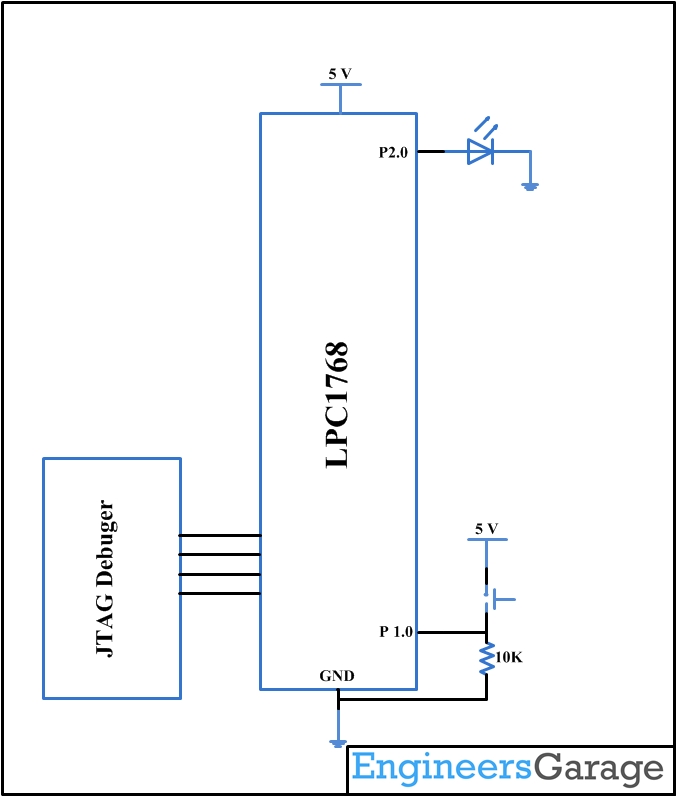
This is the one another Article to introduce the programming of ARM Cortex-M3 LPC1768 Microcontroller. Here we are going to do input and output functions of GPIO of LPC1768. For better understanding we are going to use a button and the LED. Our idea is to program in such a way that when the button is pressed, the LED will be ON. Setting up the Environment for the development of ARM cortex M3 is well discussed in this article.

The LPC 1768 is ARM Cortex- M3 based Microcontrollers for embedded application features in low power consumption and a high level of integration. The ARM Cortex M3 is designed in a such way to enhance debug features and a higher level of system integration. It clocks at a CPU frequency of 100 MHz, and incorporates a 3-stage pipeline and uses a Harvard architecture with separate local instruction and data buses for third bus peripherals. The ARM Cortex- M3 CPU have an internal pre-fetch unit to support speculative branching. The peripheral components include 512KB of flash memory, 64kb of data memory, Ethernet MAC, USB OTG, 4 UART’s, 8-channel general purpose DMA controller, 2 SSP Controllers, 10-bit DAC, Quadrature encoder interface, SPI interface, 3 I2C bus interface, 2 input plus 2 outputs I2S bus interface, 4 general purpose timers, ultra-low power Real-Time Clock (RTC) with separate battery supply, and up to 70 general purpose I/O pins, 6-output general purpose PWM. The LPC1768/66/65/64 are pin-compatible with the 100-pin LPC236x ARM7-based Microcontroller series.


Switch and Led interface with LPC1768 Prototype

Fig. 1: Switch and Led interface with LPC1768 Prototype

Before entering into the coding of interfacing of the LED and Switch lets have an introduction to the Registers in LPC1768 and its Configuration.

Register Configuration (lpc17xx.h):

As LPC1768 is 32-bit architecture which is memory mapped to the location 0x2009 C000 to 0x2009 FFFF. Special Function registers of LPC1768 are defined in lpc17xx.h which is included in the beginning of the project. There are 5 ports (PORT0 – PORT4). Every PORT will not have 32 physical pins. A structure is defined in the System file LPC_GPIOn(n= 0,1,2,3) contains all the registers for required for GPIO operation. Refer lpc17xx.h file for more info on the registers.

PINSEL: GPIO Pins Select Register:

PINSEL register is to be configured before using the PIN, since almost all the pins has a max of four alternative functions. Below table explains the function for a particular pin using two bits of the PINSEL register.


Value

Function

Enumeration

00

Primary (default) function, typically GPIO port

PINSEL_FUNC_0

01

First alternate function

PINSEL_FUNC_1

10

Second alternate function

PINSEL_FUNC_2

11

Third alternate function

PINSEL_FUNC_3


Fig. 2: Bit Value of PINSEL Register to select GPIO Pins in LPC1768

FIODIR:Fast GPIO Direction Control Register.

This register individually controls the direction of each port pin.


Values

Direction

0

Input

1

Output


Fig. 3: Bit Value of FIODIR Register to control diretion of Ports in LPC1768

FIOSET:Fast Port Output Set Register.
This register controls the state of the output pins. Writing 1 produces highs at the corresponding port pins. Writing 0s has no effect. Reading this register returns the current contents of the port output register not the physical port value.


Values

FIOSET

0

No Effect

1

Sets High on Pin


FIOCLR:Fast Port Output Clear Register.

This register controls the state of the output pins. Writing 1 produces lows at the corresponding port pins. Writing 0s has no effect.


Values

FIOCLR

0

No Effect

1

Sets Low on Pin


Fig. 4: Bit Value of FIOCLR Register to control state of output pins in LPC1768

FIOPIN:Fast Port Pin Value Register.
This register is used for both reading and writing data from/to the PORT.
Output: Writing to this register places corresponding values in all bits of the particular PORT pins.
Input: The current state of digital port pins can be read from this register, regardless of pin direction or alternate function selection (as long as the pins are not configured as an input to ADC).
Note:It is recommended to configure the PORT direction and pin function before using it.

Create a project using Keil uvision4 for LPC1768 Microcontroller:

In this section, we will start creating a project in Keil MDK we have already installed Keil µVision and Co-MDK Plug-in + CoLinkEx Drivers required for the CoLinkEx programming adapter. You can start by downloading the project files and kick start your practical experiment.

Code.rar

Code Description:

ARM programming requires good handling of Bit manipulation in C language. Here is the small note in the introduction of Bit manipulation to a newbie. C has direct support for bitwise operations that can be used for bit manipulation. In the following examples, n is the index of the bit to be manipulated within the variable bit_fld, which is an unsigned char being used as a bit field. Bit indexing begins at 0, not 1. Bit 0 is the least significant bit.

Set a bit

bit_fld |= (1 << n)

Clear a bit

bit_fld &= ~(1 << n)

Toggle a bit

bit_fld ^= (1 << n)

Test a bit

bit_fld & (1 << n)

The LED is connected to the Port 2.0 and the Switch is connected to the Port 1.0, below are code snippets used to make it work.


LPC_GPIO2->FIODIR = 0x000000FF;                   /* P2.xx defined as Outputs */

LPC_GPIO2->FIOCLR = 0x000000FF;                  /* turn off all the LEDs */

LPC_GPIO1->FIODIR = 0x00000000;                    /* P1.xx defined as Inputs */

LPC_GPIO1->FIOCLR = 0x000000FF;                  /* Make it low */

The above lines are to SET the PORT 2 pins as output and clearing it. LPC_GPIO2 structure consists of FIODIR,FIOCLR and FIOSET members.

switchStatus = (LPC_GPIO1->FIOPIN>>0) & 0x01 ;  // Read the switch status

if(switchStatus == 1)

{

LPC_GPIO2->FIOPIN = (1<<0);

}

else

{

LPC_GPIO2->FIOPIN = (0<<0);

}

The above if loop is to check the status of the input pin and accordingly changing the output of the output pin.

You may also like:


  • What are the top 4G modems available in India?

  • What are different types of industrial robots?

  • What are LoRa gateways and what types are available?

  • How does LoRa modulation enable long-range communication?

  • What are the different types of EV charging connectors?

  • What types of motors are used in electric vehicles?

Project Source Code

###
 
The codes are linked in Description ###

Circuit Diagrams
Switch-and-Led-interface-with-LPC1768

Project Components

  • LED
  • Resistor

Project Video


Filed Under: ARM, Tutorials


Next Article

← Previous Article
Next Article →

Questions related to this article?
👉Ask and discuss on EDAboard.com and Electro-Tech-Online.com forums.


Tell Us What You Think!! Cancel reply

You must be logged in to post a comment.

EE TECH TOOLBOX

“ee
Tech Toolbox: Internet of Things
Explore practical strategies for minimizing attack surfaces, managing memory efficiently, and securing firmware. Download now to ensure your IoT implementations remain secure, efficient, and future-ready.

EE Learning Center

EE Learning Center
“engineers
EXPAND YOUR KNOWLEDGE AND STAY CONNECTED
Get the latest info on technologies, tools and strategies for EE professionals.

HAVE A QUESTION?

Have a technical question about an article or other engineering questions? Check out our engineering forums EDABoard.com and Electro-Tech-Online.com where you can get those questions asked and answered by your peers!


RSS EDABOARD.com Discussions

  • Reducing "shoot-through" in offline Full Bridge SMPS?
  • High Side current sensing
  • How to simulate power electronics converter in PSpice?
  • Voltage mode pushpull is a nonsense SMPS?
  • Layout IRN reduction in Comparator

RSS Electro-Tech-Online.com Discussions

  • Back to the old BASIC days
  • Parts required for a personal project
  • PIC KIT 3 not able to program dsPIC
  • Failure of polypropylene motor-run capacitors
  • Siemens large industrial PLC parts

Featured – RPi Python Programming (27 Part)

  • RPi Python Programming 21: The SIM900A AT commands
  • RPi Python Programming 22: Calls & SMS using a SIM900A GSM-GPRS modem
  • RPi Python Programming 23: Interfacing a NEO-6MV2 GPS module with Raspberry Pi
  • RPi Python Programming 24: I2C explained
  • RPi Python Programming 25 – Synchronous serial communication in Raspberry Pi using I2C protocol
  • RPi Python Programming 26 – Interfacing ADXL345 accelerometer sensor with Raspberry Pi

Recent Articles

  • What is AWS IoT Core and when should you use it?
  • AC-DC power supply extends voltage range to 800 V DC
  • Infineon’s inductive sensor integrates coil system driver, signal conditioning circuits and DSP
  • Arm Cortex-M23 MCU delivers 87.5 µA/MHz active mode
  • STMicroelectronics releases automotive amplifiers with in-play open-load detection

EE ENGINEERING TRAINING DAYS

engineering

Submit a Guest Post

submit a guest post
Engineers Garage
  • Analog IC TIps
  • Connector Tips
  • Battery Power Tips
  • DesignFast
  • EDABoard Forums
  • EE World Online
  • Electro-Tech-Online Forums
  • EV Engineering
  • Microcontroller Tips
  • Power Electronic Tips
  • Sensor Tips
  • Test and Measurement Tips
  • 5G Technology World
  • Subscribe to our newsletter
  • About Us
  • Contact Us
  • Advertise

Copyright © 2025 WTWH Media LLC. All Rights Reserved. The material on this site may not be reproduced, distributed, transmitted, cached or otherwise used, except with the prior written permission of WTWH Media
Privacy Policy

Search Engineers Garage

  • Electronic Projects & Tutorials
    • Electronic Projects
      • Arduino Projects
      • AVR
      • Raspberry pi
      • ESP8266
      • BeagleBone
      • 8051 Microcontroller
      • ARM
      • PIC Microcontroller
      • STM32
    • Tutorials
      • Audio Electronics
      • Battery Management
      • Brainwave
      • Electric Vehicles
      • EMI/EMC/RFI
      • Hardware Filters
      • IoT tutorials
      • Power Tutorials
      • Python
      • Sensors
      • USB
      • VHDL
    • Circuit Design
    • Project Videos
    • Components
  • Articles
    • Tech Articles
    • Insight
    • Invention Stories
    • How to
    • What Is
  • News
    • Electronic Product News
    • Business News
    • Company/Start-up News
    • DIY Reviews
    • Guest Post
  • Forums
    • EDABoard.com
    • Electro-Tech-Online
    • EG Forum Archive
  • DigiKey Store
    • Cables, Wires
    • Connectors, Interconnect
    • Discrete
    • Electromechanical
    • Embedded Computers
    • Enclosures, Hardware, Office
    • Integrated Circuits (ICs)
    • Isolators
    • LED/Optoelectronics
    • Passive
    • Power, Circuit Protection
    • Programmers
    • RF, Wireless
    • Semiconductors
    • Sensors, Transducers
    • Test Products
    • Tools
  • Learn
    • eBooks/Tech Tips
    • Design Guides
    • Learning Center
    • Tech Toolboxes
    • Webinars & Digital Events
  • Resources
    • Digital Issues
    • EE Training Days
    • LEAP Awards
    • Podcasts
    • Webinars / Digital Events
    • White Papers
    • Engineering Diversity & Inclusion
    • DesignFast
  • Guest Post Guidelines
  • Advertise
  • Subscribe