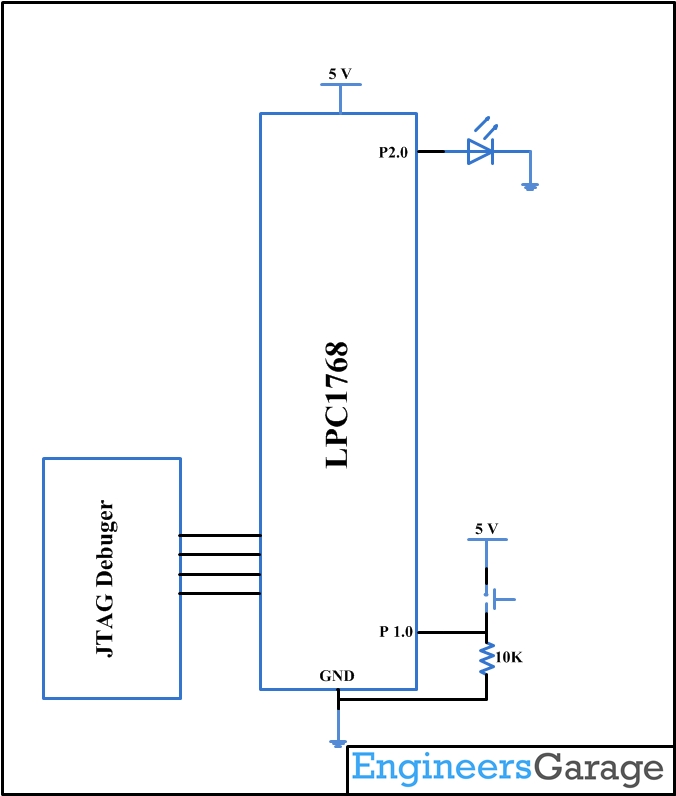
This is the Article to introduce the Timer programming of ARM Cortex-M3 LPC1768 Microcontroller. Here we are going to initialize the timer peripheral in LPC1768. Timer will improve the way of usage of any microcontroller. In this tutorial we are going to set up two timers which will blink two LEDs according to the setting of the timers. Setting up the Environment for the development of ARM cortex M3 is well discussed in this article.
The LPC 1768 is ARM Cortex- M3 based Microcontrollers for embedded application features in low power consumption and a high level of integration. The ARM Cortex M3 is designed in a such way to enhance debug features and a higher level of system integration. It clocks at a CPU frequency of 100 MHz, and incorporates a 3-stage pipeline and uses a Harvard architecture with separate local instruction and data buses for third bus peripherals. The ARM Cortex- M3 CPU have an internal pre-fetch unit to support speculative branching. The peripheral components include 512KB of flash memory, 64kb of data memory, Ethernet MAC, USB OTG, 4 UART’s, 8-channel general purpose DMA controller, 2 SSP Controllers, 10-bit DAC, Quadrature encoder interface, SPI interface, 3 I2C bus interface, 2 input plus 2 outputs I2S bus interface, 4 general purpose timers, ultra-low power Real-Time Clock (RTC) with separate battery supply, and up to 70 general purpose I/O pins, 6-output general purpose PWM. The LPC1768/66/65/64 are pin-compatible with the 100-pin LPC236x ARM7-based Microcontroller series.
There are 4 timers in LPC1768 (0, 1, 2 and 3). Each has 32-bit timer/counter with programmable 32-bit prescaler. All are independently identical and can be used separately without any interference. Each has its Timer Counter (TC) which is 32bit register which will incremented according to the clock connected up and there is a prescale counter which act as a clock divider.
Each Peripheral in LPC1768 can be turned ON or OFF according to our use, where most of the peripherals are turned off on reset. So the first step in any peripheral initialization is to turn on the peripheral.
Powering the Timers:
Conservation of power is the major concern in the LPC1768. Each peripheral has to turn ON before utilizing it. RESET makes some peripherals to enable while others are disabled. In timers Timer/Counters 0 and 1 are enabled while Timer/Counters 2 and 3 are disabled.
|
Bit |
Symbol |
Description |
Reset value |
|
0 |
– |
Reserved. |
NA |
|
1 |
PCTIM0 |
Timer/Counter 0 power/clock control bit. |
1 |
|
2 |
PCTIM1 |
Timer/Counter 1 power/clock control bit. |
1 |
|
`3 |
PCUART0 |
UART0 power/clock control bit. |
1 |
|
4 |
PCUART1 |
UART1 power/clock control bit. |
1 |
|
5 |
– |
Reserved. |
NA |
|
6 |
PCPWM1 |
PWM1 power/clock control bit. |
1 |
|
7 |
PCI2C0 |
The I2C0 interface power/clock control bit. |
1 |
|
8 |
PCSPI |
The SPI interface power/clock control bit. |
1 |
|
9 |
PCRTC |
The RTC power/clock control bit. |
1 |
|
10 |
PCSSP1 |
The SSP 1 interface power/clock control bit. |
1 |
|
11 |
– |
Reserved. |
NA |
|
12 |
PCADC |
A/D converter (ADC) power/clock control bit. |
0 |
|
13 |
PCCAN1 |
CAN Controller 1 power/clock control bit. |
0 |
|
14 |
PCCAN2 |
CAN Controller 2 power/clock control bit. |
0 |
|
15 |
PCGPIO |
Power/clock control bit for IOCON, GPIO, and GPIO interrupts. |
1 |
|
16 |
PCRIT |
Repetitive Interrupt Timer power/clock control bit. |
0 |
|
17 |
PCMCPWM |
Motor Control PWM |
0 |
|
18 |
PCQEI |
Quadrature Encoder Interface power/clock control bit. |
0 |
|
19 |
PCI2C1 |
The I2C1 interface power/clock control bit. |
1 |
|
20 |
– |
Reserved. |
NA |
|
21 |
PCSSP0 |
The SSP0 interface power/clock control bit. |
1 |
|
22 |
PCTIM2 |
Timer 2 power/clock control bit. |
0 |
|
23 |
PCTIM3 |
Timer 3 power/clock control bit. |
0 |
|
24 |
PCUART2 |
UART 2 power/clock control bit. |
0 |
|
25 |
PCUART3 |
UART 3 power/clock control bit. |
0 |
|
26 |
PCI2C2 |
I2C interface 2 power/clock control bit. |
1 |
|
27 |
PCI2S |
I2S interface power/clock control bit. |
0 |
|
28 |
– |
Reserved. |
NA |
|
29 |
PCGPDMA |
GPDMA function power/clock control bit. |
0 |
|
30 |
PCENET |
Ethernet block power/clock control bit. |
0 |
|
31 |
PCUSB |
USB interface power/clock control bit. |
0 |
Fig. 1: Bit Configuration of Peripherals on reset in LPC1768
Here for TIMER1 and TIMER2 the power bit PCTIM0 and PCTIM1 must be set.
Code Snippet:
LPC_SC->PCONP |= (0x01<<1); //enable POWER to TIMER0
LPC_SC->PCONP |= (0x1<<2); // enable POWER to TIMER1
The Timer Peripheral Clock:
The following table specifies the relationship between the peripherals and the bits in the PCLKSEL0 and PCKSEL1 registers.
|
Bit |
Symbol |
Description |
Reset value |
|
1:0 |
PCLK_WDT |
Peripheral clock selection for WDT. |
00 |
|
3:2 |
PCLK_TIMER0 |
Peripheral clock selection for TIMER0. |
00 |
|
5:4 |
PCLK_TIMER1 |
Peripheral clock selection for TIMER1. |
00 |
|
7:6 |
PCLK_UART0 |
Peripheral clock selection for UART0. |
00 |
|
9:8 |
PCLK_UART1 |
Peripheral clock selection for UART1. |
00 |
|
11:10 |
– |
Reserved. |
NA |
|
13:12 |
PCLK_PWM1 |
Peripheral clock selection for PWM1. |
00 |
|
15:14 |
PCLK_I2C0 |
Peripheral clock selection for I2C0. |
00 |
|
17:16 |
PCLK_SPI |
Peripheral clock selection for SPI. |
00 |
|
19:18 |
– |
Reserved. |
NA |
|
21:20 |
PCLK_SSP1 |
Peripheral clock selection for SSP1. |
00 |
|
23:22 |
PCLK_DAC |
Peripheral clock selection for DAC. |
00 |
|
25:24 |
PCLK_ADC |
Peripheral clock selection for ADC. |
00 |
|
27:26 |
PCLK_CAN1 |
Peripheral clock selection for CAN1.[1] |
00 |
|
29:28 |
PCLK_CAN2 |
Peripheral clock selection for CAN2.[1] |
00 |
|
31:30 |
PCLK_ACF |
Peripheral clock selection for CAN acceptance filtering.[1] |
00 |
Fig. 2: Peripheral Clock Selection Register 0 (PCLKSEL0) in PLC1768
|
Bit |
Symbol |
Description |
Reset value |
|
1:0 |
PCLK_QEI |
Peripheral clock selection for the Quadrature Encoder Interface. |
00 |
|
3:2 |
PCLK_GPIOINT |
Peripheral clock selection for GPIO interrupts. |
00 |
|
5:4 |
PCLK_PCB |
Peripheral clock selection for the Pin Connect block. |
00 |
|
7:6 |
PCLK_I2C1 |
Peripheral clock selection for I2C1. |
00 |
|
9:8 |
– |
Reserved. |
NA |
|
11:10 |
PCLK_SSP0 |
Peripheral clock selection for SSP0. |
00 |
|
13:12 |
PCLK_TIMER2 |
Peripheral clock selection for TIMER2. |
00 |
|
15:14 |
PCLK_TIMER3 |
Peripheral clock selection for TIMER3. |
00 |
|
17:16 |
PCLK_UART2 |
Peripheral clock selection for UART2. |
00 |
|
19:18 |
PCLK_UART3 |
Peripheral clock selection for UART3. |
00 |
|
21:20 |
PCLK_I2C2 |
Peripheral clock selection for I2C2. |
00 |
|
23:22 |
PCLK_I2S |
Peripheral clock selection for I2S. |
00 |
|
25:24 |
– |
Reserved. |
NA |
|
27:26 |
PCLK_RIT |
Peripheral clock selection for Repetitive Interrupt Timer. |
00 |
|
29:28 |
PCLK_SYSCON |
Peripheral clock selection for the System Control block. |
00 |
|
31:30 |
PCLK_MC |
Peripheral clock selection for the Motor Control PWM. |
00 |
Fig. 3: Peripheral Clock Selection Register 1 (PCLKSEL1) IN LPC1768
Example. Set the peripheral clock for timer 0 to divide by 8 of the system clock frequency.
pclkdiv = (LPC_SC->PCLKSEL0 >> 2) & 0x03;
switch ( pclkdiv )
{
case 0x00:
default:
pclk = SystemFrequency/4;
break;
case 0x01:
pclk = SystemFrequency;
break;
case 0x02:
pclk = SystemFrequency/2;
break;
case 0x03:
pclk = SystemFrequency/8;
break;
}
Enabling the timer:
The final step in the configuration is to enable the timer via the Timer Control Register (TCR):
|
Bit |
Symbol |
Description |
Reset Value |
|
0 |
Counter Enable |
1: the Timer Counter and Prescale Counter are enabled for counting. |
0 |
|
1 |
Counter Reset |
1:The Timer Counter and the Prescale Counter are synchronously reset on the next positive edge of PCLK. |
0 |
|
31:2 |
– |
Reserved, user software should not write ones to reserved bits. |
NA
|
Fig. 4: Bit Value Of Tmer Control Register For Enabling Timer In LPC1768
To reset and enable timer the code will be and similar to all the timer:
Code Snippet:
LPC_TIM0->TCR = 0x02; /* reset timer */
LPC_TIM0->TCR = 0x01; /* start timer */
In this section, we will start creating a project in Keil MDK we have already installed Keil µVision and Co-MDK Plug-in + CoLinkEx Drivers required for the CoLinkEx programming adapter. You can start by downloading the project files and kick start your practical experiment.
Code Description:
ARM programming requires good handling of Bit manipulation in C language. Here is the small note in the introduction of Bit manipulation to a newbie. C has direct support for bitwise operations that can be used for bit manipulation. In the following examples, n is the index of the bit to be manipulated within the variable bit_fld, which is an unsigned char being used as a bit field. Bit indexing begins at 0, not 1. Bit 0 is the least significant bit.
Set a bit
bit_fld |= (1 << n)
Clear a bit
bit_fld &= ~(1 << n)
Toggle a bit
bit_fld ^= (1 << n)
Test a bit
bit_fld & (1 << n)
timertest.c is the code to test the function of timer in the above given project as the functions are written in timer.c.
for ( i = 0; i < 2; i++ )
{
init_timer( i , TIME_INTERVAL );
enable_timer( i );
}
The above function is to initialize the Timers 0 and 1.
In while loop function each timer has its own timer counter variable which is compared to the desired blink interval and the LEDs are turned ON or OFF.
Project Source Code
###The codes are linked in Description ###
Circuit Diagrams
Project Components
Project Video
Filed Under: ARM, Featured Contributions
Filed Under: ARM, Featured Contributions
Questions related to this article?
👉Ask and discuss on EDAboard.com and Electro-Tech-Online.com forums.
Tell Us What You Think!!
You must be logged in to post a comment.