Engineers Garage

  • Electronic Projects & Tutorials
    • Electronic Projects
      • Arduino Projects
      • AVR
      • Raspberry pi
      • ESP8266
      • BeagleBone
      • 8051 Microcontroller
      • ARM
      • PIC Microcontroller
      • STM32
    • Tutorials
      • Audio Electronics
      • Battery Management
      • Brainwave
      • Electric Vehicles
      • EMI/EMC/RFI
      • Hardware Filters
      • IoT tutorials
      • Power Tutorials
      • Python
      • Sensors
      • USB
      • VHDL
    • Circuit Design
    • Project Videos
    • Components
  • Articles
    • Tech Articles
    • Insight
    • Invention Stories
    • How to
    • What Is
  • News
    • Electronic Product News
    • Business News
    • Company/Start-up News
    • DIY Reviews
    • Guest Post
  • Forums
    • EDABoard.com
    • Electro-Tech-Online
    • EG Forum Archive
  • DigiKey Store
    • Cables, Wires
    • Connectors, Interconnect
    • Discrete
    • Electromechanical
    • Embedded Computers
    • Enclosures, Hardware, Office
    • Integrated Circuits (ICs)
    • Isolators
    • LED/Optoelectronics
    • Passive
    • Power, Circuit Protection
    • Programmers
    • RF, Wireless
    • Semiconductors
    • Sensors, Transducers
    • Test Products
    • Tools
  • Learn
    • eBooks/Tech Tips
    • Design Guides
    • Learning Center
    • Tech Toolboxes
    • Webinars & Digital Events
  • Resources
    • Digital Issues
    • EE Training Days
    • LEAP Awards
    • Podcasts
    • Webinars / Digital Events
    • White Papers
    • Engineering Diversity & Inclusion
    • DesignFast
  • Guest Post Guidelines
  • Advertise
  • Subscribe

Clap sensor using STM32 MCU

By Usman ali Butt March 5, 2021

Security systems work by measuring different physical parameters. One such parameter is sound. Every moving object produces sound and vibrations. These sounds and vibrations can be sampled, and the object can be identified. Sampling sound waves and training the system to distinguish between objects requires plenty of time.

For this tutorial, let’s take a simple sound sensor and interface it with an STM32 microcontroller. The sound sensor will recognize a clap sound and switches on the LED.
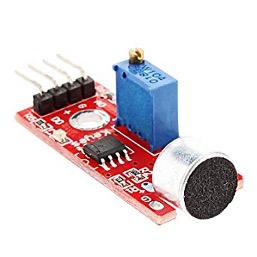
The sensor we are using is the most popular KY-038. On KY-038 sound sensor is placed in a circuit with other electrical components. Namely

  • Differential amplifier
  • Variable resistor (Potentiometer)

Why differential amplifier?

Sound sensor output voltage/signal is much lower than the standard microcontroller operating voltages (3.3 or 5 volts). To read the sound sensor’s output, it must be brought up to 3.3 or 5 volts, depending on the microcontroller operating voltage.

Many variants of KY-038 are available in the market, and various kinds of differential amplifiers are present on them. The most popular differential amplifier onboard is LM-393. Lm-393 is actually a comparator, but on our sensor board, the output voltage is pulled up. Moreover, the sensor module can output a digital as well as an analog signal.

Variable Resistor

A variable resistor is setting the threshold for sound recognition. The output of the variable resistor is input to the differential amplifier. The other input of the differential amplifier is the output of the sound sensor.

So how does it work? 

A fixed voltage(threshold) is fed to one input of the comparator by a variable resistor. On any disturbance sound sensor outputs a voltage. The comparator compares the voltage threshold vs. disturbance. If disturbance greater than threshold amplify and output 1. If less than no output.

By rotating the knob of the variable resistor, we can adjust the sound detection level.

Project circuit:

Stm32f103 discovery development board is used to test the clap sensor. An led at the output will turn on for some time if clapped near the sensor.

Two GPIO pins of the STM32 microcontroller are required for this purpose. One as input to detect the clap signal from the sensor module and one as output to turn on the led. The circuit diagram of the project is below.
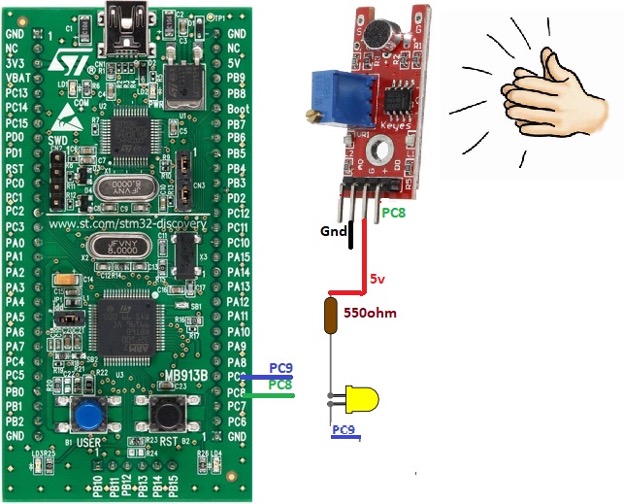
I used PC8 as the input pin and PC9 as the output pin. Led is pulled high in series with a 550-ohm resistor. Both the led and sensor module can be powered through stm32 discovery power output pins. The onboard regulator of stm32 can manage power for all three components.

Project code

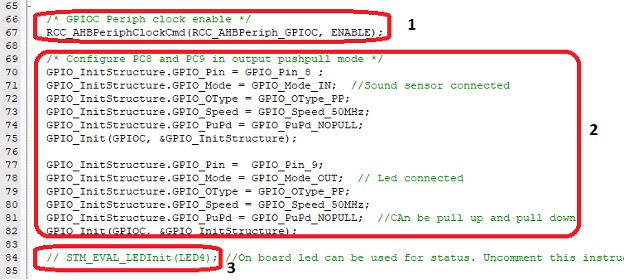
The Code of the project is simple and straightforward. First, enable the clock for port-C of stm32. We must enable the clock because we are using two pins of port-C in our application. If this step is missed in any application, nothing will be seen at the output. So be sure to enable clocks for ports under use.

Next, GPIO pins PC8 and PC9 are declared. We need to set all the parameters for each pin. Pin 8 is declared as input, sampling speed is set to 50MHz, at last, no pull-up or down resistor is enabled.

PC9 only difference with respect to PC8 is it’s declared as an output pin. Push up and down resistors can be enabled depending on the circuit requirements. Another option is to use the onboard led of STM32 discovery. A single statement in the above code snap labeled 3 can be uncommented to use the onboard led. Behind the onboard led declaration function same code as written in box 2 is executed to declare the led.
Next comes the while loop. While1 loop executes continuously unless discovery is powered off. In the while loop first, if the statement is checking the status of the sensor output. If it is found high, the control enters if statement body.

Suppose statement body is composed of just two statements. The first statement sets the PC9 or led as high. The second statement is a for loop, which iterates 1000 times. These 1000 iterations produce a delay in milliseconds. This delay is very significant. It enables the person to see the led switching on and then back off visually. Led off statement is outside if statement.

During testing, it was found that it is impossible to see the led turning on and off without for loop delay. Led transition is so fast because of the operating frequency of the stm32.
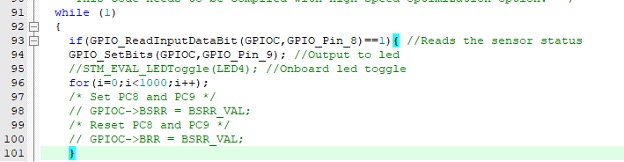
If you are using onboard led of stm32 discovery, you must uncomment the STM_EVAL_LEDToggle() instruction. LED togging can also be achieved if instead of GPIO_SetBits() directly GPIOC->BSSR and BSR are used. BSR and BSSR are output registers associated with ports of stm32. All the instructions are present in the above code.

Download full code from Github

The above concept can be applied in different applications, such as security systems, opening and closing doors, vehicle start theft, etc. The analog output of the sensor provides precise voltage change on disturbance. The analog feature can be used for precise sound differentiation. Working with analog features requires knowledge of ADC, which we will learn in the upcoming tutorials.

Let’s DIY the Project: Where to Purchase parts?

StM32 Discovery: From Mouser

Sound sensor: From Mouser

LED: From Mouser

Resistor: From Mouser


You may also like:

  • Microcontroller Project: STM32 low power modes analysis

  • What are different types of industrial robots?

  • How does LoRa modulation enable long-range communication?

  • What is the role of embedded software in electric vehicles?

  • What are the components of robotic arms and industrial robots?

  • What drone parts you need to build a quadcopter?

Filed Under: Electronic Projects, Microcontroller Projects, STM32


Next Article

← Previous Article
Next Article →

Questions related to this article?
👉Ask and discuss on EDAboard.com and Electro-Tech-Online.com forums.


Tell Us What You Think!! Cancel reply

You must be logged in to post a comment.

EE TECH TOOLBOX

“ee
Tech Toolbox: Internet of Things
Explore practical strategies for minimizing attack surfaces, managing memory efficiently, and securing firmware. Download now to ensure your IoT implementations remain secure, efficient, and future-ready.

EE Learning Center

EE Learning Center
“engineers
EXPAND YOUR KNOWLEDGE AND STAY CONNECTED
Get the latest info on technologies, tools and strategies for EE professionals.

HAVE A QUESTION?

Have a technical question about an article or other engineering questions? Check out our engineering forums EDABoard.com and Electro-Tech-Online.com where you can get those questions asked and answered by your peers!


RSS EDABOARD.com Discussions

  • Reducing "shoot-through" in offline Full Bridge SMPS?
  • High Side current sensing
  • How to simulate power electronics converter in PSpice?
  • Voltage mode pushpull is a nonsense SMPS?
  • Layout IRN reduction in Comparator

RSS Electro-Tech-Online.com Discussions

  • Back to the old BASIC days
  • Parts required for a personal project
  • PIC KIT 3 not able to program dsPIC
  • Failure of polypropylene motor-run capacitors
  • Siemens large industrial PLC parts

Featured – RPi Python Programming (27 Part)

  • RPi Python Programming 21: The SIM900A AT commands
  • RPi Python Programming 22: Calls & SMS using a SIM900A GSM-GPRS modem
  • RPi Python Programming 23: Interfacing a NEO-6MV2 GPS module with Raspberry Pi
  • RPi Python Programming 24: I2C explained
  • RPi Python Programming 25 – Synchronous serial communication in Raspberry Pi using I2C protocol
  • RPi Python Programming 26 – Interfacing ADXL345 accelerometer sensor with Raspberry Pi

Recent Articles

  • What is AWS IoT Core and when should you use it?
  • AC-DC power supply extends voltage range to 800 V DC
  • Infineon’s inductive sensor integrates coil system driver, signal conditioning circuits and DSP
  • Arm Cortex-M23 MCU delivers 87.5 µA/MHz active mode
  • STMicroelectronics releases automotive amplifiers with in-play open-load detection

EE ENGINEERING TRAINING DAYS

engineering

Submit a Guest Post

submit a guest post
Engineers Garage
  • Analog IC TIps
  • Connector Tips
  • Battery Power Tips
  • DesignFast
  • EDABoard Forums
  • EE World Online
  • Electro-Tech-Online Forums
  • EV Engineering
  • Microcontroller Tips
  • Power Electronic Tips
  • Sensor Tips
  • Test and Measurement Tips
  • 5G Technology World
  • Subscribe to our newsletter
  • About Us
  • Contact Us
  • Advertise

Copyright © 2025 WTWH Media LLC. All Rights Reserved. The material on this site may not be reproduced, distributed, transmitted, cached or otherwise used, except with the prior written permission of WTWH Media
Privacy Policy

Search Engineers Garage

  • Electronic Projects & Tutorials
    • Electronic Projects
      • Arduino Projects
      • AVR
      • Raspberry pi
      • ESP8266
      • BeagleBone
      • 8051 Microcontroller
      • ARM
      • PIC Microcontroller
      • STM32
    • Tutorials
      • Audio Electronics
      • Battery Management
      • Brainwave
      • Electric Vehicles
      • EMI/EMC/RFI
      • Hardware Filters
      • IoT tutorials
      • Power Tutorials
      • Python
      • Sensors
      • USB
      • VHDL
    • Circuit Design
    • Project Videos
    • Components
  • Articles
    • Tech Articles
    • Insight
    • Invention Stories
    • How to
    • What Is
  • News
    • Electronic Product News
    • Business News
    • Company/Start-up News
    • DIY Reviews
    • Guest Post
  • Forums
    • EDABoard.com
    • Electro-Tech-Online
    • EG Forum Archive
  • DigiKey Store
    • Cables, Wires
    • Connectors, Interconnect
    • Discrete
    • Electromechanical
    • Embedded Computers
    • Enclosures, Hardware, Office
    • Integrated Circuits (ICs)
    • Isolators
    • LED/Optoelectronics
    • Passive
    • Power, Circuit Protection
    • Programmers
    • RF, Wireless
    • Semiconductors
    • Sensors, Transducers
    • Test Products
    • Tools
  • Learn
    • eBooks/Tech Tips
    • Design Guides
    • Learning Center
    • Tech Toolboxes
    • Webinars & Digital Events
  • Resources
    • Digital Issues
    • EE Training Days
    • LEAP Awards
    • Podcasts
    • Webinars / Digital Events
    • White Papers
    • Engineering Diversity & Inclusion
    • DesignFast
  • Guest Post Guidelines
  • Advertise
  • Subscribe