Engineers Garage

  • Electronic Projects & Tutorials
    • Electronic Projects
      • Arduino Projects
      • AVR
      • Raspberry pi
      • ESP8266
      • BeagleBone
      • 8051 Microcontroller
      • ARM
      • PIC Microcontroller
      • STM32
    • Tutorials
      • Audio Electronics
      • Battery Management
      • Brainwave
      • Electric Vehicles
      • EMI/EMC/RFI
      • Hardware Filters
      • IoT tutorials
      • Power Tutorials
      • Python
      • Sensors
      • USB
      • VHDL
    • Circuit Design
    • Project Videos
    • Components
  • Articles
    • Tech Articles
    • Insight
    • Invention Stories
    • How to
    • What Is
  • News
    • Electronic Product News
    • Business News
    • Company/Start-up News
    • DIY Reviews
    • Guest Post
  • Forums
    • EDABoard.com
    • Electro-Tech-Online
    • EG Forum Archive
  • DigiKey Store
    • Cables, Wires
    • Connectors, Interconnect
    • Discrete
    • Electromechanical
    • Embedded Computers
    • Enclosures, Hardware, Office
    • Integrated Circuits (ICs)
    • Isolators
    • LED/Optoelectronics
    • Passive
    • Power, Circuit Protection
    • Programmers
    • RF, Wireless
    • Semiconductors
    • Sensors, Transducers
    • Test Products
    • Tools
  • Learn
    • eBooks/Tech Tips
    • Design Guides
    • Learning Center
    • Tech Toolboxes
    • Webinars & Digital Events
  • Resources
    • Digital Issues
    • EE Training Days
    • LEAP Awards
    • Podcasts
    • Webinars / Digital Events
    • White Papers
    • Engineering Diversity & Inclusion
    • DesignFast
  • Guest Post Guidelines
  • Advertise
  • Subscribe

Analysing Values of Different Wave types on Arduino (Part 13/13)

By Arpit jain October 12, 2016

Hyperterminal – Analysing Values of Different Wave types

SUMMARY
In this Brain wave series till now we have seen few real time applications on Brain Wave like controlling servo motor. Now presently I am planning to analyse the values of different wave types.  So, I am just thinking to show the values on arduino serial monitor. I have just connected the arduino with my computer and trying to see the values on screen.
DESCRIPTION
Now, the Mindflex sensor sends the power FFT values of all the different wave types serially. So by receiving them on the arduino, we can send the values to the serial monitor of arduino. We have just connected the arduino to the PC and analyzing the values. First we have taken the values sent by Mindflex in the arduino board and then transferred them to the PC serially. We can see the values of the different wave types in the attached screenshot.
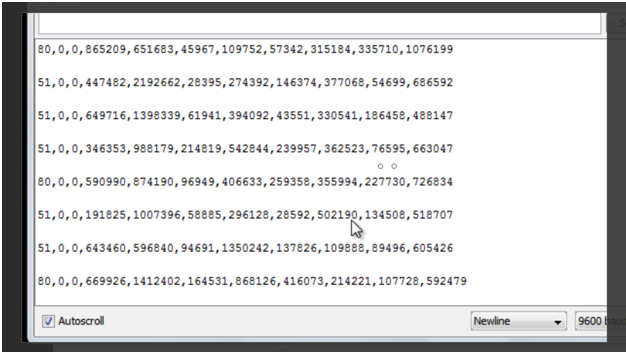
Image showing FFT Values of Different Brain Waves
Fig. 1: Image showing FFT Values of Different Brain Waves
The sequence of the below string is:
“Signal strength, attention, meditation, delta, theta, low alpha, high alpha, low beta, high beta, low gamma, high gamma”
The limit of Signal Strength is 0 to 200. The lower the value, the higher is the signal strength. The average signal strength is in the range of 25 to 75.  After that, the next two digits are attention and meditation. These values are 0 here as the signal strength is not 100 %. We have discussed this earlier that we can only get the attention and meditation values when the signal strength is 100 % and the numeric value coming from the MindFlex is 0. The attention and meditation values are sent by e meters of TGAM1 chip. Then there are power FFT values of different wave types. We have performed experiments using these different wave types earlier.
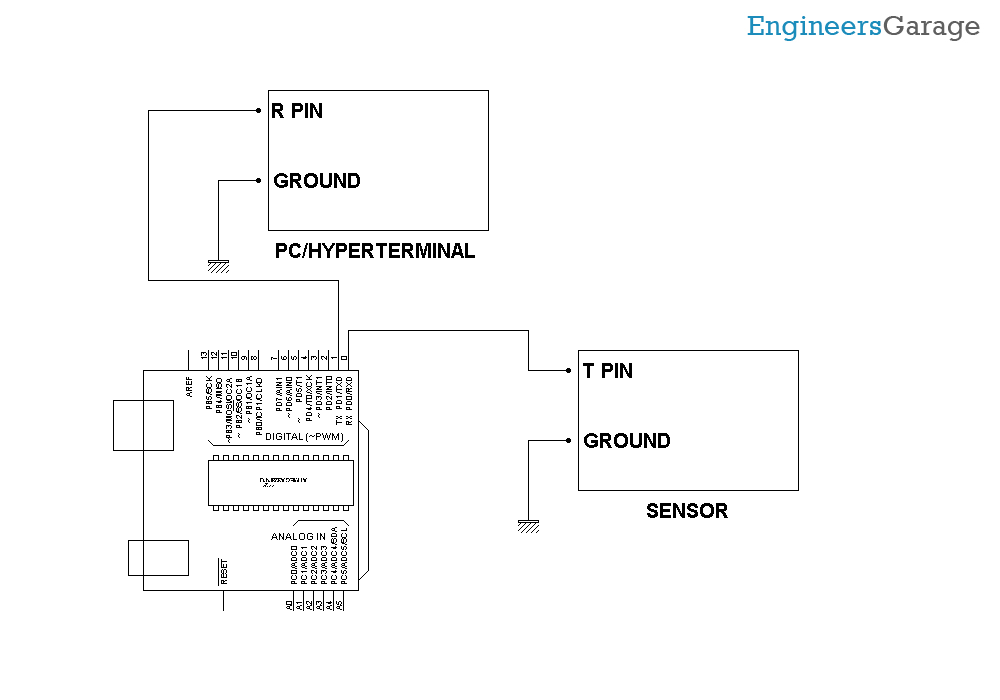
Please find attached below the block diagram on the connections we have done.
Block Diagram of Brain Wave Analysis Device
Fig. 2: Block Diagram of Brain Wave Analysis Device

Hardware: Please find the attached circuit diagram of the connections we need to do. We have taken a pin from T pin of the mindflex sensor and connected that pin to the Rx pin of our Arduino UNO. Also, we have shorted the ground of both the Sensor and UNO by a wire. Please take special care while soldering anything to the Mindflex sensor as pins are very close to each other. After establishing the connection with the Arduino UNO, we have simply connected the arduino with the PC using the Serial USB cable. This can also be done by using CP2102 and attaching the RX TX pin of the arduino with the CP2102 RX TX respectively. 

Few points to Note:
The sensor usually gives the strength from 60 – 80% due to its orientation and the place where it’s located. Try to keep the metal sensor exactly above your left eye.  I have also applied salt water at my forehead for better connectivity to the sensor.  If you do not find it 100%, then it is normal. The signal strength also disrupts about how we solder the wire to the T pin.
Try to shield this wire and also make sure that the references probes are correctly connected. If you have any wire connected to the EEG pin of the sensor, please disconnect that wire as that will create much noise in the sensor values.
You can also make efforts to undertake the experiment and then share your feedback with us. Stay tuned for more experiments in the series.

Project Source Code

###

//Program to 

// Arduino Brain Library - Brain SoftSerial Test
 
// Description: Grabs brain data from software serial on pin 10 and sends CSV out over the hardware serial
// More info: https://github.com/kitschpatrol/Arduino-Brain-Library
// Author: Eric Mika, 2014
 
#include
#include
 
// Set up the software serial port on pins 10 (RX) and 11 (TX). We'll only actually hook up pin 10.
SoftwareSerial softSerial(10, 11);
 
// Set up the brain reader, pass it the software serial object you want to listen on.
Brain brain(softSerial);
 
void setup() {
    // Start the software serial.
    softSerial.begin(9600);
    
    // Start the hardware serial. 
    Serial.begin(9600);
}
 
void loop() {
    // Expect packets about once per second.
    // The .readCSV() function returns a string (well, char*) listing the most recent brain data, in the following format:
    // "signal strength, attention, meditation, delta, theta, low alpha, high alpha, low beta, high beta, low gamma, high gamma"    
    if (brain.update()) {
        Serial.println(brain.readErrors());
        Serial.println(brain.readCSV());
    }
}
 

###


Circuit Diagrams

Circuit-Diagram-Brain-Wave-Analysis-Device


Filed Under: Brainwave, Electronic Projects, Tech Articles, Tutorials


Next Article

← Previous Article
Next Article →

Questions related to this article?
👉Ask and discuss on Electro-Tech-Online.com and EDAboard.com forums.


Tell Us What You Think!! Cancel reply

You must be logged in to post a comment.

EE TECH TOOLBOX

“ee
Tech Toolbox: Internet of Things
Explore practical strategies for minimizing attack surfaces, managing memory efficiently, and securing firmware. Download now to ensure your IoT implementations remain secure, efficient, and future-ready.

EE Learning Center

EE Learning Center
“engineers
EXPAND YOUR KNOWLEDGE AND STAY CONNECTED
Get the latest info on technologies, tools and strategies for EE professionals.

HAVE A QUESTION?

Have a technical question about an article or other engineering questions? Check out our engineering forums EDABoard.com and Electro-Tech-Online.com where you can get those questions asked and answered by your peers!


RSS EDABOARD.com Discussions

  • Reducing "shoot-through" in offline Full Bridge SMPS?
  • High Side current sensing
  • How to simulate power electronics converter in PSpice?
  • Voltage mode pushpull is a nonsense SMPS?
  • Layout IRN reduction in Comparator

RSS Electro-Tech-Online.com Discussions

  • Back to the old BASIC days
  • Parts required for a personal project
  • PIC KIT 3 not able to program dsPIC
  • Failure of polypropylene motor-run capacitors
  • Siemens large industrial PLC parts

Featured – RPi Python Programming (27 Part)

  • RPi Python Programming 21: The SIM900A AT commands
  • RPi Python Programming 22: Calls & SMS using a SIM900A GSM-GPRS modem
  • RPi Python Programming 23: Interfacing a NEO-6MV2 GPS module with Raspberry Pi
  • RPi Python Programming 24: I2C explained
  • RPi Python Programming 25 – Synchronous serial communication in Raspberry Pi using I2C protocol
  • RPi Python Programming 26 – Interfacing ADXL345 accelerometer sensor with Raspberry Pi

Recent Articles

  • What is AWS IoT Core and when should you use it?
  • AC-DC power supply extends voltage range to 800 V DC
  • Infineon’s inductive sensor integrates coil system driver, signal conditioning circuits and DSP
  • Arm Cortex-M23 MCU delivers 87.5 µA/MHz active mode
  • STMicroelectronics releases automotive amplifiers with in-play open-load detection

EE ENGINEERING TRAINING DAYS

engineering

Submit a Guest Post

submit a guest post
Engineers Garage
  • Analog IC TIps
  • Connector Tips
  • Battery Power Tips
  • DesignFast
  • EDABoard Forums
  • EE World Online
  • Electro-Tech-Online Forums
  • EV Engineering
  • Microcontroller Tips
  • Power Electronic Tips
  • Sensor Tips
  • Test and Measurement Tips
  • 5G Technology World
  • Subscribe to our newsletter
  • About Us
  • Contact Us
  • Advertise

Copyright © 2025 WTWH Media LLC. All Rights Reserved. The material on this site may not be reproduced, distributed, transmitted, cached or otherwise used, except with the prior written permission of WTWH Media
Privacy Policy

Search Engineers Garage

  • Electronic Projects & Tutorials
    • Electronic Projects
      • Arduino Projects
      • AVR
      • Raspberry pi
      • ESP8266
      • BeagleBone
      • 8051 Microcontroller
      • ARM
      • PIC Microcontroller
      • STM32
    • Tutorials
      • Audio Electronics
      • Battery Management
      • Brainwave
      • Electric Vehicles
      • EMI/EMC/RFI
      • Hardware Filters
      • IoT tutorials
      • Power Tutorials
      • Python
      • Sensors
      • USB
      • VHDL
    • Circuit Design
    • Project Videos
    • Components
  • Articles
    • Tech Articles
    • Insight
    • Invention Stories
    • How to
    • What Is
  • News
    • Electronic Product News
    • Business News
    • Company/Start-up News
    • DIY Reviews
    • Guest Post
  • Forums
    • EDABoard.com
    • Electro-Tech-Online
    • EG Forum Archive
  • DigiKey Store
    • Cables, Wires
    • Connectors, Interconnect
    • Discrete
    • Electromechanical
    • Embedded Computers
    • Enclosures, Hardware, Office
    • Integrated Circuits (ICs)
    • Isolators
    • LED/Optoelectronics
    • Passive
    • Power, Circuit Protection
    • Programmers
    • RF, Wireless
    • Semiconductors
    • Sensors, Transducers
    • Test Products
    • Tools
  • Learn
    • eBooks/Tech Tips
    • Design Guides
    • Learning Center
    • Tech Toolboxes
    • Webinars & Digital Events
  • Resources
    • Digital Issues
    • EE Training Days
    • LEAP Awards
    • Podcasts
    • Webinars / Digital Events
    • White Papers
    • Engineering Diversity & Inclusion
    • DesignFast
  • Guest Post Guidelines
  • Advertise
  • Subscribe