In the previous tutorial, it was discussed that for driving a MOSFET as high side switch, a gate driver circuit needs to be used. The IR2110 IC is one of the high speed and high voltage gate driver ICs for IGBT and power MOSFET. The IC is having independent low and high side output channel.
By using a single IC, a half bridge circuit can be operated in which one MOSFET is in high side configuration and another one is in the low side configuration. For driving the high side MOSFET, this IC uses a bootstrap circuit which otherwise could have to be designed externally. Before using this IC for driving the half or full bridge circuit, it is necessary to test the faultiness of the IC. A faulty IC can give unstable output and may blow up the MOSFET or other components in the circuit. In this tutorial, the method to test the IR2110 IC is discussed.
Components Required –
1. DC power supply of 5V and 12V.
2. IR2110 IC
3. Microcontroller atmega328
4. Some jumpers
Circuit Connections –
The IR2110 IC comes in a 14-pin DIP package. It has the following pin configuration –

Fig. 1: List of Components required for IR2110 Gate Driver IC Tester
The IR-2110 has the following pin diagram –
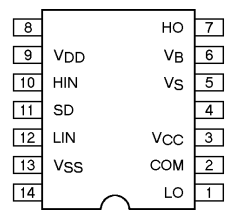
Fig. 2: Pin Diagram of IR2110 IC
The IR2110 has the following internal circuitry –
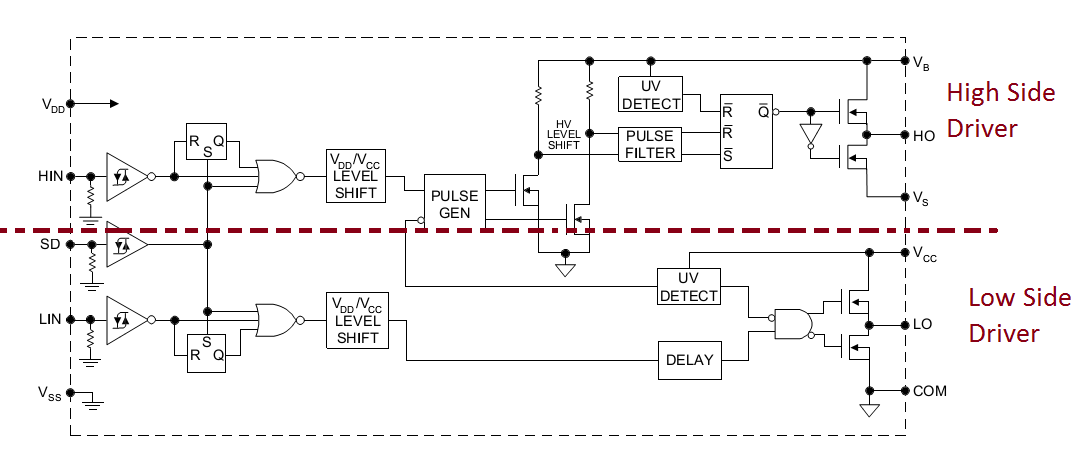
Fig. 3: Internal block diagram of IR2110 IC
Source: www.irf.com
In the internal circuit diagram of IR2110, the low side and high side blocks are separated with a dotted line for simplicity. The upper half circuit works for driving high side MOSFET and lower half is for driving the low side MOSFET.
As in accordance to the pin configuration of IR2110, the SD (shutdown) pin is used to shutdown the IC. This pin is active high, so for enabling the IC to work, this pin is connected to the ground. The VDD is the supply voltage for driving the internal circuitry of the IC and it should be in between 3V to 20 V (with reference to Vss) as per the datasheet. The VCC is directly connected to the drain of internal MOSFET of low side driver(as shown in internal circuit diagram of IR2110) and it can be in between 10V to 20V. For testing the IR 2110 IC, 5V is taken as VDD and 12V is taken as VCC. When the input at Lin or Hin pin is high then the IC gives High output at LO or HO pin corresponding to the input supply. When logic input at Lin and Hin are low then a low is obtained at LO and HO pin.
A square wave is applied at the Lin and Hin pin with the zero phase difference between them and the wave is generated using a microcontroller. For a good IC when Hin pin is high then it should give high at output otherwise low, same for Lin and LO.
For testing the IC, the 5V is taken as VDD and 12V is taken as VCC. The supply voltage for VDD and VCC can be drawn from a battery and then regulated to 5V and 12V level using 7805 and 7812 voltage regulator ICs. For voltage regulation, the anode of the battery should be connected to pin 1 of the voltage regulator ICs and pin 2 should be grounded. The respective voltage outputs then can be drawn from the pin 3 of the regulator ICs.
The square wave which has to be applied at the input of Lin and Hin pin is generated by a microcontroller. The controller works on TTL (transistor- transistor logic). So to avoid any synchronization error in between VDD and Hin/Lin input supply, 5V is taken as VDD. So, the VDD pin is connected to 5V while VCC and Vb pins are connected to 12V power source. The SD, Vss, COM and Vs pins are connected to the ground.
The square wave can be generated using any microcontroller board. In testing for this IC, the square wave has been generated using Arduino board. The Arduino is the most popular prototyping board and can be easily programmed to generate a perfect square wave. Since the square wave has to be applied at two pins of the IR2110, the Arduino is programmed to output square wave from two of its pins.
While assembling the circuit for testing the IR2110 IC, following precautions must be taken care of –
1. Never exceed the input voltage of VDD and VCC above their range as it may damage the IC. Check the input voltage limits from the datasheet of IR2110.
2. Always common the ground of 12V and 5V supply.
3. If TTL power source is used for Lin and Hin pin then VDD must be taken equal to 5V. This should be done to avoid any undermine state at the output.
4. Apply a clean DC to the IC to avoid any voltage spikes. For this, an electrolyte capacitor in parallel with ceramic capacitor for filtering the input power supply can be used.
5. Make proper connections as loose connections can result into abrupt wave at the output.

Fig. 4: Prototype of circuit for testing IR2110 MOSFET Gate Driver IC
How the circuit works –
From the internal circuit it can be seen that in high side and lows side, there are two MOSFETs at the end followed by a latch (on high side) and an AND gate (on low side).

Fig. 5: Internal Circuit Diagram of IR2110 Gate Driver IC
When the output from SR latch (on high side) is low then a bubble at output convert this to high and this makes the MOSFET Q1 ON and MOSFET Q2 OFF. This gives high output at HO pin. Whenever the SR latch gives low then it turns ON the MOSFET Q2 and turns OFF the MOSFET Q1 and a low is obtained at LO pin.
Similarly, on the low side when the output from AND gate is high then MOSFET Q3 is ON and MOSFET Q4 is OFF. So, high output is obtained at LO pin. In the case of low output from AND gate then LO pin gives low output.
The generated square wave from the controller should be applied at the Hin and Lin pins and at the output pins (LO and HO respectively) a square wave of same amplitude and frequency should be obtained. If the exact square wave is not obtained at the LO and HO pins or no square wave is output fromeither pin, then IR2110 in case is faulty. If the IC is heating too fast despite not exceeding input supply voltages beyond limit, then also the IC can be predicted to be faulty.
Testing the IR2110 IC –
After applying the square waves at Lin and Hin pins, the following voltage waveforms at the Lo and Ho pins were observed on a Cathode Ray Oscilloscope.

Fig. 6: Graph showing Output Waveform at Ho Pin

Fig. 7: Graph showing Output Waveform at Lo Pin
From the voltage waveforms observed on CRO, it can be seen that it has the same amplitude and frequency as of the input square wave. So, the IR2110 IC under test is working properly. It can now be used as a gate driver circuit for Half bridge or full H-bridge circuit without doubt.
In the next tutorial learn about improving the switching time of relays.
You may also like:


Project Video
Filed Under: Featured Contributions, Power, Tutorials
Filed Under: Featured Contributions, Power, Tutorials
Questions related to this article?
👉Ask and discuss on Electro-Tech-Online.com and EDAboard.com forums.
Tell Us What You Think!!
You must be logged in to post a comment.