In the previous tutorial, we learned about manipulating data values in lists and byte arrays. Python also has mutable unordered collections, including sets and dictionaries.
Let’s review these two and learn how to manipulate the data values/objects in sets and dictionaries.
Sets
Sets are unordered mutable collections of items. The items in a set can be any arbitrary immutable objects and each one should be unique. This means no duplicate items are allowed.
The sets in Python are similar to mathematical sets. For example, the items are called elements of the set. A set is defined by the set() constructor or by using a pair of braces ({}). When a set is created using the set() constructor, only one argument can be passed to it. So, the elements of the set should be grouped in a list as an argument in the set() constructor.
Here are a few valid examples:
s1 = {1, 2, 3, 4}
print(s1)
s2 = set([‘a’, ‘b’, ‘c’])
print(s2)
The elements of a set cannot be mutable objects. This means lists, sets, and dictionaries cannot be elements of a set. However, strings, bytes, integers, floats, complex numbers, and tuples can be elements of a set.
An empty set can be created using the set() constructor without an argument or by an empty pair of braces.
Here are valid examples of empty sets:
s1 = {}
s2 = set()
Since sets are unordered collections, their elements are not bound to any key or index. The elements of a set cannot be accessed by a key or index, but it’s possible to test if an element belongs to a set or not. When this occurs, the elements in a set are referenced by their value.
Although sets can contain only immutable objects, the sets themselves are mutable. So, it’s possible to add, remove, and modify the elements of a set. The immutable objects contained in a set can be manipulated using the operators, set methods, and built-in Python functions.
Sets have the following methods:
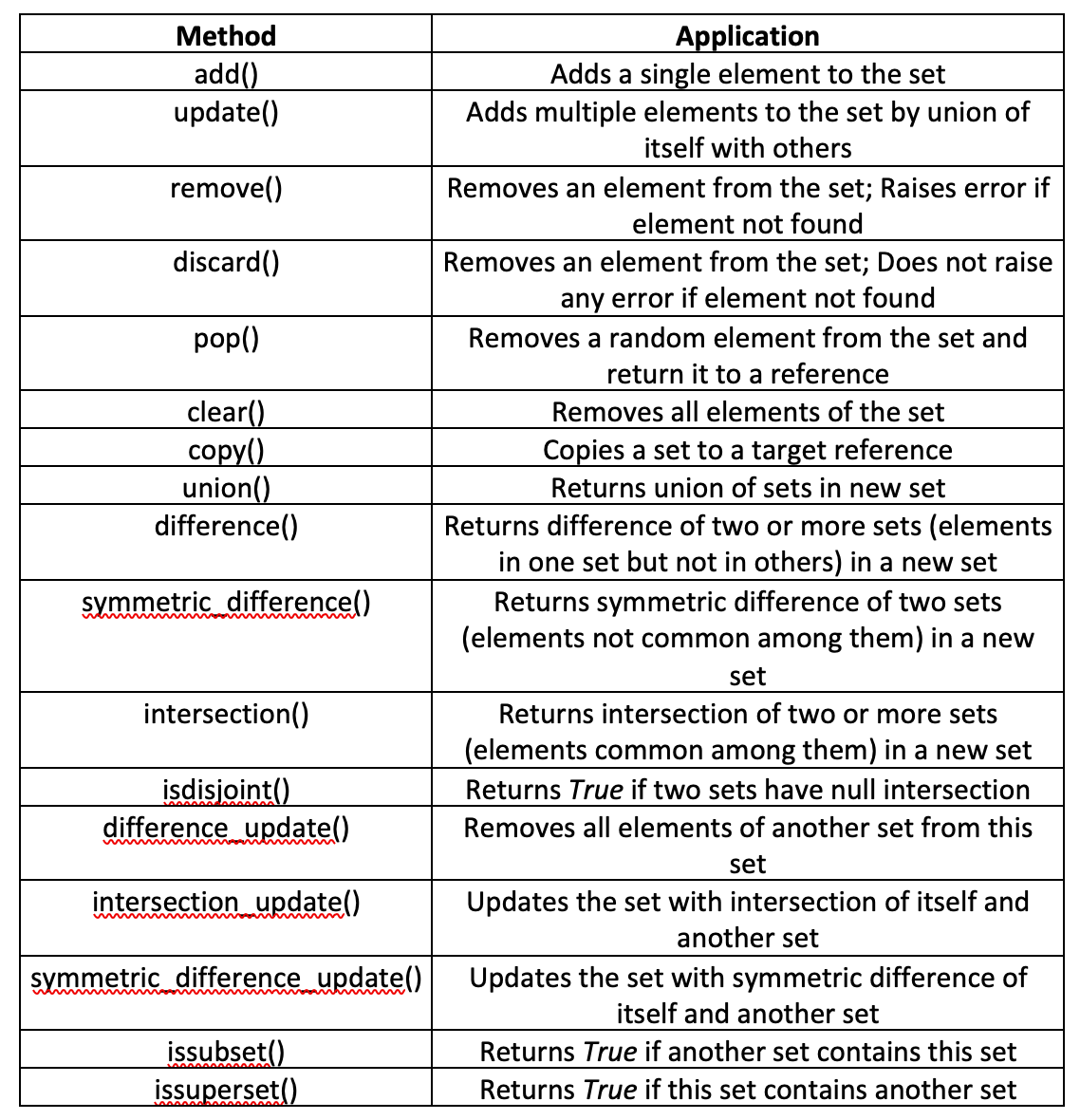
The methods can be applied on a set using the set_name.method_name syntax. Here are valid examples of the set methods:
s1 = {0, 1, 2, 3, 4, 5, 6, 7, 8, 9}
s2 = {2, 4, 6}
s3 = {2, 3}
s2.add(8)
print(s2)
s3.update([5, 7, 9, 11])
print(s3)
s3.remove(9)
print(s3)
s3.discard(11)
print(s3)
a = s3.pop()
print(a)
print(s3)
s3.add(a)
s4 = s3.copy()
print(s4)
s4.clear()
print(s4)
s4 = s2.union(s3)
print(s4)
s5 = s2.difference(s3)
print(s5)
s5 = s2.symmetric_difference(s3)
print(s5)
s5 = s2.intersection(s3)
print(s5)
print(s5.isdisjoint(s3))
s1.difference_update(s5)
print(s1)
s1.add(2)
s1.intersection_update(s5)
print(s1)
s1.update([0, 1, 3, 4, 5, 6, 7, 8, 9])
s1.symmetric_difference_update(s5)
print(s1)
print(s3.issubset(s1))
s1.add(2)
print(s3.issubset(s1))
print(s3.issuperset(s1))
print(s1.issuperset(s3))
The following built-in Python functions accept sets as arguments:
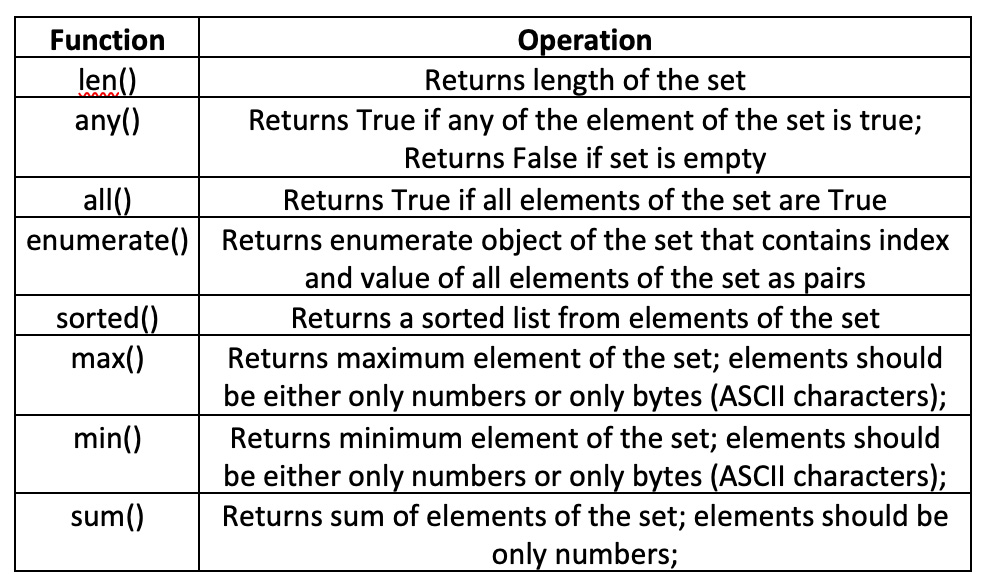 Here’s a valid example of using functions on sets:
s1 = {‘a’, ‘c’, None, ‘b’}
s2 = {12, 8, 41, 245, 5}
print(len(s1))
print(any(s1))
print(all(s1))
s1.remove(None)
print(max(s1))
print(min(s1))
print(sum(s2))
print(sorted(s1))
print(sorted(s2))
for x in enumerate(sorted(s1)):
print(x)
This table summarizes the common operations on sets when using operators, statements, methods or functions:
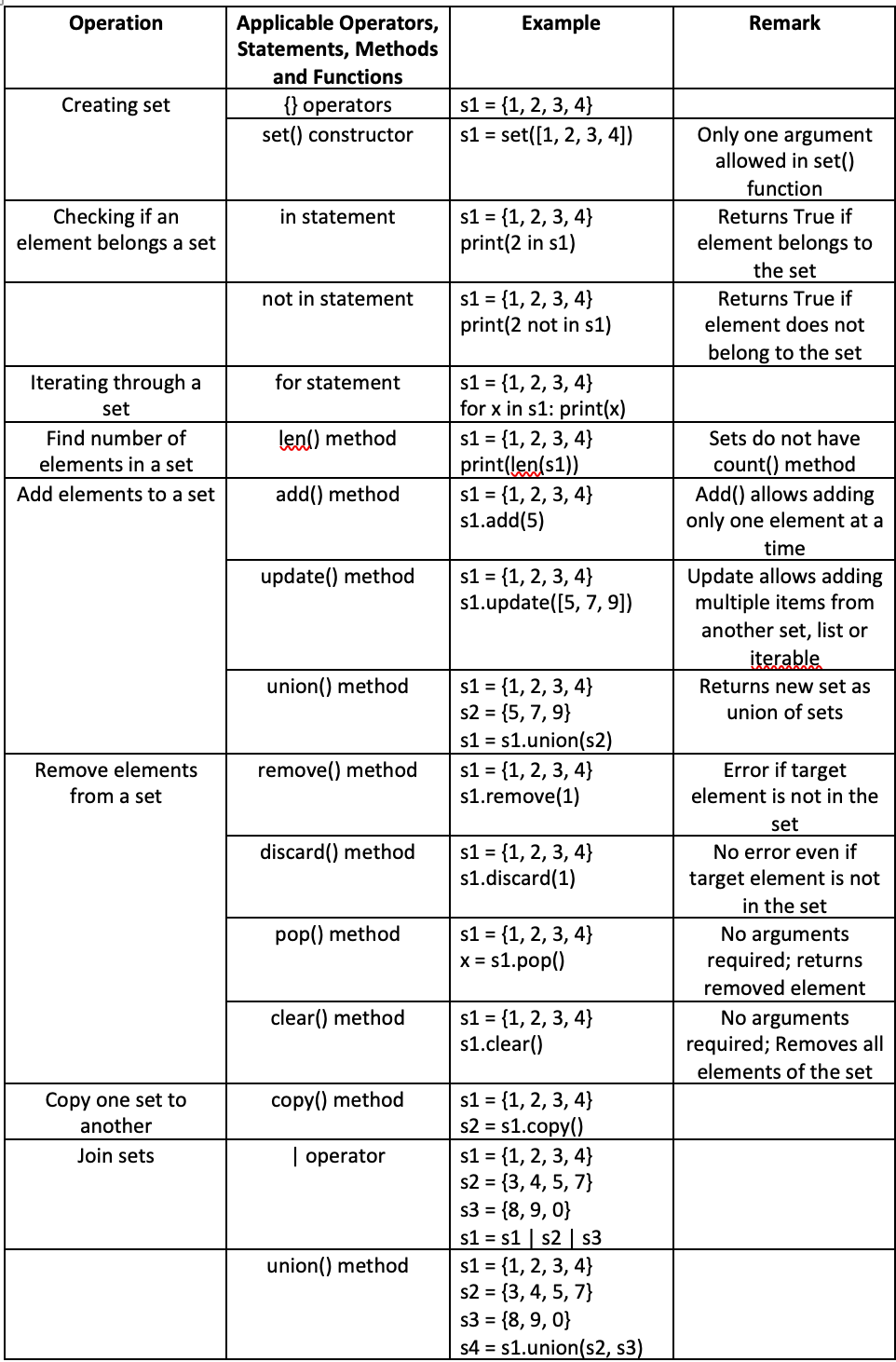
It’s important to note that the elements in a set have no order, which means that duplicate elements are not allowed. When applying the union method, if two sets have duplicate elements, only one copy of the duplicate will remain in the set.
Similarly, adding or updating duplicate elements to a set does not change it. A set always has unique elements.
Dictionaries
Dictionaries are a mutable unordered collection of key-value pairs. The keys in a dictionary can only be immutable and “hashable” (unique) objects. The values can include any arbitrary immutable or mutable objects.
A dictionary can be defined by using the dict() constructor or using a pair of braces ({}). These are valid examples of dictionaries:
d1 = {x:25, y:57, z:64}
d2 = {‘x’:25, ‘y’:57, ‘z’:64,}
d3 = {‘x’:25, 57:’y’, ‘z’:8.9j6.5}
d4 = dict(x=25, y=57, z=64)
d5 = dict((x, 25), (y, 57), (z, 64))
The elements in a dictionary are bound to their keys, which means the data values/objects stored in a dictionary can be accessed by their keys. These keys can include any hashable objects — unlike integer keys in lists.
Here’s an example of accessing the elements of a dictionary by a key:
d1 = {‘a’:25, ‘b’:57, ‘c’:92}
print(d1[‘a’])
If identifiers are used as keys or values, they must be defined objects. This example is not valid:
d1 = {a:25, b:57, c:92}
print(d1[a])
Here’s a valid example:
a = 0
b = 1
c = 2
d1 = {a:25, b:57, c:92}
print(d1[a])
The elements of a dictionary can also be accessed by the get() method. What’s ideal about the beauty of get() method is that it returns a None object if the key does not exist. Attempting to access a dictionary element by the non-existent key will result in an KeyError.
This is a valid example of accessing the dictionary elements by the get() method:
d1 = {‘a’:25, ‘b’:57, ‘c’:92}
print(d1.get(‘a’)) # Prints 25
print(d1.get(‘d’)) # Prints None
Dictionaries have these methods:
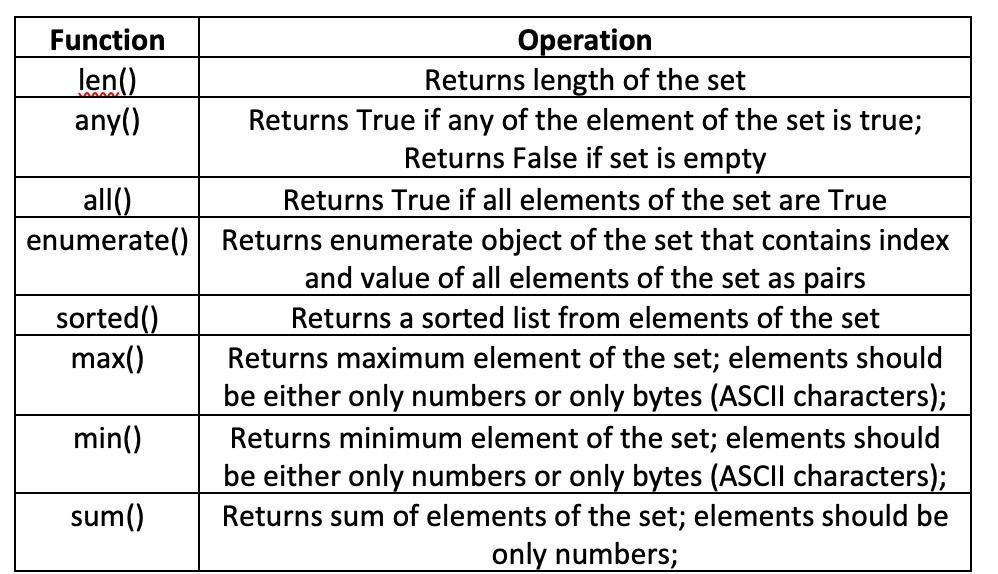
These methods can be applied on a dictionary using the dict_name.method_name syntax. Here’s a valid example of the dictionary methods:
d1 = {0:’a’, 1:’b’, 2:’c’, 3:’d’}
print(d1.get(0)) # Prints 25
print(d1.get(4)) # Prints None
print(d1.get(4, ‘Not Found’))
print(d1.keys())
print(d1.values())
print(d1.items())
d1.setdefault(4, ‘e’)
print(d1.items())
d1.update({5:’f’, 6:’g’})
print(d1.items())
d1.pop(6)
print(d1.items())
d1.popitem()
print(d1.items())
d2 = d1.copy()
d1.clear()
print(d1.items())
print(d2.items())
x = [0, 1, 2, 3]
y = ‘VAL’
d1 = dict.fromkeys(x, y)
print(d1.items())
print(d2.items())
The following built-in Python functions accept dictionaries as arguments:
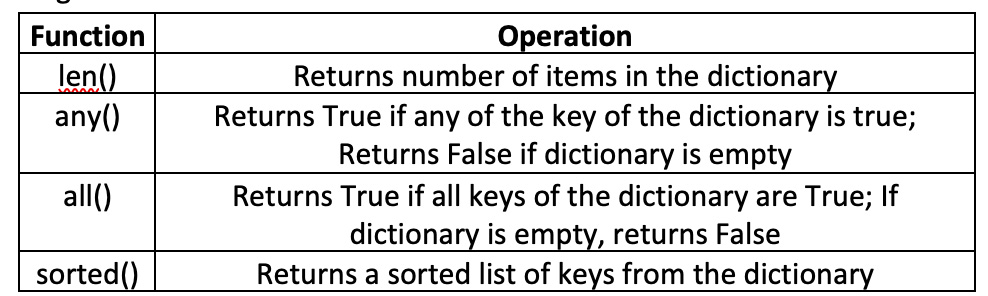 This is a valid example of using the functions on dictionaries:
d1 = {0:’a’, 1:’b’, 2:’c’, 3:’d’}
print(len(d1))
print(any(d1))
print(all(d1)) #Returns False as one of the key is 0
d1.pop(0)
print(all(d1))
d2 = {‘LED’: 40, ‘Seven Segment’:12, ‘LCD Display’:4}
print(sorted(d2))
print(sorted(d2, reverse=True))
def f(x):
return len(x)
print(sorted(d2, key=f))
This table summarizes the common operations on dictionaries when using operators, statements, methods, or functions:

Dictionaries can have duplicate values but never duplicate keys. The keys in a dictionary should always be immutable and hashable.
In the next tutorial, we’ll cover object-oriented features and design patterns in Python.
Filed Under: Python, Tutorials