Organic light-emitting diode or OLED displays have become essential for many embedded devices. OLEDs are considered one of the highest-quality displays to showcase device information.
Typically, embedded devices use single-screen graphics, but complex interfaces are required when there are several user interactions. For example, such interfaces might use menus or other graphical navigation. Adding a menu or multi-page graphic interface on embedded displays is a complicated task. Microcontrollers have limited flash memory and RAM, so they cannot host rich graphical interfaces.
The only alternative is animated text. Text can be animated to display menus and submenus, show multiple navigation screens, and host multi-screen user interfaces.
In this project, we’ll host a multi-screen interface on an SSD1306 OLED controlled using the ESP8266 microcontroller. MicroPython is the embedded firmware, so we’ll use a MicroPython script on the board to host SSD1306’s front end. The user interface will display a collection of screens with horizontal and vertical animated text.
Components required
1. ESP8266 x1
2. SSD1306 OLED x1
3. Dupont wires
4. Micro USB cable (to connect ESP8266 with computer)
Circuit connections
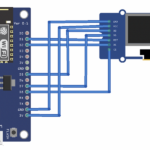
Connect the SSD1306 OLED with ESP8266 using SPI software.
- The OLED’s DC, RST, and CS pins connect with GPIO4, GPIO5, and GPIO15.
- The OLED’s D0 and D1 pins connect with GPIO14 and GPIO13.
- The OLED’s VCC and GND pins connect to the 3V out and GND of the ESP8266.
 Getting ESP8266 ready
MicroPython IDE must be ready to write, edit, and upload codes before continuing with this project. You can use uPyCraft IDE or Thonny IDE for software development. Ensure the MicroPython firmware is correctly uploaded to ESP8266. Learn how here.
Extending the ssd1306.py library for text animation
MicroPython firmware holds the library for the SSD1306 OLED. To work with the SSD1306 OLED using MicroPython, first learn how to interface SSD1306 with ESP32 and ESP8266. You’ll note that the Github link for the MicroPython source code has changed. The source code on Github also excludes the SSD1306 library. Fortunately, the library is still available in the source code on the official site.
This library is sufficient for interfacing the SSD1306 OLED with MicroPython’s ports, especially via the SPI port. Interfacing through the I2C port is no longer working properly.
The library must be extended to create text animations. The following methods should be added to the library’s class SSD1306.
def fill(self, col):
self.framebuf.fill(col)
def pixel(self, x, y, col):
self.framebuf.pixel(x, y, col)
def scroll(self, dx, dy):
self.framebuf.scroll(dx, dy)
def text(self, string, x, y, col=1):
self.framebuf.text(string, x, y, col)
The methods added to the SSD1306 class are called the same as in the MicroPython class FrameBuffer. The FrameBuffer class provides a pixel buffer that represents a pixel, line, shape, or text.
These FrameBuffer methods are used to extend the library….
- FrameBuffer.fill(c): fills the entire frame buffer with a specified color. The SSD1306 OLED driver uses this method to fill the OLED screen with monochromatic color.
- FrameBuffer.pixel(x, y[, c]): used to get or set the color of a specified pixel. The pixel’s position is passed as arguments ‘x’ and ‘y.’ If it’s used to set the color of the pixel, ‘c’ is the color that’s passed as an argument.
- FrameBuffer.scroll(dx, dy): used to shift the contents of the FrameBuffer by a given vector.
- FrameBuffer.text(s, x, y[, c]): used to write a string text on the OLED display. The text starts printing on the screen from the ‘x’ and ‘y’ pixel positions. The color of the text can be set to ‘c.’
The extended SSD1306 library has this source code:
Uploading the OLED driver using uPyCraft IDE
To use uPyCraft IDE to upload the OLED driver to ESP8266 or ESP32, connect the board to a computer using a USB cable. The MicroPython firmware must already be uploaded to ESP8266/ESP32.
Next, select the COM port. ESP8266/ESP32 is connected by navigating to Tools-> Serial. Choose your MicroPython board by navigating to Tools->board. Now connect the board to uPyCraft IDE by clicking the connect button.

Once the board is connected, browse boot.py from the device folder. To add the SSD1306 OLED driver, create a new file by navigating to File->New or clicking the New button.
Copy the SSD1306 OLED driver library code and save the file as ssd1306.py. Then, click the ‘Download and Run’ button to upload the library file to ESP8266/ESP32.

Creating screens
The user interface must be arranged as separate screens to add submenus or a multi-pane layout. This means different submenus or navigation panes open as separate screens on the display. Each screen can be thought of as a list of pixel rows where each row contains a text or shape.
The following code defines three different screens. Each screen is a list of rows containing plain text.
screen1_row1 = “Screen 1, row 1”
screen1_row2 = “Screen 1, row 2”
screen1_row3 = “Screen 1, row 3”
screen2_row1 = “Screen 2, row 1”
screen2_row2 = “Screen 2, row 2”
screen3_row1 = “Screen 3, row 1”
screen1 = [[0, 0 , screen1_row1], [0, 16, screen1_row2], [0, 32, screen1_row3]]
screen2 = [[0, 0 , screen2_row1], [0, 16, screen2_row2]]
screen3 = [[0, 40 , screen3_row1]]
Scrolling text horizontally
To scroll text horizontally from left to right (with the text entering the screen), the ‘x’ coordinate of each line of text is incremented by four pixels in a nested loop — until the loop variable exceeds the width of the LED.
def scroll_h_in(screen):
for i in range (0, oled_width+1, 4):
for line in screen:
oled.text(line[2], -oled_width+i, line[1])
oled.show()
if i!= oled_width:
oled.fill(0)
To scroll text horizontally left to right (with the text leaving the screen), the ‘x’ coordinate of each line of is incremented by the user-defined number of pixels — until the text disappears from the display.
def scroll_h_out(speed):
for i in range ((oled_width+1)/speed):
for j in range (oled_height):
oled.pixel(i, j, 0)
oled.scroll(speed,0)
oled.show()
To scroll text horizontally in and out, the ‘x’ coordinate of each line of is continuously incremented to let the text enter and then leave the screen.
def scroll_h_in_out(screen):
for i in range (0, (oled_width+1)*2, 1):
for line in screen:
oled.text(line[2], -oled_width+i, line[1])
oled.show()
if i!= oled_width:
oled.fill(0)
Scrolling text vertically
To scroll text vertically from top to bottom (with the text entering the screen), the ‘y’ coordinate of each line is incremented by four pixels in a nested loop — until the loop variable exceeds the height of the LED.
def scroll_v_in(screen):
for i in range (0, (oled_height+1), 1):
for line in screen:
oled.text(line[2], line[0], -oled_height+i+line[1])
oled.show()
if i!= oled_height:
oled.fill(0)
To scroll text vertically from top to bottom (with the text leaving the screen), the ‘y’ coordinate of each line is incremented by the user-defined number of pixels — until the text disappears from the display.
def scroll_v_out(speed):
for i in range ((oled_height+1)/speed):
for j in range (oled_width):
oled.pixel(j, i, 0)
oled.scroll(0,speed)
oled.show()
To scroll text vertically in and out, the ‘y’ coordinate of each line of is continuously incremented to let the text enter and then leave the screen.
def scroll_v_in_out(screen):
for i in range (0, (oled_height*2+1), 1):
for line in screen:
oled.text(line[2], line[0], -oled_height+i+line[1])
oled.show()
if i!= oled_height:
oled.fill(0)
The MicroPython script
Try the following code in main.py. This script creates three different screens composed of plain text and tests the horizontal and vertical scrolling of each one.
How it works
The script uses the functions added to the SSD1306.py library. It creates screens with plain text and alters the ‘x’ and ‘y’ positions of each line to move horizontally and vertically over the frame of the screen.
Applications
The code demonstrated here can be reused to host a multi-menu user interface on a MicroPython-powered embedded device or a multi-pane graphic interface.
Results
You may also like:

Filed Under: Microcontrollers, Python, Tutorials
Questions related to this article?
👉Ask and discuss on EDAboard.com and Electro-Tech-Online.com forums.
Tell Us What You Think!!
You must be logged in to post a comment.