A security alarm detects unauthorized entry into a home or building. In the past, these security devices simply triggered a loud siren when an intrusion was detected. As technology advanced, the systems were equipped with GSM modems to send an SMS alert to the home or building owner whenever an intrusion was detected.
One drawback of the GSM-based alarm system is there’s no guarantee the message was delivered or received. For example, the GSM modem might be unable to connect to a cellular network and send the alert. So, users might not be notified that their home or building alarm system is activated.
Fortunately, WiFi networks have become more widespread and reliable. It’s more than likely a home or office microcontroller can access the internet and web services to properly send a security alert message via SMS, email, WhatsApp, Telegram, or another communication app.
In this project, we’ll design an ESP32-based security alarm that will send notifications to a WhatsApp number upon detection of an intrusion. The system requires no additional hardware to do so. Instead, it uses the Whatabot API to send the alert messages to the Whatsapp number.
As a sophisticated WiFi development board, ESP32 easily connects to a WiFi network. The circuit for this project is so compact that it can be installed as a covert alarm, concealed anywhere in a home or office building. Or, if not used covertly, it can be integrated with a siren to activate an alarm upon detecting an intrusion.
Components required
1. ESP32 x1
2. PIR sensor x1
3. LED x1
4. 330Ω resister
5. Connecting wires/Jumper wires
Circuit connections
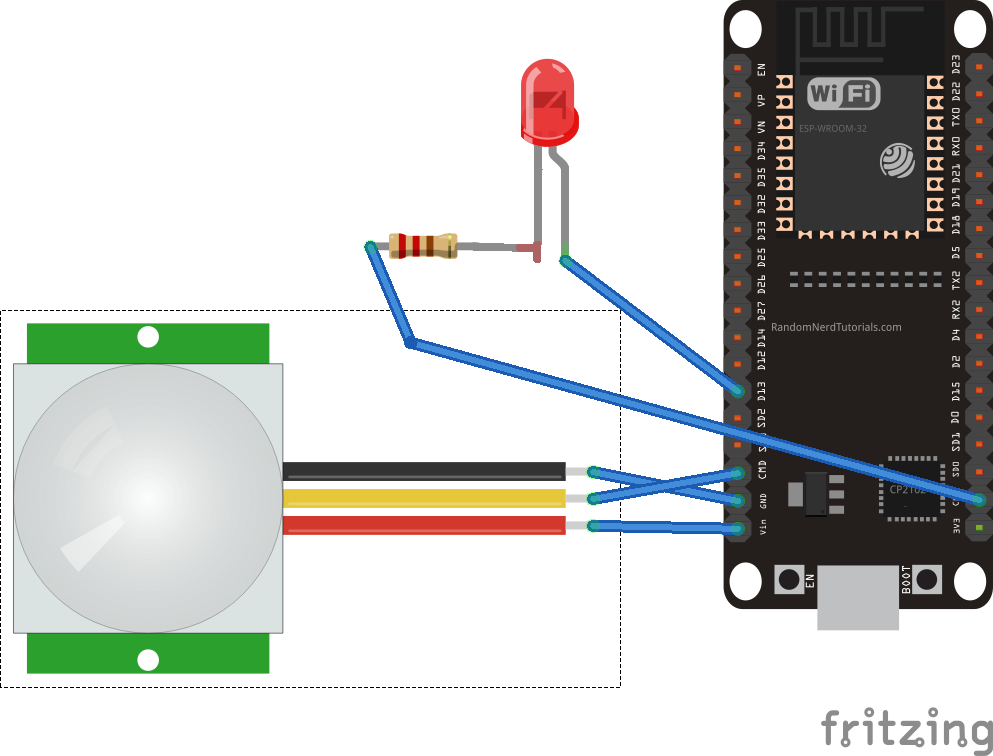
It’s necessary to interface a PIR sensor with ESP32 to build this security system. The PIR sensor has three terminals: VDD, output, and ground.
- Connect the PIR sensor’s VDD and GND terminals with ESP32’s Vin and GND pins, respectively.
- Connect the PIR sensor’s output terminal to ESP32’s D13 pin.
- Connect an LED with ESP32’s D14 pin to visually indicate the alarm’s activation. Or, instead of the LED, the ESP32 pin can also be connected to an electronic siren.
Whatabot API
We’ll use Whatabot API to send a security message to WhatsApp from ESP32 (learn how to do so here). Before going further, you must have a Whatabot API-activated account, a registered mobile number with the web service, and an API key for the account.
Arduino sketch
Once the circuit connections are complete, connect ESP32 to your computer and open Arduino IDE. you must have the ESP32 add-on installed to Arduino IDE or it will not recognize the ESP32 board. (To learn how to install the ESP32 add-on, here).
After ESP32 is successfully detected on Arduino IDE, select the port that ESP32 is connected with on your computer. Copy and paste the below sketch to the code editor. Save the code with a proper filename.
Remember, you must replace the SSID and NETWORK_KEY with the SSID and network key of your WiFi network in the code. Similarly, you will need to replace the MOBILE_NUMBER and API_KEY with your Whatabot-registered mobile number and API key in the code.
Lastly, compile and upload the code to ESP32.
How it works
The PIR sensor is interfaced with ESP32 to detect motion in a set area. If unauthorized movement is detected, the ESP32 signals an alarm. It also connects with an NTP server for the current timestamp.
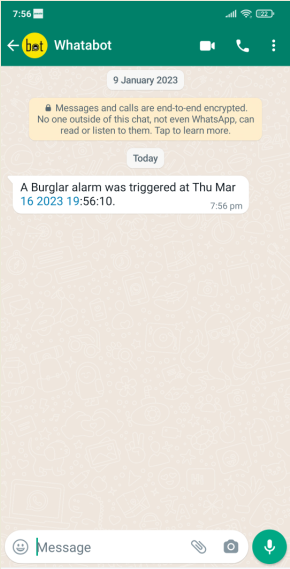
Next, it sends a WhatsApp message to the registered mobile number using Whatabot API. The WhatsApp alert contains the timestamp of the intrusion. Once the message is delivered, the alarm system rests for five minutes, so continuous notifications are not sent to the registered number.
The code
The sketch begins by importing the WiFi.h, HTTPClient.h, UrlEncode.h, and time.h libraries. The WiFi.h connects with the WiFi network. The HTTPClient library makes the API call via an HTTP request. The UrlEncode library encodes the link for the API call. The time library processes the timestamp retrieved from the NTP server.
The variables are declared to store the NTP server’s URL, GMT (offset in seconds), daylight (offset in seconds), and the current date (including time, hour, minutes, and seconds).
The variables are then declared to store the WiFi network’s SSID and network key. Next, the variables are declared to store the registered mobile number and API key from the Whatabot web service. The variables are declared for the PIR sensor and the LED’s pin assignments.
The user-defined function, sendWhatsappMessage(), is defined to deliver a text message that’s passed as an argument to the registered mobile number. This function stores the API URL as a variable.
An object of the HTTPClient class is instantiated. The HTTPClient object makes the API call using the API URL. The http.addheader() function is called to add a header to the HTTP request.
The response code is monitored by calling the http.GET() method. If the API call is successful, the WhatsApp message is delivered to the registered mobile number. If the call is unsuccessful, error messages are printed to the console (i.e., Arduino’s serial monitor). The HTTP request is terminated by calling the http.end() method.
The user-defined function, currentLocalTime(), is defined to retrieve the current timestamp from the NTP server. This function instantiates a timestamp struct, retrieving the timestamp by calling the getLocalTime() method. The members of the timestamp struct are accessed and aggregated in a formatted string. The function updates the current_time variable with the formatted string containing the current timestamp.
In the setup() function, the baud rate for serial communication is set to 115200 bps to log the console messages. The pin connected to the PIR sensor’s output terminal is set as a digital input. The pin connected to the LED is set as zn digital output and is pulled LOW by default.
The WiFi network connection is initiated by calling the WiFi.begin() method. The local time settings with the NTP server are configured by calling the configTime() function.
In the loop() function, the state of the PIR sensor’s output pin is polled. If the output from the PIR sensor is HIGH, the alarm is activated by pushing the LED pin to HIGH.
The current timestamp is retrieved from the NTP server by calling the user-defined currentLocalTime() function. A WhatsApp message is sent to the registered mobile number, signaling an intrusion (with the timestamp) by calling the user-defined WhatsappMessage() send function. Otherwise, the alarm is silent.
Results
You may also like:



Filed Under: Electronic Projects, Sensors, Tutorials, Video
Questions related to this article?
👉Ask and discuss on Electro-Tech-Online.com and EDAboard.com forums.
Tell Us What You Think!!
You must be logged in to post a comment.