What is MP3?
The MP3 format is a compression tool to reduce the size of the song of without noticeably affecting the quality of the sound. Every day hundreds and thousands of MP3 file are shared and downloaded. With this format a 32 mega byte song is compressed to about 3MB which allows fast downloads and storage of hundreds of songs on our computers hard disk. It has changed the traditional ways which people used to find, listen and store music.
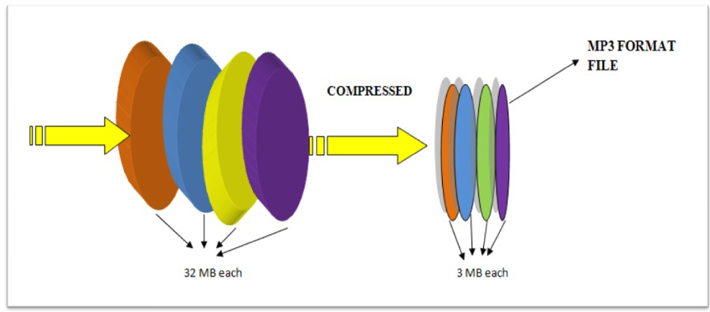
Fig. 1: Figure Showing Working of MP3 Format
Need of MP3 format
Do you know if we stretch out all the data stored on a single compact disc in the straight line it would be over 4 miles long. Surprised! Ok let’s do the math to understand better.Music in a CD is sampled at 44,100 times per second. The samples are 2 bytes (16 bits) long. So the total sampling bits would be equal to 44,100 times/sec* 16 bits which equals 705600 bits/sec. Also, separate samples are taken for left and right speakers so the total sampling bits would be 705600 bits/sec*2 equals 1.4million bits per second.
Let’s break this down: If an average song is three minutes long i.e. 180 seconds, then the average song on a CD consumes about 32 million bytes (or 32 megabytes) of space. All this data is stored in the CD is uncompressed with high resolution. When the songs of this length are stored on our desktop or mobiles, it will occupy a high amount of space.In another situation where we want to download songs from internet, even with a high-speed cable or DSL modem, it can take several minutes to download just one song of audio quality and if you are the lucky one with slow internet connection it will fell like eternity by the time song is downloaded.The solution to both these problem was MP3 format which compressed the files and made it easy to store and download them.
But in this entire picture of MP3 format, the puzzling question is how they are able to compress the file without hurting the quality of songs?
We all use .jpg and .gif files that compresses the images or the zip files that compress text all the time. The same concept is used in audio compression. Both these methods make use of compression algorithms.
Compression algorithm- is a technique used in computer science that encodes information using fewer bits than the original representation. It is just like a telegram where unnecessary words are removed without losing the meaning of the message.
Similarly, the compression algorithms are developed for audio that removes the certain parts of the audio without hurting the quality of music. To make a good compression algorithm for sound, a technique called perceptual noise shaping is used. It’s “perceptual” partly because the MP3 format uses characteristics of the human ear to design the compression algorithm.
Let’s understand the concept of perceptual noise shaping clearly.
Perceptual Noise shaping
Perceptual Noise shaping- Perceptual noise shaping is a technique used to develop compression algorithms that converts audio files to MP3 files. The figure below presents three different scenarios with prospect to our human ear.
Perceptual noise shaping model
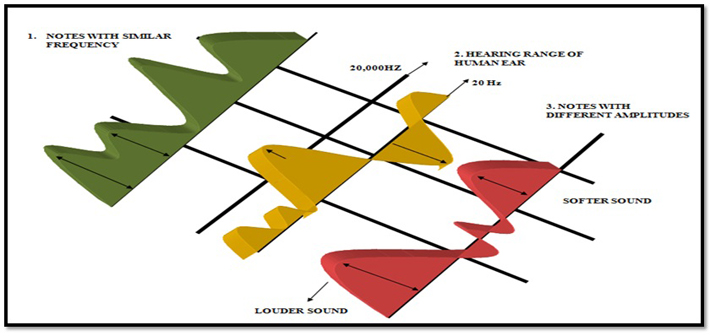
Fig. 2: Image Showing Perceptual Noise Shaping Model
The explanation below clears the picture how the technique of perceptual noise shaping is works.
1.Some sound frequencies can be heard by human ear better than others. For example if two notes are very similar and close together as shown by two pink arrows. Our brain will perceive only one of them.
{C 2. There are some frequencies that can’t be heard by a human ear because our hearing ranges only from 20 Hz to 20,000 Hz. All the frequencies above and below this range are not heard by human ear. The blue arrow lies below 20 Hz so it will be removed from the audio.
{C 3. A Louder sound will drown out the softer sound if they are played simultaneously. When a drum and a flute are played together as shown by orange arrows, our brain will be more focused on beats of the drum as compared to flute. Using these three facts entire compression algorithm is designed which is known as psychoacoustics model to eliminate certain parts of the song without significantly hurting the quality of the song for the listener. Compressing the rest of the song with well-known compression techniques shrinks the song considerably — by a factor of 10 at least. When you’re done creating an MP3 file, what you have is a song with reduced size and of acceptable quality.
Putting all the pieces together let’s see what exactly happen when a normal file is converted to MP3format.
MP3 Working Model
MP3 FORMAT WORKING MODEL
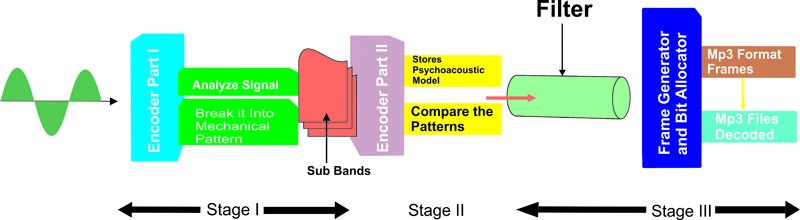
Fig. 3: MP3 Format Working Model
Working of MP3 format
MP3 is not a method of digital recording but it is a process in the middle that removes the irrelevant data from the existing recording. So, the first requirement for creating an MP3 file we need an audio file. The audio to be encoded will typically be 16-bit and sampling frequencies of 32 kHz, 44.1 kHz and 48 kHz. After we have audio file the process of MP3 conversion starts with the MP3 encoder. An MP3 encoder is a software that is developed using MP3 codec i.e. compression/de-compression algorithm to make MP3’s. The encoder works in stages.
Stage 1-.MP3 encoder accepts bits at regular intervals. These bits are analyzed and broken down into mathematical patters using a variation of mathematical algorithms like “Fast Fourier transformation” or “.Discrete Cosine Transformation”. An audio signal will have mixture of very different sounds. It might contain a low-frequency sound like bass drum or high frequency sound like ride cymbal or vocals that lies somewhere in between them all at once. As we know MP3 needs to separate irrelevant sounds from the relevant sound. This is why the algorithms divide the audio signal into 32 parts with different kinds of sounds according to their frequency. These are known as sub bands.
Stage 2- In the stage 2 of MP3 encoder, these sub bands are compared to the Psychoacoustic model developed using features of human ear as explained above. As the audio signal has already been separated it is possible for the MP3 encoder to sort different kinds of sounds according to their frequency content — and so to prioritize some over others, according to the requirements of the psychoacoustic model.
If, in the above example, some of the low-frequency sounds of the bass drum were deemed to be irrelevant, the encoder could use fewer bits of data to encode the sub-bands containing those frequencies, thereby leaving more bits free to encode the sub-bands carrying some of the frequencies from the vocal — which might be more ‘relevant’ to a listener, and thus less forgiving of distortion and noise caused by lower bit rate encoding.
Stage 3– After comparison they are passed through the filter which removes the irrelevant sounds. The sub-band sections left behind are grouped together into ‘frames’. The encoder examines the contents of these frames and uses this information for last stage of the process bit allocation. The encoder decides how many bits of data should be used to encode each frame.
A simple structure of an MP3 frame is shown below.
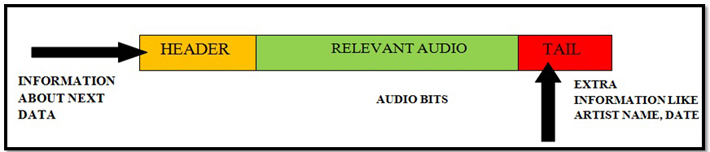
Fig. 4: Image Explaining MP3 Format Structure
Each frame starts with a header that contains extra information about the data to come. In some encodings, these frames may interact with one another. For example, if one frame has leftover storage space and the next frame doesn’t have enough, they may team up for optimal results. At the beginning or end of an MP3 file or tail that carries extra information about the file itself, such as the name of the artist, the track title, the name of the album from which the track came, the recording year, genre, and personal comments may be stored. This is called” ID3″ data, and will become increasingly useful as your collection grows.
Decoding
When encoding ends all the frames are saved together and then can be read by an MP3 decoder. An MP3 decoder performs a simplified reverse form of the encoding process. The sub-band frames are‘re-synthesized’ into time-domain sections and joined up to recreate an audio stream.
Filed Under: Articles, Featured Contributions
Questions related to this article?
👉Ask and discuss on EDAboard.com and Electro-Tech-Online.com forums.
Tell Us What You Think!!
You must be logged in to post a comment.