To make the audio-visual entertainment experience as natural as possible is one of the major targets of electronic entertainment companies. The journey of televisions from Black & White to plasma and now to LEDs is a fair example of it. High definition digital recording has been made possible through DVDs and Blu-rays. However, to transmit the same quality of high definition data to the display, high quality interface is needed. In pursuit of this life like quality, electronics giants of the world: Sony, Thomson, Panasonic, Toshiba, Phillips and Hitachi, made a joint research group that has given one of the best ways to transmit and access video and audio, HDMI.
HDMI stands for High Definition Multimedia Interface. A HDMI cable is a single cable that serves as link for audio as well as video applications. For a video recorded in high definition, a standard Audio-video component cable gives an output of 480 pixels per inch. On the other hand, HDMI connectors give at least a 720 pixel/inch output, thus giving a more rich and lively video that can recreate the actual scene with more accuracy. There are similar enhancements in audio side too (2.1 channel sound and above). This means that a single HDMI cable can replace up to 11 analog signal cables not only in aspects like reduced clutter, but in bandwidth, content transmission and presentation quality too. HDMI is constantly worked upon and improved by HDMI Consortium, which also handles certifying HDMI cables.
Outer Structure
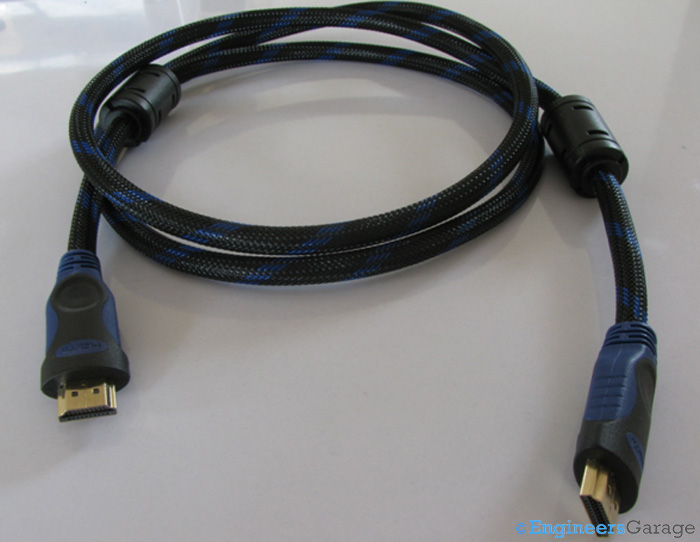
Fig. 1: Image Showing HDMI Connector Cable
The image above shows a conventional HDMI connector cable. HDMI cables are relatively thicker than a normal audio/video connector owing to their construction. The above cable is cylindrical in shape; however, flat HDMI cables are also getting popular.
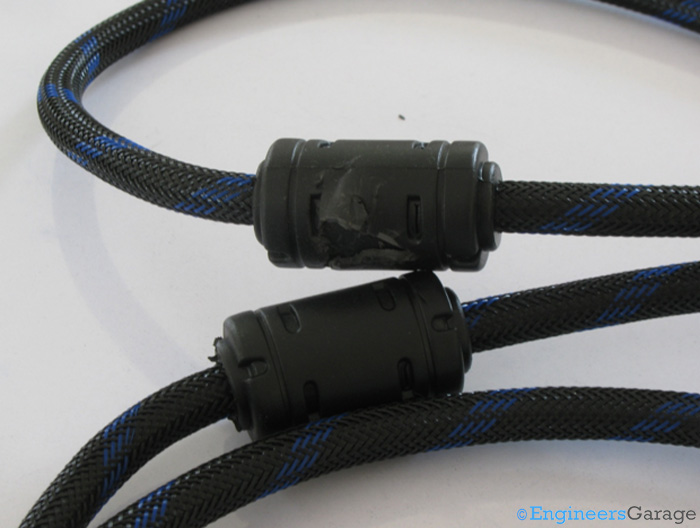
Fig. 2: Ferrite Beads Casing of HDMI Cable
The thick casings house ferrite beads that suppress high frequency EMI signals and noise when the signal is transmitted. Thus, radiations from nearby power cables or other HDMI cables are significantly reduced by using these ferrite beads. These are a type of electronic choke that work by dissipating high frequency currents in the form of heat, unlike inductive chokes which release the energy later.
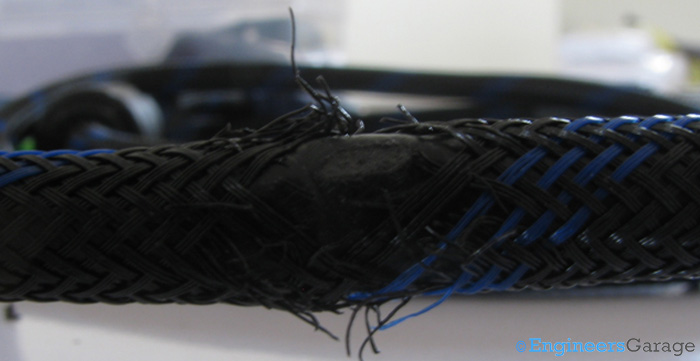
Fig. 3: Image Showing the Braided Fiber Mesh that Covers Plastic Jacket that, in Turn, Encloses the Transmission Wires of HDMI Cable
The plastic jacket housing and protecting the transmission wires is covered by a braided layer of fiber mesh. Made of a high density polymer, this layer is heat and flame retardant. It helps prevent abrasion of cable and increases the longevity of the cable.
HDMI Connectors
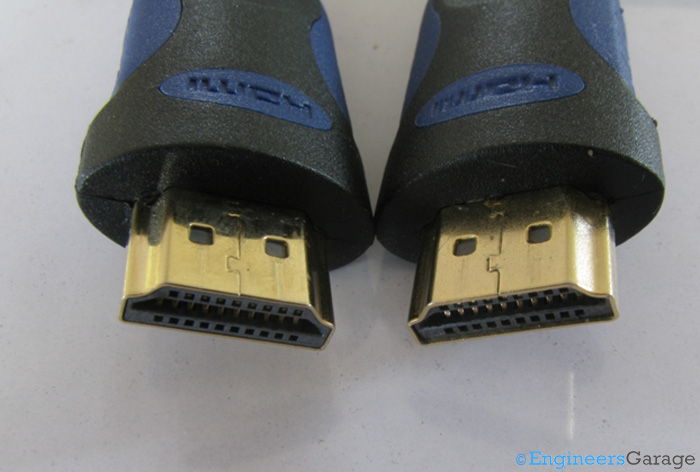
Fig. 4: Connectors at End of HDMI Cable
Identical pair of female connectors is placed at the ends of the HDMI cable. In order to meet stringent quality requirements while transmitting the digital signals, the entry points into the cable, i.e. the connectors are Gold plated from the section that connects to the HDMI compliant devices. Gold is the choice simply because it is one of the best conducting elements and does not tarnish easily. The same quality is to be maintained when the connectors transmit the signal to the wiring section. Hence, the section connecting them is plated with nickel. (But it is again a choice of construction and if the requirements can be met with other coatings like simple copper, that should not be a problem either, especially at short lengths.)
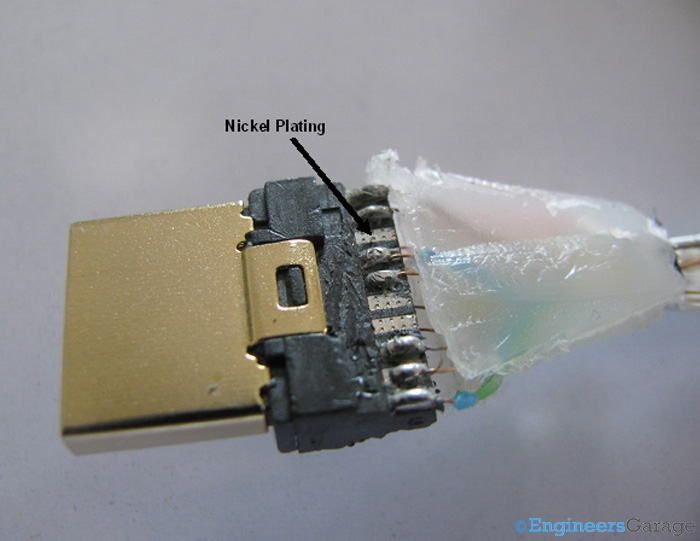
Fig. 5: Type A 19-Pin Connector
Various types of HDMI connectors are available so that majority of multimedia devices can enjoy high definition content. The image above details with a Type A connector which was introduced with the 1.0 version of HDMI. It is a 19 pin connector and is used to connect media players, laptops, gaming consoles etc to the display. There are 4 more types of HDMI connectors available: type B, C, D, E. Type B and C were introduced in 1.3 version of HDMI while D and E were introduced in 1.4 versions. But it should be remembered that connectors do not define which version of HDMI does the cable supports.
Type B HDMI connectors have 29 pins and are designed for Wide Quad Ultra Extended Array which is one of the most high resolution futuristic displays. Type C is a mini HDMI connector and has 19 pins just like the A type. It is used in smart phones and tablet computers.Type D connectors are micro connectors and have 19 pins, but they also are designed to serve few smart phones and cameras. These connectors are 50% percent smaller than the type C connectors, thus are more suited more devices which are small and have space at a premium. Type E connectors feature an automotive connection system. As the name suggests, this system is designed for accessing media content in a vehicle.
With multiple types of HDMI connectors being introduced in new versions, backward compatibility has been ensured so that no HDMI cable gets obsolete due to any new specification being released. This means that the cable which came bundled with a HDMI 1.3 compliant device will work seamlessly with a HDMI 1.4 compliant device too, since it is just a passive component. There are only slight chances of the older cable not supporting the new specification conformance standards, but the possibility cannot be completely waived off. Manufacturers often use this ignorance of the customer to make them buy new cables with a new device, when the older cable would have worked just fine.
In a recent major change, HDMI Forum has removed the version specification as lot of misguiding and confusions were created. The HDMI cables can be now specified into 5 types that are distinctly defined on basis of their characteristics. These are Standard HDMI Cable, Standard HDMI Cable with Ethernet, Automotive HDMI cable, High Speed HDMI Cable and High Speed Cable with Ethernet. Most of the differences are in speed and bandwidth capabilities and the Standard HDMI cable is the most frequently encountered category of these.
Pin Layout
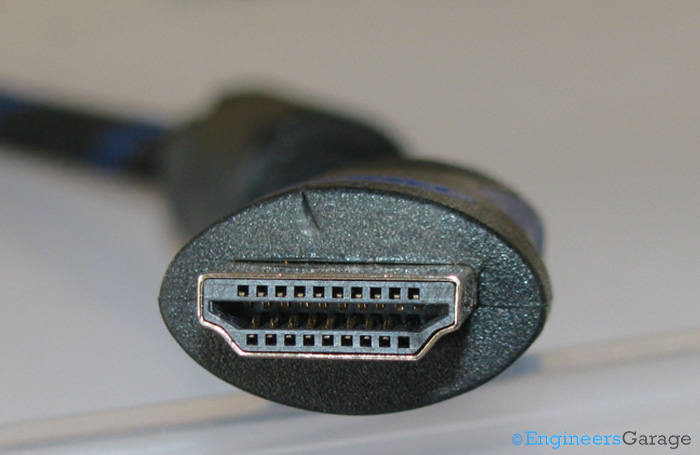
Fig. 6: Image Showing 19-pin Configuration at Connector End
19 pins configuration is used in this (Type A) HDMI connector. In the picture shown above, we can notice that connector has pin outs on its inner walls. The pins of upper section are numbered 1, 3, 5…19 while that of the lower section would be 2, 4, 6…18. If the connector is flattened into one plane, the pin arrangement is such that the lower pins will fit in snugly between the upper pins and the numbering will be like 1,2,3,4,5…19. The pins can be identified on the basis of their function as in the table below.
|
S.No
|
HDMI Pin Number
|
Function
|
Additional Comments
|
|
1.
|
Group A (Pins 1-3),
Group B (Pins 4-6),
Group C (Pins 7-9)
|
These pins aid in Transition Minimized Differential Signaling (TMDS). Every group for TMDS signals has 3 pins out serving as positive (1, 4, 7), negative (pins 3, 6, 9) and ground (pins 2, 5, 8).
|
This technology increases up the speed for signal transmission as well as minimizes the interference between the signals. The TMDS signals can carry visual and audio data simultaneously.
|
|
2.
|
Group D (Pins 10-12)
|
This group of pins aids in syncing the signals sent in the TMDS so that information is transferred in the best and precise manner even if the rate of transmission is high.
|
|
|
3.
|
Pin 13
CEC(Consumer Electronics Channel)
|
Serves as a communicator between the connected devices, thus acting as a bi-directional control bus.
|
It is an optional feature in HDMI configurations
|
|
4.
|
Pin14
|
Kept as spare for future purposes
|
|
|
5.
|
Pin 15
DDC
(Display Data Channel)
|
Utilized to make the output HDMI device send data to input HDMI device.
|
Through this, the devices are synced in terms of video and audio output format.
|
|
6
|
Pin 16
EDID
(Extended Display Information Data)
|
Used to sync the source and destination device in terms of output quality.
|
For instance, display should be 1080p or 720p and audio should be a 2.1 or 5.1 sound etc. is all synced between the devices through EDID.
|
|
7
|
Pin 17
|
Provides a shielding for DDC and CEC channels by acting as ground for unwanted signals conveyed through them
|
|
|
8
|
Pin 18
|
Responsible for supplying power to the HDMI cable which is 5V.
|
|
|
9
|
Pin 19 (Hot Plug Detect)
|
Facilities simple plug and play facilities for the user.
|
|
Table 1: Table Showing Functions of each of 19 Pins of HDMI Cable
Wiring Section & Conclusion
Wiring section
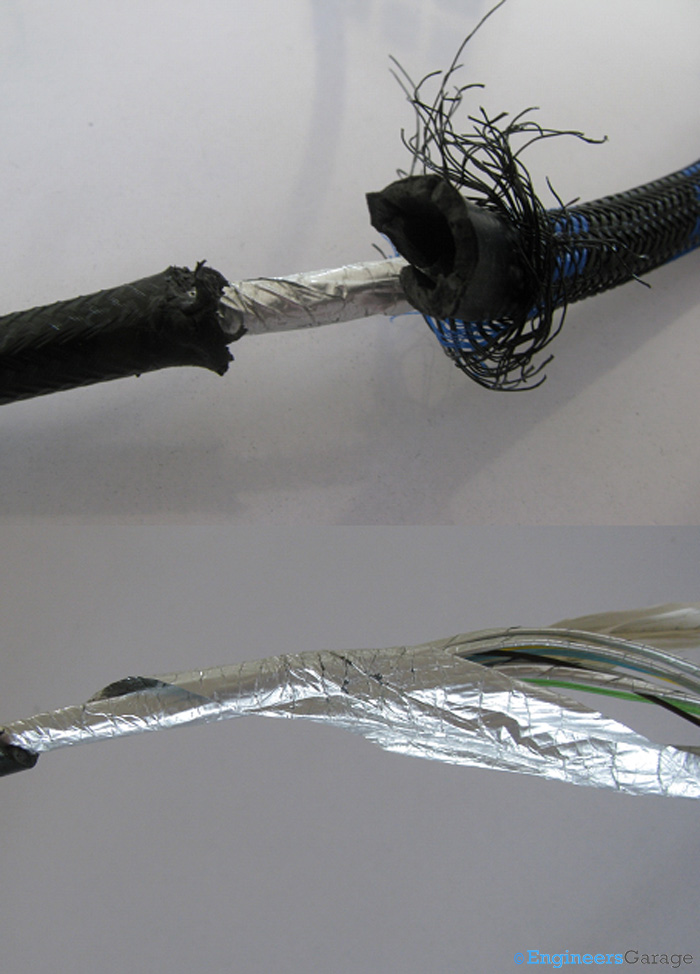
Fig. 7: Image of Thick Plastic Covering and Aluminium Mylar Layer Under which Copper Wires of HDMI Cable Lie
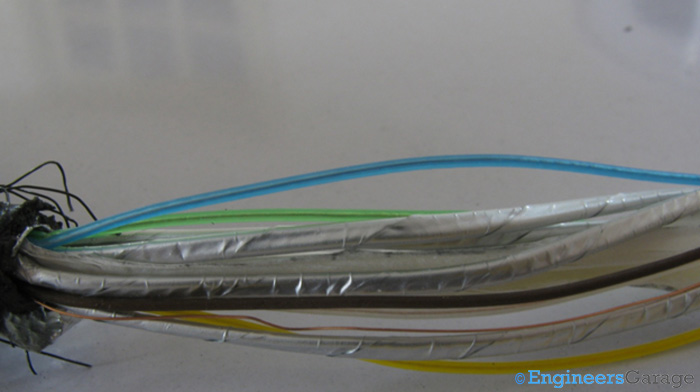
Fig. 8: Image of HDMI Cable Wires
Images above show the thick plastic covering and Aluminum Mylar layer under which the wires of the cable are laid. Among the total 19 wires, there are three sets of 3 cables each for TMDS and one for TMDS clock. These are multi-stranded shielded twisted pair cables and are covered in separate aluminum sheaths. In all, there are 3 layers of protection for most of the wires.
There is no color coding in the internal wires, thus making the connections easier. However, care should be taken while soldering, that wires terminate on the same pin number of the other connector from which it started. Read more about soldering and learn some exciting tips on it. Wires are made of copper and in order to provide high speed communication. Nitrogen injected dielectric layer is used to prevent oxidation of these wires to improve longetivity.
Length forms a critical aspect of HDMI configuration too and only certain lengths are HDMI certified. The one taken here is 1.5m HDMI cable. Longer cables of 5m and above are also available. As the internal wiring of HDMI cables requires high grade materials, the cost of the cable keeps on increasing with length. HDMI cables, like any other passive connecting lines face a constraint of maximum run-length which means that signal starts weakening after travelling a certain distance through the cable. Although there is no official limit on length of the cable and is subject to conformance testing and certification, longer HDMI cables are avoided because of high signal attenuation. Even though data transmitted in HDMI is digital signals, the high quality requirements necessitate requirement of boosters for longer runs like 50 feet and above. Speculations are there that using optical fibers would reduce the attenuation considerably and will give a higher run length to the cable.
Conclusion
HDMI cables stand as one of the most efficient present day solution for high quality video as well as audio applications. Many of the entertainment giants such as Columbia Pictures and 20th Century Fox support HDMI compatibility and Direct-to-Home TV broadcasters such as Echostar and Hathway have their set-top boxes loaded with HDMI outputs. Gaming consoles like X-Box, PlayStation and soon to be launched Ouya also promote HDMI outputs. Thus, HDMI is a widely accepted standard in the entertainment industry, the market and is widely preferred by users all over the world.
As an economic solution, HDMI is one of the few features available in computers, televisions, disc players and even mobile phones. With inclusion of more enhancements like Ethernet and 3D, HDMI is definitely making rapid strides to becoming a versatile interface standard of the world.
Filed Under: Insight
Questions related to this article?
👉Ask and discuss on EDAboard.com and Electro-Tech-Online.com forums.
Tell Us What You Think!!
You must be logged in to post a comment.