Electronics makers often build mobile apps to control electronic devices. These are typically WiFi or Bluetooth-connected devices controlled by a smartphone. Several software frameworks and tools support the development of native or cross-platform mobile apps for iOS and Android. Some popular frameworks include React Native, Flutter, Xamarin, Swiftic, Ionic, Apache Cordova, Jquery Mobile, and Native Scripts.
However, these software frameworks require mobile apps to be coded from scratch. This takes time, knowledge, and a certain level of expertise. An alternative to coding is to use a visual mobile app that’s part of an IoT platform. Users simply need to figure out which app is ideal for their device and how the different elements operate and can interact with electronics.

These visual tools are fairly primitive but are sufficient for building apps for IoT, home automation, and WiFi or Bluetooth-connected electronic projects that can be controlled via a smartphone. They allow programmers to build the user interface and define the app’s functionality.
In this article, we’ll explore some popular visual mobile app development tools for electronics makers.
The top visual mobile app development tools
1. MIT App Inventor
2. RAD Studio
3. Cayenne
4. Blynk
5. Thingsboard
6. Appy Pie
7. Zoho Creator
8. BuildFire
9. Adalo
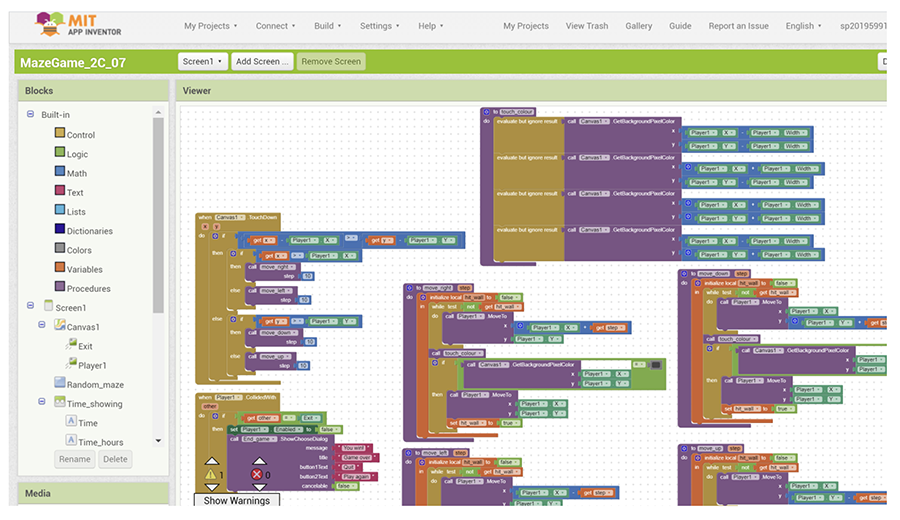
MIT App Inventor is a visual mobile app development tool initially developed by Google and now maintained by the Massachusetts Institute of Technology (MIT). It’s a blocks-based tool for building fully functional apps for iOS and Android. The tool is free and open-source, available under dual licensing from Apache License 2.0 and Creative Commons Attribution Sharealike 3.0. The source code for the software is included with the Apache License 2.0.
Building a mobile app using MIT App Inventor is extremely easy and intuitive. A beginner can understand how it works within 30 minutes. The App Inventor Companion must be downloaded to test the app. The app builder is available as a web-based platform, but there are also computer-based emulators available for Mac OS, Windows, and Linux that can test the mobile app without a mobile phone or tablet.
With MIT App Inventor, it’s possible to build apps that rely on wireless sensor data for:
- For home automation or IoT projects
- To control internet-activated devices and electronic circuits
- That navigate maps
- To build mobile games
- Apply artificial intelligence to textual data, images, and audio.
More than 22 million apps are currently in use built using MIT App Inventor. More than 400K users access the platform for mobile app development every month.
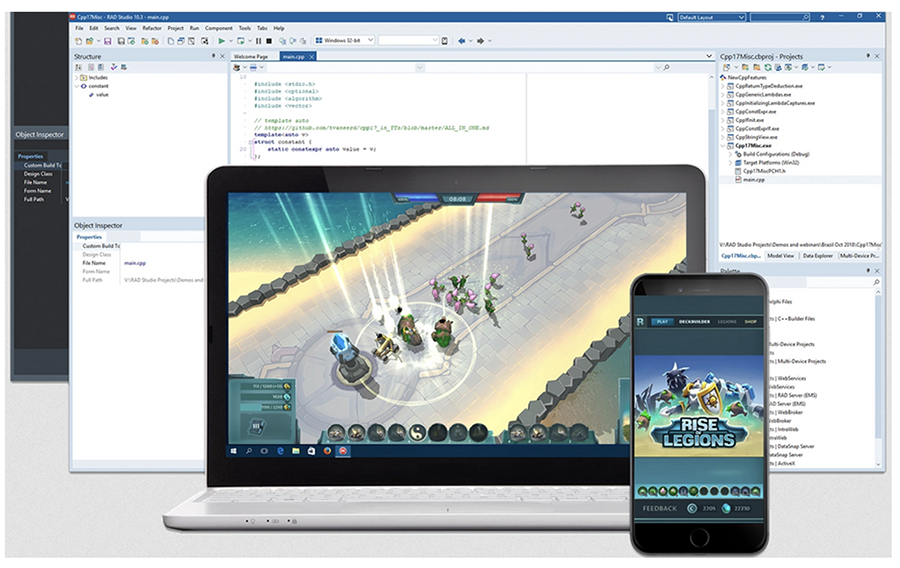
RAD Studio from Embarcedero is a popular software framework for building cross-platform applications for mobile and desktop. Users can build an application that runs on iOS, Android, Mac OS, Windows, and Linux.
This tool provides a low-code development environment through its VCL and FireMonkey wizards. The wizards allow for responsive user interfaces for mobile and desktop through visual tools with support for multiple screens. ARM M1 and M2 Apple Silicon simulators can test the mobile apps built on RAD. Note, this is a visual app builder, but it still requires knowledge of C++ or Delphi to build a mobile app, but it’s much easier than coding entirely from scratch.
The platform supports Android 32 APIs, AndroidX libraries, building APIs, and multiple classes.dex files. For iOS and MacOS, there’s a 64-bit ARM compiler. The tool supports VCL apps for Windows 11 with WinRT APIs and HighDPI features. For Linux, the platform facilitates server and FireMonkey GUIs. There’s also support for 20+ databases, including MySQL, PostgreSQL, SQLite, SQL server, and MongoDB. The framework allows for using REST services and AWS components through HTTPS and REST client libraries.
There’s a single code base for iOS, Android, MacOS, Windows, and Linux. This is one visual environment that lets users access source code and build native mobile apps for Android and iOS. RAD Studio is ideal for controlling most DIY IoT and electronic devices. A mobile application of almost any complexity with a cloud service or platform can be easily built on RAD Studio. This is an excellent platform for high-end IoT applications involving databases and web services through mobile applications.
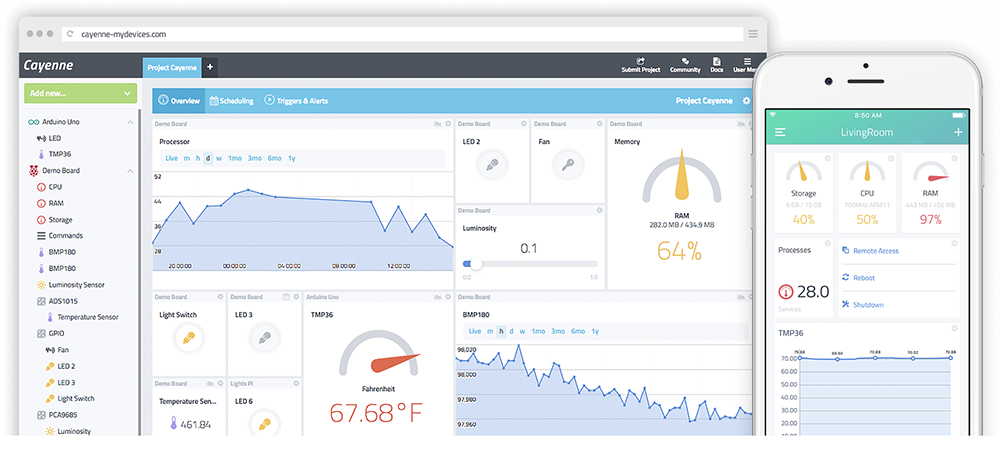
Cayenne from myDevices claims to be the world’s first drag-and-drop IoT project builder. The platform allows for complete IoT solutions that are built for any device or connection. It easily controls sensors and binary devices through any microcontroller or single-board computer.
Cayenne is a web-based platform with a customizable dashboard, triggers, alerts, asset tracking, MQTT API, LoRaWAN, remote monitoring, data visualization, visual coding, and IoT cloud. It features an IoT-ready program that readily connects microcontrollers, gateways, and sensors.
Registered users can build a customized dashboard with drag-and-drop widgets to visualize, control, and manage connected devices. The dashboard can be accessed through either web or mobile applications. Depending on the hardware features and functions, each device, sensor, or gateway can have multiple widgets on the dashboard.
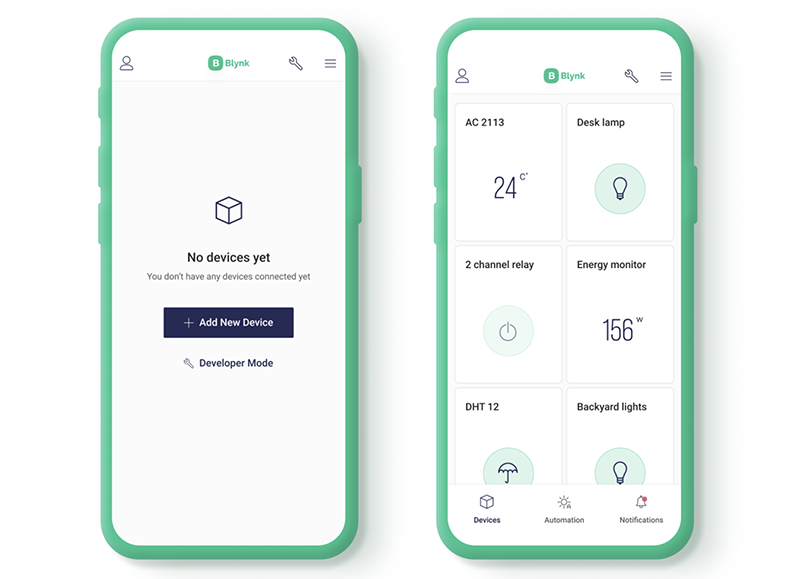
Blynk is an IoT platform with iOS and Android apps for controlling Arduino, ESP, Raspberry Pi, and other microcontrollers. It’s a fully integrated suite of IoT software, including Blynk.App, Blynk.Cloud, Blynk.360, and Blynk.Edgent. The platform can control and manage connected devices at any scale.
Users must download the Blynk app for iOS or Android to control electronic circuits or connected devices through mobile app. The app can be used to visualize sensor data and send/receive commands to connected devices and binary appliances. Register an account on the Blynk platform and begin building a customized dashboard with drag-and-drop widgets.
The Blynk app connects with a Blynk server to access connected devices through the Internet. The server could be Blynk Cloud or a Blynk server operating locally. Accessing thousands of devices through one app and one server is possible. A Blynk library can configure a connection over WiFi, Ethernet, Bluetooth, or cellular networks to communicate with hardware platforms like Arduino, Raspberry Pi, ESP, etc.
Blynk is a low-code platform but does require writing some code for functions. It’s not ideal for beginners and is designed for building high-end or complex IoT projects. Consider Cayenne instead for a no-code mobile app development with a more straightforward user interface design.
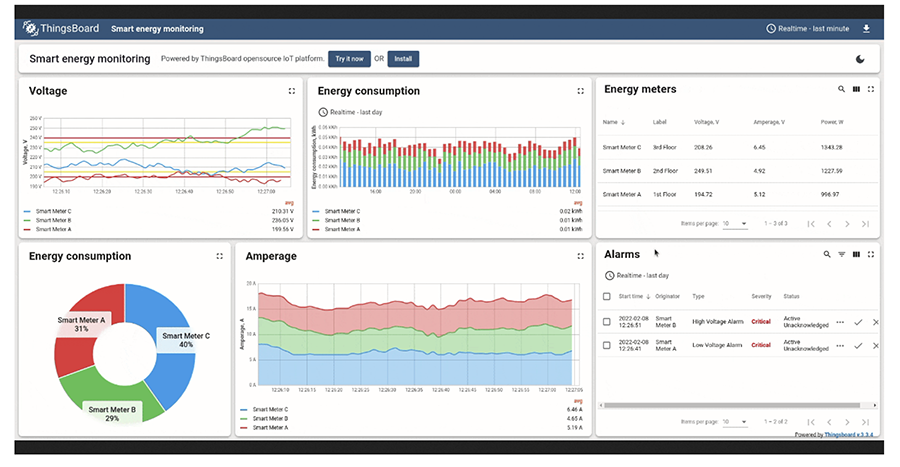
Thingsboard is a free, open-source IoT platform that enables connected device management, data collection, and visualization for IoT solutions. The platform allows real-time IoT dashboard building for remote device control and data display. The dashboard features more than 30 drag-and-drop widgets to control and manage devices. The database support includes many SQL, NoSQL, and hybrid options.
Thingsboard lets users create complex rule chains to process data communicated through connected devices. The data communication over the Internet is encrypted for the HTTPS and MQTT protocols. There’s also support available for device authentication and credentials management. The server-side application uses RPC commands to manage and control devices.
Some of the key features of this platform include telemetric data collection, data visualization, multi-tenancy, horizontal scaling, IoT rule engine, device management, asset management, alarms management, safety, and encryption. Thingsboard supports micro-services for clustered devices enabling rapid scalability.
Appy Pie is a no-code AI program for building cross-platform mobile applications. It features drag-and-drop elements, pre-built templates, and customizable color themes for web and mobile applications. The user interface for Android, iOS, or a cross-platform mobile app can be built by dragging and dropping the graphical elements of choice. Thanks to the no-code AI workflow, functions can be added by creating triggers for the actions. Appy Pie is ideal for beginners.
Zoho Creator is a low-code visual mobile app development environment. The platform offers several intuitive and attractive drag-and-drop elements to build any web or mobile application. Users can create a graphic user interface using wizards and automate processes visually. Adding AI to the app functions visually without writing any code is also possible.
Users can generate their own data models and visualize their structures and relationships. The data can be visualized from different sources using cross-functional analytics. Zoho Creator is a general-purpose visual mobile app builder. It can also be used to build professional apps for IoT and connected devices with minimum coding.
BuildFire is a visual mobile app development tool for simple mobile apps for iOS and Android. It offers several drag-and-drop features and pre-built templates enabling a rapid user interface design. The templates can be customized and pre-viewed in real time.
Adalo is a no-code platform for building mobile apps for iOS and Android. It features more than 25+ drag-and-drop components and pre-built templates. The platform supports automatic database configuration. Users can build an app with database spreadsheets.
Conclusion
One of the most common ways to control and manage IoT-connected devices is through a mobile app. Mobile app development can prove challenging for electronics makers as it requires time-consuming coding and development.
Fortunately, many IoT platforms now offer visual mobile app development that lets users build cross-platform mobile applications for connected devices without coding or learning complex software programs.
IoT platforms like MIT App Inventor, Blynk, Cayenne, or Things-Board are ideal solutions for building apps that rely on a Cloud server or the Internet. For those projects that require connection via a mobile device or desktop, RAD Studio is an excellent tool for building a cross-platform app.
General-purpose visual mobile-app builders, such as Appy Pie, BuildFire, Zoho Creator, and Adalo, are worth trying for creating apps that require no WiFi connection or Cloud access. These mobile application development tools can provide simple drag-and-drop functionality to user projects, making the complicated simple.
You may also like:




Filed Under: IoT applications, Tech Articles
Questions related to this article?
👉Ask and discuss on Electro-Tech-Online.com and EDAboard.com forums.
Tell Us What You Think!!
You must be logged in to post a comment.