The idea of a smart home first took hold in 1975 when Pico Electronics introduced the X10 protocol and devices designed to control electronic appliances using power lines. However, computers were not yet advanced enough for automation or remote control.
As technology evolved, so did automation. Microcontrollers played a critical role, but the early systems had limitations. For example, communication protocols restricted remote control to 256 devices. Additionally, the need to physically wire devices together further restricted integration.
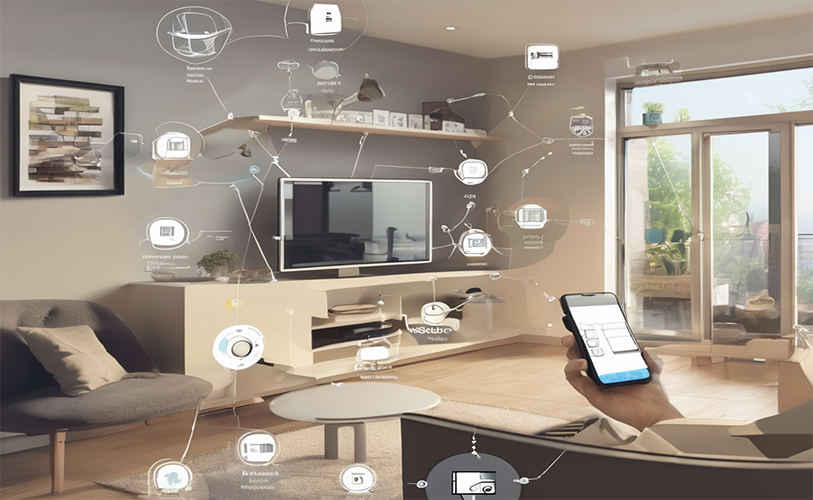 Today, smart home technology has evolved, thanks mainly to wireless communication protocols and the Internet of Things (IoT). These advancements have transformed smart-home devices from basic remote-controlled systems into feature-rich, IT-integrated living environments.
In this article, we’ll explore the components typically involved in smart-home automation, explaining how to configure them to create your own system.
What is a smart home?
A smart home is a living space equipped with everyday devices and appliances linked through the Internet, allowing them to communicate with one other and the user. This connectivity enables remote control, automation, improved energy efficiency, enhanced convenience, better security, and an overall improved lifestyle.
The critical functions of a smart home network include:
- Communication between devices and the user
- Data exchange among interconnected devices
- The ability to derive valuable insights from shared data
- Automation of tasks and actions
In many systems, artificial intelligence (AI) is integrated at the server level to enhance further the functions and goals of a smart home network. For instance, AI can analyze data from a CCTV network to identify visitors and log essential details, such as who visited a home and when.
Why make your home smart?
Imagine no longer getting up to switch off lights, turn on a fan, or lock a door — everything can be done from the sofa with a simple voice command or smartphone. This is thanks to advancements in wireless communication technologies, IoT, cloud computing, and AI, which now provide a more comprehensive range of devices, improved connectivity and integration, and reduced costs.
The result: innovative smart-home systems that offer many practical features useful for everyday life. With the proper system, it’s possible to control appliances, electronics, and home security systems from anywhere, anytime.
There limitations have narrowed and today’s devices can be automated and personalized. Not only can lights be programmed to turn on or off as someone enters or leaves a room, but they can also be configured to dim or turn on at sunset. It’s also possible to schedule alarms pre-set the coffeemaker, water the garden, or see who’s at the door.
Integrating connected security systems can significantly enhance home security, letting users view live feeds from anywhere, receive instant security alerts, and remotely control smart locks. Parents can also receive notifications that their kids arrived home safely after school, ensuring peace of mind.
Additionally, smart-home devices can be configured to improve energy efficiency and save energy costs. Adjusting appliances and lighting based on actual usage and occupancy (for example, configuring HVAC systems to turn off when not in use) can significantly reduce energy waste and lower electricity bills.
Smart home hardware
The key technologies that make a modern smart home possible include the IoT, wireless communication technologies, voice assistants, and home automation platforms. Many systems also integrate AI, primarily at the cloud platform level, to enhance functionality and analyze data.
The essential hardware components to build a home automation system are as follows:
- Server
- Smart devices
- Sensors
- Actuators
- Wireless modules
- Input/output interfaces
- Power supplies
The server
The server can be a microcontroller or microprocessor system that acts as a smart home’s central hub for interconnected devices. This runs the home automation software that manages communication between devices and users. The server connects to devices using wireless communication protocols, such as Wi-Fi, Bluetooth, Zigbee, Z-Wave, or Thread, with most systems relying on Wi-Fi for connectivity. Internet connection is only required for the remote control of devices: Even without Internet access, the server can still manage devices through a local area network.
Various computing devices can serve as a home automation server, including single-board computers, mini-PCs, NAS devices, and even repurposed PCs or laptops. Single-board computers are the most popular choice due to their compact size and low energy consumption, making them ideal for running home automation systems 24/7. Some examples include the Raspberry Pi, RockPro64, and Orange Pi.
Mini-PCs, like the Intel NUC, HP ProDesk 400 G4, and ASRock Beebox, are also commonly used for compact size, energy efficiency, and performance. Network-attached storage (NAS) devices, such as the QNAP TS-x70, Synology DiskStation, and Western Digital My Cloud, are also commonly used among developers.
While an older PC can be repurposed, it’s typically not as energy-efficient as a modern computer. The ideal server should be compact, capable of running continuously without interruption, power-efficient, and equipped with wireless connectivity. Most developers prefer single-board computers or mini-PCs because these systems usually have built-in Wi-Fi and Bluetooth, are compact, and have low power consumption.
When choosing hardware for a home automation server, it’s crucial to consider a range of factors such as processing power, storage capacity, power consumption, cost, and compatibility with both home automation software and devices. This comprehensive approach ensures you’re well-prepared for your home automation project.
Smart devices
A variety of home devices can be integrated into a smart home system. Some examples include:
- Home control devices: Smart lights, smart switches, smart outlets, smart locks, smart thermostats, etc.
- Entertainment devices: Smart TV, smart sound systems, smart speakers, etc.
- Home appliances: Smart refrigerators, smart ovens, smart washing machines, etc.
- Security devices: Smart security cameras, smart doorbells, smart smoke detectors, etc.
- Other niche devices: Smart irrigation systems, smart air purifiers, smart curtains, smart blinds, etc.
A smart home is often restricted by the selection of home automation software. Some software can only support proprietary devices, while others are compatible with a range of products from various vendors. It’s recommended to select a home automation software that supports several smart devices for greater flexibility.
Sensors: A sensor consists of a sensing element, a circuitry for signal conditioning (which may have a microcontroller), and a wireless radio. Modern sensors typically integrate these components into a single system-on-chip (SoC), which combines the microcontroller and wireless radio into one unit. These sensors are built around Wi-Fi development chips, such as the ESP8266 or ESP32.
Several types of sensors can be integrated into a smart home system to enhance functionality. Common ones include:
- Temperature and humidity sensors: Measure ambient temperature and humidity, which can be used to control the HVAC system or detect a fire hazard.
- Motion sensors: Generate security alerts and control smart lights and smart fans.
- Light sensors: Detect the intensity of ambient light for controlling smart lights.
- Door sensors: Detect the status of a door or gate.
- Gas and smoke sensors: Prevent fire hazards.
- Energy meter sensors: Monitor energy consumption of the house.
Sensors can be either analog or digital. Digital sensors often include an onboard microcontroller for signal conditioning and can communicate data to other systems using I2C or SPI interfaces.
Actuators: Actuators are used for controlling devices or performing specific actions based on conditions monitored by the home automation software. Various types of actuators can be integrated into a smart home system, including:
- Relays: Control smart lights, smart fans, and other smart home appliances.
- Motors: Control the movement of smart curtains, garage doors, smart blinds or robotic vacuums.
- Solenoids: Control locks, switches and valves, which are used to control the flow of gas or water.
- Servo motors: Control robotic arms and smart thermostats.
Actuators are controlled by microcontrollers, which receive data wirelessly from the smart home server. This data is used to generate signals that activate the actuators, often with the help of signal conditioning circuits. All smart home devices incorporate one or more built-in actuators to perform actions based on user commands or detected events.
Wireless modules
Wireless modules are critical for integrating devices into a smart home system. Most smart home products come with an integrated wireless radio or system-on-chip (SoC) that supports a variety of wireless technologies. The choice of wireless module depends on the technology used to connect devices to the central server, such as Wi-Fi, Bluetooth, Zigbee, Z-Wave, or Thread.
Wi-Fi and Bluetooth are the most common wireless technologies for adding devices to a smart home network. However, due to the compact size of these devices, their wireless radios often use short PCB antennas, which can limit coverage range.
Input/output interfaces
In a smart home system, input interfaces, such as physical devices like buttons, touchscreens, microphones, and sensors, receive user commands and interactions. Output interfaces, including LED displays, LCD screens, actuators, and speakers, display information and execute actions.
Power supplies
Power supplies are necessary for operating smart home devices, sensors, actuators, and input/output interfaces. Each device has specific power requirements, and while many smart home products come with built-in power supplies, DIY projects may require custom solutions. Options include ac adapters, batteries, UPS units, and solar panels.
Smart home software
A smart home system operates as a local network of devices, sensors, actuators, and user interfaces that can be accessed locally or via the internet. Setting up such a system requires the installation or development of the following software components:
- Operating system
- Home automation software
- Drivers
- Protocols
- User interfaces
- Cloud platform
Operating system
The home automation server manages all devices, sensors, and actuators and runs on an operating system. This server handles device control and configuration through home automation software. Common operating systems for home automation include Linux, FreeRTOS, and Zephyr, which are often open-source and free.
When selecting an operating system, the factors to consider are compatibility with the hardware platform and cloud services, support for home automation features, security, customization, hardware requirements, performance, ease of use, and learning curve.
Home automation software
Home automation software controls and manages interconnected devices within the smart home system. This software operates on the server’s operating system, managing device control, integrating new devices, and automating routines. It also enables security, voice control, user interfaces, and energy management.
You can either build your own home automation software or use pre-existing solutions. Popular options include Home Assistant, openHAB, Amazon Alexa, Google Home, SmartThings, Lutron, and Insteon.
When choosing home automation software, consider compatibility with your server and operating system, the range of supported devices, customization options, automation features, and the user interface.
Drivers
Some smart home devices may require drivers to be installed on the home automation server’s operating system. These drivers enable communication with the devices’ low-level hardware.
Protocols
Several IoT protocols, including MQTT, CoAP, HTTP, and WebSockets, enable communication between smart devices. While developers may need to configure these protocols manually, most off-the-shelf smart home products come pre-configured, minimizing the need for user intervention in protocol management.
User interfaces
Creating a user interface will be necessary if you’re developing custom home automation software. On the other hand, commercial smart home software typically comes with a pre-built interface. These interfaces can be accessed through display screens connected to the home automation server, including voice control options, mobile apps, or physical remote controls.
Cloud platform
A smart home system can be designed around a cloud platform rather than a purely local setup. In this configuration, devices connect to the cloud platform via the internet router, allowing the cloud to handle the user interface, commands, and device control. Cloud services can also be integrated into locally built systems but rely on a stable internet connection.
Building a smart home
To create your own smart home system, follow these eight simple steps:
- Set goals: Define your objectives for the smart home and adjust based on your budget and space.
- Research and selection: Choose the smart home devices, sensors, and actuators you want to incorporate.
- Choose components: Select a compatible home automation server, operating system, and software.
- Install software: Set up the operating system on the server and develop or install home automation software.
- Integrate devices: Connect devices, sensors, and actuators to the software, install drivers if needed, and manage IoT protocols.
- Customize and configure: Set automation routines, configure settings, and tailor the system to your preferences.
- Verify and troubleshoot: Test all functionalities, troubleshoot any issues, and ensure smooth operation.
- Expand and enhance: Add new devices and create additional automation routines as you grow your system.
You may also like:



Filed Under: Tech Articles
Questions related to this article?
👉Ask and discuss on EDAboard.com and Electro-Tech-Online.com forums.
Tell Us What You Think!!
You must be logged in to post a comment.