Engineers Garage

  • Electronic Projects & Tutorials
    • Electronic Projects
      • Arduino Projects
      • AVR
      • Raspberry pi
      • ESP8266
      • BeagleBone
      • 8051 Microcontroller
      • ARM
      • PIC Microcontroller
      • STM32
    • Tutorials
      • Audio Electronics
      • Battery Management
      • Brainwave
      • Electric Vehicles
      • EMI/EMC/RFI
      • Hardware Filters
      • IoT tutorials
      • Power Tutorials
      • Python
      • Sensors
      • USB
      • VHDL
    • Circuit Design
    • Project Videos
    • Components
  • Articles
    • Tech Articles
    • Insight
    • Invention Stories
    • How to
    • What Is
  • News
    • Electronic Product News
    • Business News
    • Company/Start-up News
    • DIY Reviews
    • Guest Post
  • Forums
    • EDABoard.com
    • Electro-Tech-Online
    • EG Forum Archive
  • DigiKey Store
    • Cables, Wires
    • Connectors, Interconnect
    • Discrete
    • Electromechanical
    • Embedded Computers
    • Enclosures, Hardware, Office
    • Integrated Circuits (ICs)
    • Isolators
    • LED/Optoelectronics
    • Passive
    • Power, Circuit Protection
    • Programmers
    • RF, Wireless
    • Semiconductors
    • Sensors, Transducers
    • Test Products
    • Tools
  • Learn
    • eBooks/Tech Tips
    • Design Guides
    • Learning Center
    • Tech Toolboxes
    • Webinars & Digital Events
  • Resources
    • Digital Issues
    • EE Training Days
    • LEAP Awards
    • Podcasts
    • Webinars / Digital Events
    • White Papers
    • Engineering Diversity & Inclusion
    • DesignFast
  • Guest Post Guidelines
  • Advertise
  • Subscribe

How to design an automatic streetlight system using Arduino

By Ashutosh Bhatt May 14, 2024

In this project, we’ll design an automatic, energy-efficient streetlight system using Arduino. A streetlight will automatically turn on when the outside ambient light falls below a certain threshold, as evening turns to night. They turn off when sufficient light returns in the morning to conserve energy. So, these streetlights only power on when needed.  

The lighting system not only turns on and off but varies in brightness. Additionally, it will turn on if it detects any movement on the road (such as a vehicle or pedestrian) using a proximity sensor. If no movement is detected, the light remains off or dim to save energy.  

When an object passes by, the light turns on in a sequence, turning brightest when the object is close and dimming as it moves away. For this demonstration project, we’ll use a series of IR proximity sensors to detect movement and a bright (high-intensity) white LED as the streetlight. Let’s get started.
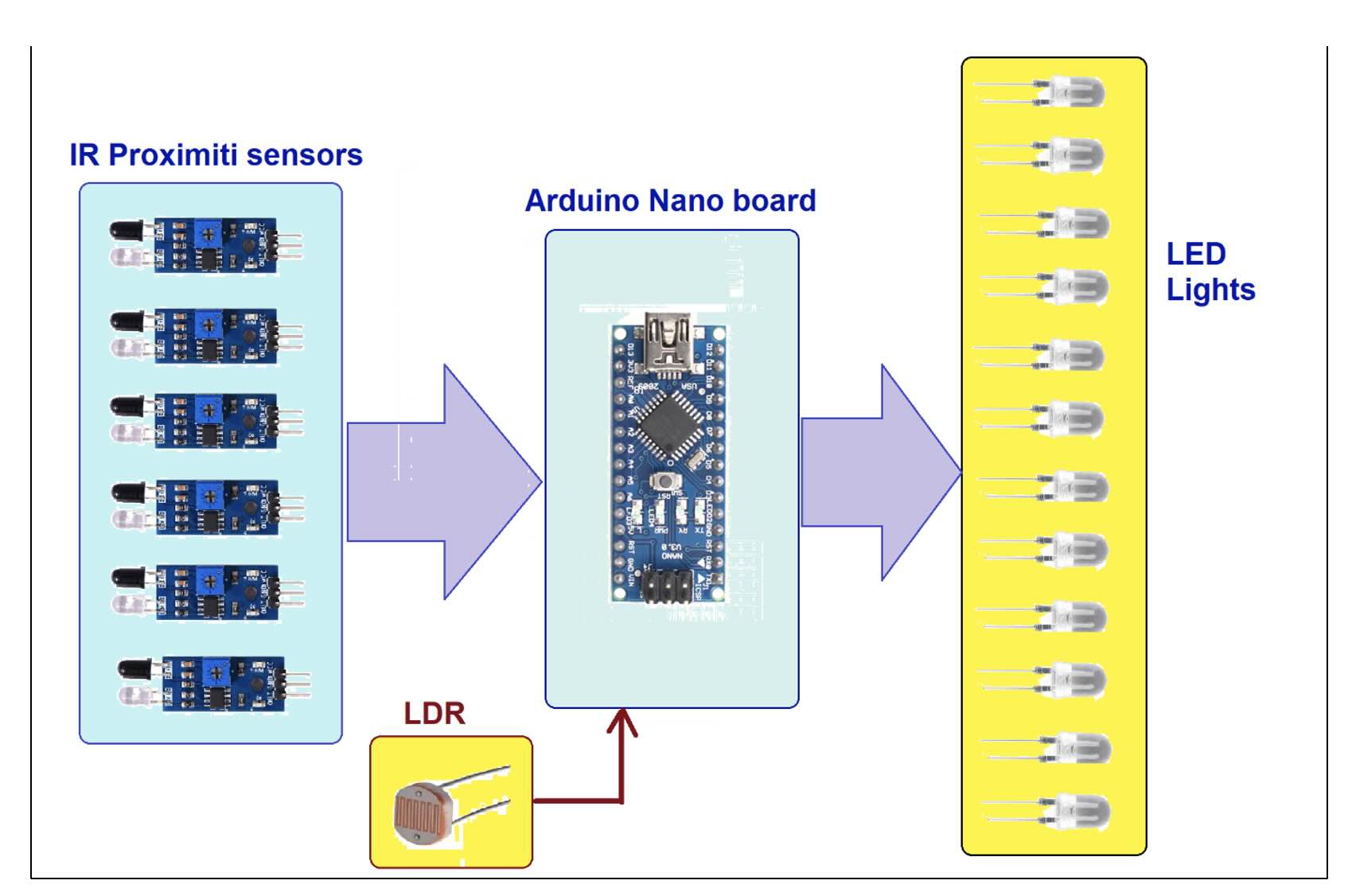
Figure 1. A block diagram of the automatic street light system using Arduino, IR sensors, and LED’s.

As shown in the above diagram, this lighting system comprises four blocks of IR proximity sensors, an LDR, Arduino NANO development board, and LEDs

IR proximity sensor: This sensor detects any nearby object (such as a vehicle or pedestrian) and generates a high (+5 V) output as it passes by. The sensor emits IR light and detects IR light reflected by any object in front of it. So, IR light gets reflected, generating a high output. The output is low if there’s no nearby object. 

Arduino: detects any nearby object by using proximity sensors. It also detects daylight with the help of the LDR. It turns the LED ON/OFF and also varies its intensity as per the requirements.

LDR: a light-dependent resistor, which varies its intensity depending on the brightness. Essentially, it’s used to detect daylight.

LED lights: white LED lights that are turned ON and OFF in sequence as per the requirements. 
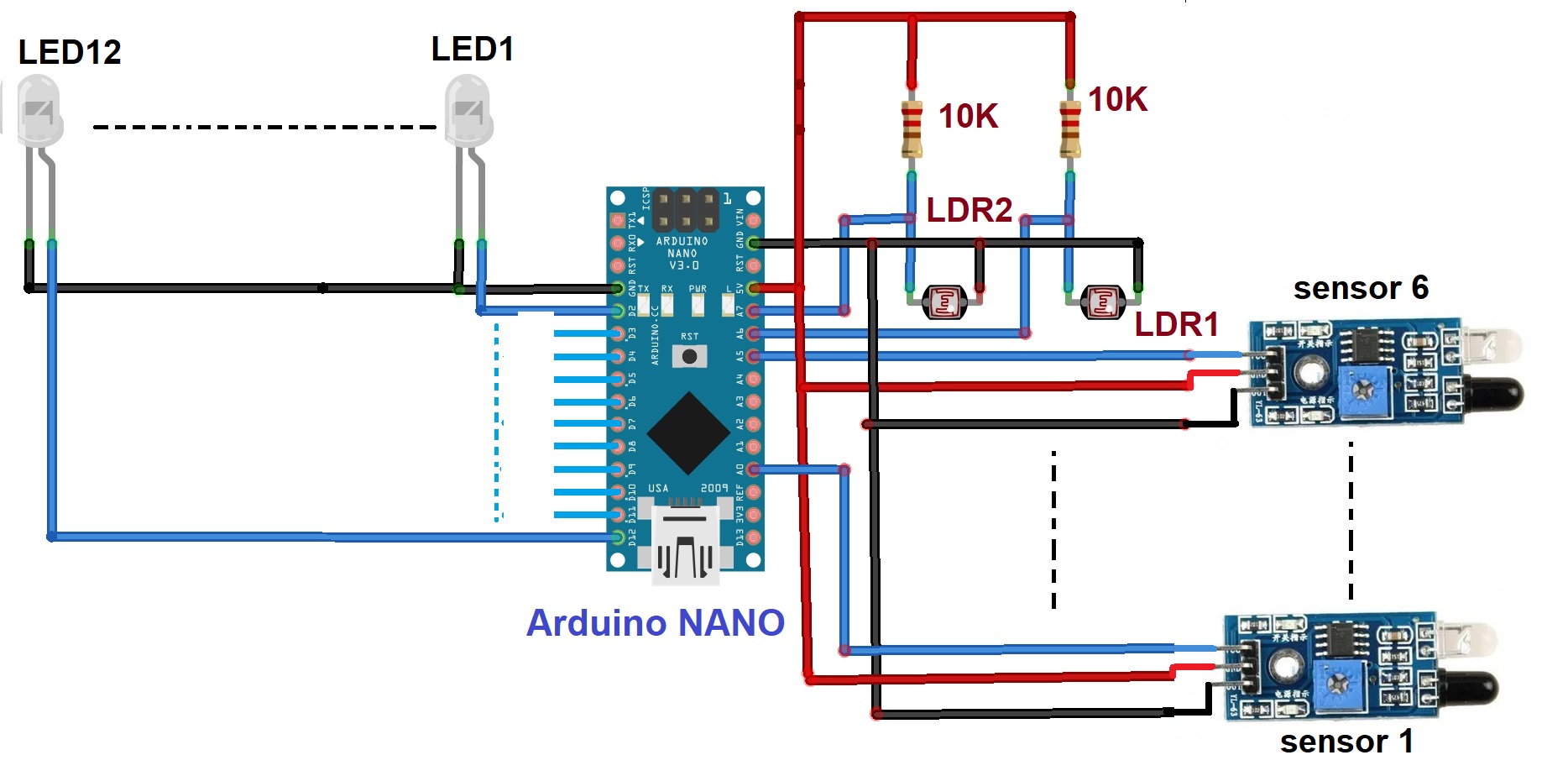
Figure 2. Circuit diagram of the complete automatic street light system.

The circuit is built using six IR proximity sensor modules, two LDRs, and 12 white LEDs

  • The IR proximity sensor module has three pins: (1) Vcc, (2) Gnd, and (3) Out.
  • The Vcc pin connects to the Arduino’s 5V output, and the Gnd pin connects to the circuit ground. The out pin connects to Arduino’s pin A0 (digital pin 14).
  • All six sensor’s output pins connect with Arduino’s pins A0 to A5.
  • The two LDRs connect to Arduino’s analog input pins A6 and A7. Two 10K pull-up resistors also connect to this LDR.
  • The digital IO pins D0 – D12 connect with the white LEDs (LED1 to LED12). The LED’s cathodes are shorted and connect with the ground and the anode connects with the pins.

Circuit operation
The circuit operation is simple and uses only one statement. When the sensor detects any object in front of it, two LED lights are turned ON. The LEDs are turned ON and OFF in sequence as each sensor detects a nearby object.

  • When Sensor 1 detects any object, it will provide Logic high (1) input to Arduino’s pin A.
  • When Arduino receives the Logic 1 input at pin A0, it will turn ON LED1 and LED2 for some time (say, 5 to 10 seconds).
  • Similarly, when Sensor 2 detects an object, it provides input to Arduino’s pin A1, which turns ON LED3 and LED4 for a while.
  • This sequence continues. For every sensor input, Arduino turns ON two consecutive LEDs.
  • When both LDRs detect daylight, they’ll generate a low analog voltage output (0.3 – 0.6V). Arduino reads this low analog voltage and turns OFF all of the LEDs.
  • At night, the LDR generates a comparatively high analog voltage output (3.5 – 4.5 V), and Arduino will turn ON all of the LEDs — but with 20% intensity. If a sensor detects an object nearby, the two LEDs will turn ON to full intensity. As the object passes, both LEDs dim to 20% intensity again. The aim is to conserve power so the light is only on when needed.

The program


You may also like:

  • How to design an emergency rechargeable bulb circuit
  • IR LEDs
    Arduino-based optical proximity sensor using IR LEDs

  • How to control LEDs using the MIT App Inventor and…

  • How to design a rechargeable LED table lamp

  • How to create a constant current source using LM338

  • How LoRa can impact smart cities with parking sensors

Filed Under: Arduino Projects, Electronic Projects
Tagged With: Arduino, arduinonano, electronicproject, irsensor, led, proximitysensor, sensors
 

Next Article

← Previous Article
Next Article →

Questions related to this article?
👉Ask and discuss on Electro-Tech-Online.com and EDAboard.com forums.


Tell Us What You Think!! Cancel reply

You must be logged in to post a comment.

EE TECH TOOLBOX

“ee
Tech Toolbox: Internet of Things
Explore practical strategies for minimizing attack surfaces, managing memory efficiently, and securing firmware. Download now to ensure your IoT implementations remain secure, efficient, and future-ready.

EE Learning Center

EE Learning Center
“engineers
EXPAND YOUR KNOWLEDGE AND STAY CONNECTED
Get the latest info on technologies, tools and strategies for EE professionals.

HAVE A QUESTION?

Have a technical question about an article or other engineering questions? Check out our engineering forums EDABoard.com and Electro-Tech-Online.com where you can get those questions asked and answered by your peers!


RSS EDABOARD.com Discussions

  • Reducing "shoot-through" in offline Full Bridge SMPS?
  • High Side current sensing
  • How to simulate power electronics converter in PSpice?
  • Voltage mode pushpull is a nonsense SMPS?
  • Layout IRN reduction in Comparator

RSS Electro-Tech-Online.com Discussions

  • Back to the old BASIC days
  • Parts required for a personal project
  • PIC KIT 3 not able to program dsPIC
  • Failure of polypropylene motor-run capacitors
  • Siemens large industrial PLC parts

Featured – RPi Python Programming (27 Part)

  • RPi Python Programming 21: The SIM900A AT commands
  • RPi Python Programming 22: Calls & SMS using a SIM900A GSM-GPRS modem
  • RPi Python Programming 23: Interfacing a NEO-6MV2 GPS module with Raspberry Pi
  • RPi Python Programming 24: I2C explained
  • RPi Python Programming 25 – Synchronous serial communication in Raspberry Pi using I2C protocol
  • RPi Python Programming 26 – Interfacing ADXL345 accelerometer sensor with Raspberry Pi

Recent Articles

  • What is AWS IoT Core and when should you use it?
  • AC-DC power supply extends voltage range to 800 V DC
  • Infineon’s inductive sensor integrates coil system driver, signal conditioning circuits and DSP
  • Arm Cortex-M23 MCU delivers 87.5 µA/MHz active mode
  • STMicroelectronics releases automotive amplifiers with in-play open-load detection

EE ENGINEERING TRAINING DAYS

engineering

Submit a Guest Post

submit a guest post
Engineers Garage
  • Analog IC TIps
  • Connector Tips
  • Battery Power Tips
  • DesignFast
  • EDABoard Forums
  • EE World Online
  • Electro-Tech-Online Forums
  • EV Engineering
  • Microcontroller Tips
  • Power Electronic Tips
  • Sensor Tips
  • Test and Measurement Tips
  • 5G Technology World
  • Subscribe to our newsletter
  • About Us
  • Contact Us
  • Advertise

Copyright © 2025 WTWH Media LLC. All Rights Reserved. The material on this site may not be reproduced, distributed, transmitted, cached or otherwise used, except with the prior written permission of WTWH Media
Privacy Policy

Search Engineers Garage

  • Electronic Projects & Tutorials
    • Electronic Projects
      • Arduino Projects
      • AVR
      • Raspberry pi
      • ESP8266
      • BeagleBone
      • 8051 Microcontroller
      • ARM
      • PIC Microcontroller
      • STM32
    • Tutorials
      • Audio Electronics
      • Battery Management
      • Brainwave
      • Electric Vehicles
      • EMI/EMC/RFI
      • Hardware Filters
      • IoT tutorials
      • Power Tutorials
      • Python
      • Sensors
      • USB
      • VHDL
    • Circuit Design
    • Project Videos
    • Components
  • Articles
    • Tech Articles
    • Insight
    • Invention Stories
    • How to
    • What Is
  • News
    • Electronic Product News
    • Business News
    • Company/Start-up News
    • DIY Reviews
    • Guest Post
  • Forums
    • EDABoard.com
    • Electro-Tech-Online
    • EG Forum Archive
  • DigiKey Store
    • Cables, Wires
    • Connectors, Interconnect
    • Discrete
    • Electromechanical
    • Embedded Computers
    • Enclosures, Hardware, Office
    • Integrated Circuits (ICs)
    • Isolators
    • LED/Optoelectronics
    • Passive
    • Power, Circuit Protection
    • Programmers
    • RF, Wireless
    • Semiconductors
    • Sensors, Transducers
    • Test Products
    • Tools
  • Learn
    • eBooks/Tech Tips
    • Design Guides
    • Learning Center
    • Tech Toolboxes
    • Webinars & Digital Events
  • Resources
    • Digital Issues
    • EE Training Days
    • LEAP Awards
    • Podcasts
    • Webinars / Digital Events
    • White Papers
    • Engineering Diversity & Inclusion
    • DesignFast
  • Guest Post Guidelines
  • Advertise
  • Subscribe